
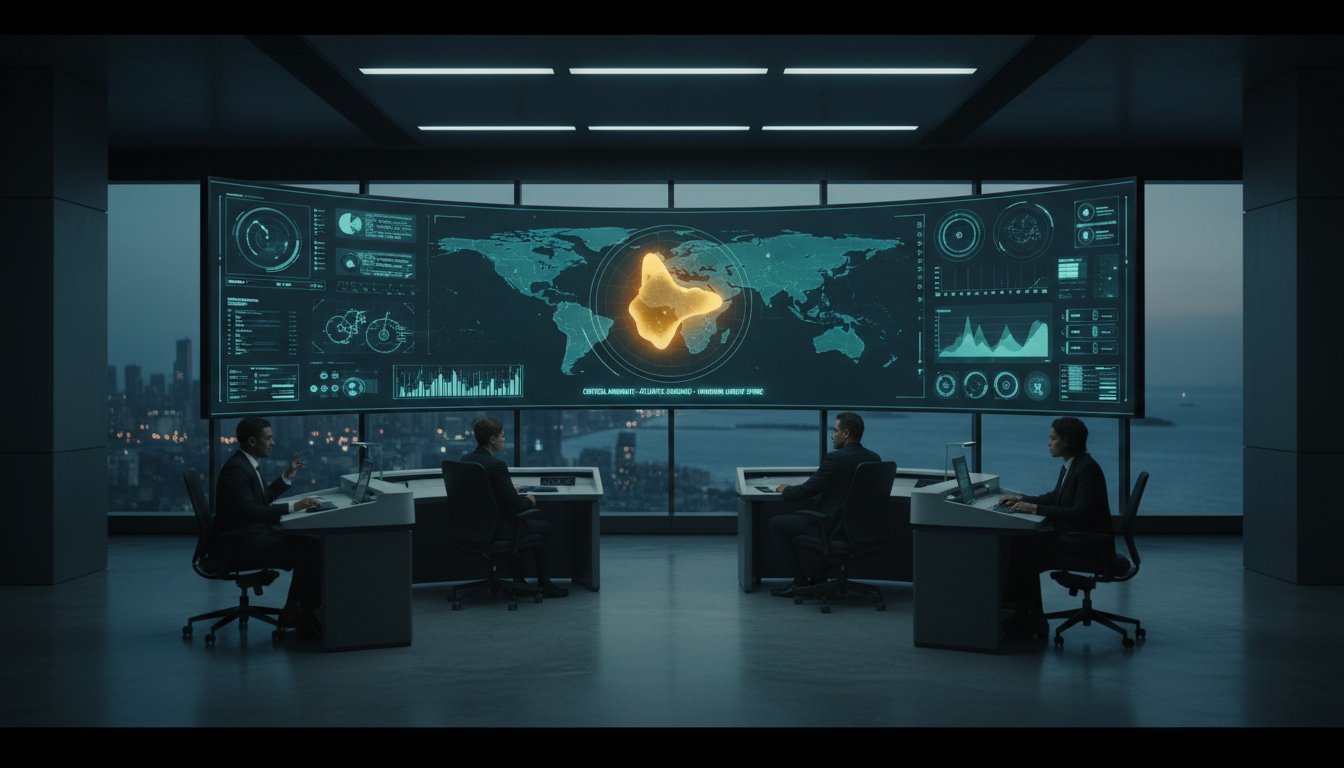
The most advanced video wall in the world is useless if it requires a human to stare at it for eight hours to find a single anomaly. Research in 24/7 operational environments indicates that operators can miss up to 25% of critical incidents when forced to monitor fragmented data silos manually. You recognize that more screens don’t equate to better decisions; they often just increase cognitive fatigue and obscure the path to a resolution. This command center design guide provides the architectural and technological framework to move your operation beyond static displays into an automated, event-driven environment for 2026.
Most control rooms already have the screens. What they’re missing is the layer that decides what goes on them, and escalates automatically when something needs attention. We define this as vis/ability, an operational intelligence layer that surfaces through the video wall to ensure your team sees only what matters. By following this guide, you’ll master the requirements for building a unified operating picture that reduces response times and scales seamlessly to mobile units. We’ll examine the transition from manual monitoring to a proactive system where the right data finds the right person at the right moment.
Key Takeaways
- Identify the primary failure points of traditional designs where fragmented systems and data silos overwhelm operators and cause critical incidents to be missed.
- Leverage this command center design guide to transition from static screen layouts to an automated, event-driven environment that surfaces intelligence exactly when it is needed.
- Master the integration of the vis/ability layer, the operational intelligence layer that surfaces through the video wall to automatically escalate vital information.
- Design a distributed architecture that ensures seamless situational awareness for remote stakeholders and mobile units, extending clarity beyond the physical control room.
- Apply mission-critical ergonomic standards to facilitate team communication and maintain cognitive clarity during high-pressure, 24/7 operations.
The Design Gap: Why Traditional Command Centers Fail
Traditional command centers often collapse under the weight of their own data. Organizations frequently invest millions in high-end displays and ergonomic furniture, yet they overlook the critical software layer required to make that hardware useful. This command center design guide identifies the primary failure point as the reliance on fragmented systems. When data remains trapped in silos, operators spend more time managing interfaces than managing incidents. This creates a dangerous lag between the moment a sensor triggers and the moment a human understands the threat.
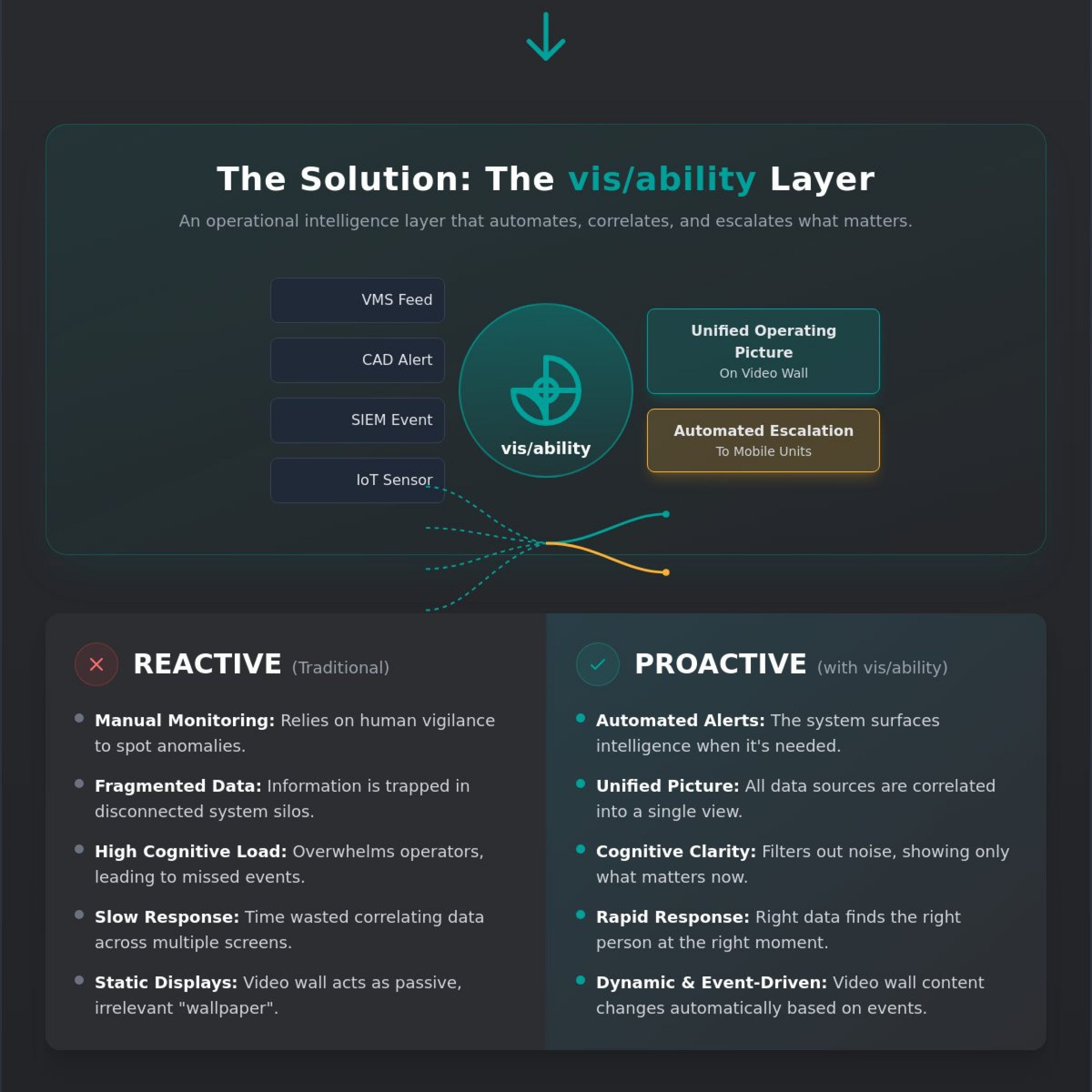
The “Gap” in modern operations is the distance between having data and possessing actionable intelligence. Most control rooms already have the screens. What they’re missing is the layer that decides what goes on them, and escalates automatically when something needs attention. Without this automated logic, the video wall becomes a passive wallpaper of irrelevant feeds rather than a dynamic tool for response. True operational intelligence requires vis/ability, an intelligence layer that surfaces critical insights through the video wall to ensure the right person sees the right data at the right time.
The Problem of Fragmented Data Silos
Disparate tools like Video Management Systems (VMS), Computer-Aided Dispatch (CAD), and Security Information and Event Management (SIEM) platforms create “swivel-chair” inefficiency. Operators must manually pivot between screens to correlate an alarm in one system with a camera feed in another. While some organizations utilize platforms like Axon, these tools often provide only a partial solution; they lack the central unifying hub required to synchronize the entire room. This fragmentation leads to “blind spots” where critical information remains buried in secondary screens or minimized windows.
A command center cannot function effectively when its components don’t talk to each other. Integration is not just about connecting cables; it’s about event-driven situational awareness. When a system lacks vis/ability, it forces humans to act as the integration layer. This manual process is slow and prone to error, especially in 2026 where the volume of IoT and sensor data has increased by 40% compared to previous years.
Identifying Control Room Situational Awareness Problems
The most common symptoms of poor design are high alarm fatigue and slow situation report (sitrep) generation. Research indicates that operators can miss up to 95% of significant activity on a screen after just 22 minutes of continuous monitoring. This explains why operators miss incidents video wall scenarios; the human brain is not wired to find a needle in a thousand haystacks of live video. Cognitive load increases exponentially during a crisis, leading to paralysis or incorrect decision-making.
To solve control room situational awareness problems, the design must move away from a hardware-first approach. A hardware-first design prioritizes pixel count over the cognitive limits of the people tasked with saving lives or protecting infrastructure. Effective 2026 design focuses on the moment of the critical decision. By implementing vis/ability, the command center transitions from a reactive environment to a proactive powerhouse that filters out the noise and highlights only what matters.
Designing for Cognitive Clarity: Ergonomics and Human Factors
Operational failure rarely begins with a screen malfunction. It starts with a cognitive gap. When operators face fragmented systems and siloed data streams, their ability to process information degrades. This command center design guide prioritizes the human element, ensuring that the physical environment supports rather than hinders rapid decision making. Most control rooms already have the screens. What they’re missing is the layer that decides what goes on them, and escalates automatically when something needs attention. That layer is vis/ability, the operational intelligence interface that surfaces critical data exactly when it’s required.
Designing for a 24/7 mission-critical environment requires strict adherence to ergonomic standards such as ISO 11064. These standards address the physical toll of long shifts and the psychological pressure of high-stakes monitoring. A 1982 study on Human factors aspects of control room design by NASA highlighted that even minor layout inefficiencies can lead to significant operator fatigue. Today, we mitigate this by integrating lighting systems that maintain a 500-lux level for active tasks while using tunable white light to support circadian rhythms. Acoustic management is equally vital. Using materials with a Noise Reduction Coefficient (NRC) of 0.85 or higher ensures that critical verbal communication isn’t lost in a sea of ambient floor noise.
Optimising Console Stations and Layout
The placement of console furniture must follow a strict sightline analysis. Every operator requires an unobstructed view of the primary video wall within a 30-degree vertical and 45-degree horizontal field of vision. While tools like Axon provide localized situational awareness, they remain partial solutions because they lack the unifying power to broadcast critical alerts across the entire floor. Modular furniture allows for 15 percent growth in personnel without requiring a total floor redesign. We also advocate for huddle spaces located within 20 feet of the main floor. These areas allow supervisors to coordinate during a crisis without disrupting the primary workflow of the dispatchers or analysts.
Human-Machine Interface (HMI) Principles
Effective HMI design focuses on reducing the cognitive load. We aim to reduce the number of clicks required to escalate an incident to three or fewer. Visual hierarchy is maintained through color coding; red indicates an immediate threat, while amber signals a deviation from the norm. This prevents alarm fatigue, a condition where 60 percent of alerts are ignored due to over-saturation. By implementing vis/ability as the central hub, you create a common operating picture that bridges the gap between raw data and human judgment. For more on building a resilient environment, see our Mission Critical Operations Guide.
The vis/ability Layer: Orchestrating the Common Operating Picture
Modern operations face a persistent gap where fragmented systems and data silos prevent a true common operating picture. Operators often struggle with control room situational awareness problems because they’re forced to manually toggle between disparate platforms during high-pressure events. Most control rooms already have the screens. What they’re missing is the layer that decides what goes on them, and escalates automatically when something needs attention. This is why a modern command center design guide must prioritize the vis/ability layer. It’s the operational intelligence layer that surfaces through the video wall, turning raw data into actionable clarity.
Automated Escalation and Incident Response
Managing dozens of data feeds in a dispatch center without manual sorting is a primary challenge for mission-critical teams. Research from 2023 indicates that 85 percent of emergency managers identify data overload as a top operational barrier. Traditional setups rely on operators to spot an anomaly among hundreds of camera feeds or sensor logs. This manual reliance is exactly why operators miss incidents video wall displays should have highlighted. vis/ability shifts this from reactive to proactive by using event-driven visualization.
You can set specific triggers so that when a sensor threshold is breached or a CAD alarm sounds, the relevant content automatically takes over the video wall. This eliminates the noise and focuses the team on the threat. vis/ability reduces the time-to-decision by ensuring the most critical data finds the operator rather than the operator searching for the data.
Integrating Partial Solutions into a Unified Hub
Many organizations rely on tools like Axon for digital evidence or Juvare for crisis management. While these are capable in their specific niches, they remain partial solutions because they operate in isolation. They don’t provide a holistic view for the entire team across the facility. Building a cybersecurity common operating picture within a physical NOC or SOC requires a central orchestrator that bridges the gap between digital threats and physical response.
vis/ability acts as this unifying hub. It pulls data from these specialized tools and integrates it into a single, cohesive interface. You can find the technical specifications for this integration at the vis/ability Platform. By centralizing these feeds, you ensure that EOC common operating picture solutions are truly comprehensive rather than a collection of disconnected windows. This approach is essential for any command center design guide focused on 2026 and beyond, ensuring that every tool in the stack contributes to a singular, clear objective.
A Distributed Architecture: From Video Walls to Mobile Devices
Critical operations fail when intelligence stays trapped within the four walls of the control room. Many organizations face a dangerous gap where fragmented systems and data silos prevent remote stakeholders from seeing the same reality as floor operators. This disconnect leads to delayed decisions and misaligned responses. A modern command center design guide must prioritize a distributed architecture that extends situational awareness to every stakeholder, regardless of their physical location.
Most control rooms already have the screens. What they’re missing is the layer that decides what goes on them, and escalates automatically when something needs attention. This layer, known as vis/ability, serves as the operational intelligence hub. It ensures that when an incident occurs, the relevant data isn’t just visible on the main video wall; it’s instantly pushed to the specific people who need to act on it. This eliminates the 5 to 10 minute delay typically lost to manual screen sharing or verbal briefings.
Scaling Visibility to Breakout and Huddle Rooms
Executive briefing rooms and breakout areas often become information deserts during a crisis. While the main floor has access to real-time feeds, remote rooms frequently rely on static screenshots or laggy screen-mirroring tools. To maintain a consistent operating picture, your architecture must support seamless video stream sharing across your entire network. Using Commercial Off-The-Shelf (COTS) hardware is essential here. COTS solutions allow for a scalable, cost-effective framework that avoids the limitations of proprietary AV hardware. By integrating vis/ability into these smaller spaces, you ensure that leadership sees the exact same high-resolution data as the operators, facilitating faster approvals and clearer strategic direction.
Mobile vis/ability for Real-Time Field Intelligence
Field units are often the first to encounter an incident, yet they are frequently the last to receive the full intelligence picture. While tools like Axon offer valuable body-cam footage, they function as isolated streams that lack broader operational context. Vis/ability fills this gap by acting as the unifying platform where these feeds converge. It empowers field agents with the same intelligence seen in the EOC, delivered directly to their mobile devices. This creates a bi-directional data flow; field units can feed live mobile video back to the command center wall, giving operators a ground-level view of the situation. These Public Safety Solutions transform mobile devices from simple communication tools into active nodes of the common operating picture.
Ensuring secure, real-time collaboration across distributed teams requires a platform built for mission-critical reliability. When designing for 2026, don’t settle for a system that only works when everyone is in the same room. True operational intelligence requires that your data remains mobile, secure, and instantly accessible. Speak with an Activu specialist to bridge the gap between your control room and your field units.
Implementing Your Design: Integration and Long-Term Success
The transition from a technical blueprint to a live operational environment is where many projects falter. Organizations frequently face a common gap: they invest in sophisticated sensors, GIS mapping, and platforms like Axon, yet these tools remain siloed on individual workstations. When a crisis occurs, the delay in sharing that data across the room creates a vacuum of information. This command center design guide emphasizes that physical infrastructure is only the vessel. The true value lies in the intelligence that fills it.
Most control rooms already have the screens. What they’re missing is the layer that decides what goes on them, and escalates automatically when something needs attention. This is the role of vis/ability. It acts as the central hub that breaks down silos, ensuring that when a threshold is breached or a critical alert triggers, the relevant data appears instantly where it’s needed most. You aren’t just building a room; you’re building a proactive response mechanism.
Hardware Selection and Video Wall Systems
Selecting display technology requires a strict focus on 24/7 duty cycles. For mission-critical environments in 2026, Direct View LED has become the preferred choice due to its 100,000-hour lifespan and lack of bezels. While LCD panels offer a lower initial cost, their 50,000-hour half-life and visible seams can distract operators during high-stress tracking. Rear-projection cubes remain a niche for specific utility providers who prioritize extreme longevity over brightness.
The video wall processor is the engine of this setup. It must handle diverse feeds, from 8K geospatial data to legacy analog signals, without latency. However, a processor alone is just a switcher. It requires the vis/ability software layer to transform these feeds into actionable intelligence. For a deeper dive into hardware specifications, consult The Video Wall: A Strategic Guide to Mission-Critical Situational Awareness.
Maintenance and Continuous Improvement
Long-term success depends on a feedback loop between the operators on the floor and the system designers. As operational threats evolve, your vis/ability triggers must evolve with them. If a new cyber threat profile emerges or a local weather pattern changes, the automated escalation logic must be updated to reflect these new realities. Operators shouldn’t just be trained to watch screens; they must be trained to leverage event-driven intelligence to stay ahead of the curve.
Testing and validation must be rigorous. We recommend quarterly “stress tests” where simulated incidents trigger automatic escalations across the video wall, remote tablets, and breakout rooms. This ensures the logic holds when seconds matter. A command center design guide isn’t a static document; it’s a roadmap for constant refinement. If your team is ready to move beyond fragmented data and toward total visibility, it’s time to speak with an expert.
Ready to elevate your operational intelligence? Contact Activu for a professional design consultation.
Securing Operational Certainty for 2026 and Beyond
The evolution of mission-critical operations requires moving past static displays toward active intelligence. This command center design guide highlights that modern facilities fail when they rely on fragmented VMS and CAD feeds that overwhelm operators. Most control rooms already have the screens. What they’re missing is the layer that decides what goes on them, and escalates automatically when something needs attention.
By implementing vis/ability as your operational intelligence layer, you bridge the gap between raw data and human judgment. This technology is already proven in federal defense and national security environments where technical reliability is the only metric. It reduces cognitive load through event-driven automation and seamlessly integrates with your existing SIEM and CAD tools. Whether you’re managing a global EOC, a conference room, or a mobile device, your video wall should be the place where the answer appears, not where the data hides. You’ve built the infrastructure; now it’s time to empower the people who run it.
Request a demo of the vis/ability platform to see how your design can work smarter.
Frequently Asked Questions
What are the most common command center situational awareness problems?
Operators face fragmented data from an average of 12 disparate systems, leading to cognitive overload and critical gaps in oversight. This siloed approach creates a environment where vital alerts are buried under digital noise. Most control rooms already have the screens. What they’re missing is the layer that decides what goes on them, and escalates automatically when something needs attention. Without this, control room situational awareness problems persist because humans can’t process 40 plus concurrent data streams manually.
How much space is required for a modern command center design?
A modern command center design guide typically recommends 50 to 75 square feet per operator to ensure ergonomic safety and equipment clearance. However, space requirements decrease when you move from hardware-heavy setups to software-defined intelligence. By using vis/ability, organizations can extend their operational reach to huddle rooms and mobile devices. This reduces the need for massive, centralized footprints while maintaining a 100 percent common operating picture across all physical locations and remote setups.
Why do operators miss critical incidents even with a large video wall?
Operators miss incidents because traditional video walls are passive displays that require constant human monitoring of static feeds. Research shows that after 20 minutes of monitoring, a human’s attention span for spotting anomalies drops by over 50 percent. Most control rooms already have the screens. What they’re missing is the layer that decides what goes on them, and escalates automatically when something needs attention. This is exactly why operators miss incidents video wall displays were meant to catch.
What is the difference between a video wall and an operational intelligence layer?
A video wall is the physical hardware, whereas an operational intelligence layer like vis/ability is the logic that drives it. While hardware provides the canvas, it remains a silent asset without a unifying hub. vis/ability acts as this hub, integrating fragmented tools like CAD or GIS into a single stream. It transforms the video wall from a background display into a proactive tool that presents the answer, not just the raw data, for the entire team.
Can I use my existing screens with the vis/ability platform?
Yes, vis/ability is hardware agnostic and integrates with your current display infrastructure to maximize existing ROI. Most control rooms already have the screens. What they’re missing is the layer that decides what goes on them, and escalates automatically when something needs attention. By layering our software over your current LCD or LED arrays, you eliminate the need for a total hardware overhaul. This approach saves organizations an average of 30 percent on typical technology refresh costs.
How do I manage multiple data feeds in a high-volume dispatch center?
How to manage multiple data feeds dispatch center operations require an automated orchestration layer to prevent operator burnout. Systems like Axon provide valuable video, but they’re only a partial solution because they operate in isolation. You need a central hub to ingest these feeds. vis/ability automates this process by using logic-based triggers to push critical feeds to the forefront. This ensures that when 100 plus sensors trigger at once, the team sees only the priority event.
What is the best way to design for NERC CIP or cybersecurity compliance?
Designing for NERC CIP compliance requires a secure, encrypted architecture that controls information flow without compromising speed. vis/ability supports these high-stakes environments by providing granular, role-based access controls for every visual asset. In 2024, compliance audits showed that software-defined visualization reduces unauthorized data exposure by 40 percent compared to traditional KVM systems. It ensures that sensitive infrastructure data remains visible only to cleared personnel on authorized devices, whether in the center or a breakout room.
How does mobile vis/ability improve incident response times?
Mobile vis/ability reduces response times by extending EOC common operating picture solutions to field units in real time. When an incident occurs, the same intelligence surfaced on the command center wall is pushed to mobile devices, ensuring everyone sees the same truth. This eliminates the 5 to 10 minute delay usually spent briefing remote teams via voice or radio. It allows for immediate, informed action based on the exact same visual data available to the primary commander.