

What happens when an automated response moves faster than the team can see its status? Fragmented security tools, unclear escalation paths, and analyst silos can leave responders without the shared context they need to coordinate. Security orchestration and response (SOAR) visualization brings incident priorities, response activity, and decisions requiring human judgment into a view teams can interpret together.
SOAR coordinates tasks and response actions. Visualization helps analysts understand what is happening across systems and teams. A control room may already have the screens, but teams also need a way to bring the relevant information onto them and make important activity visible.
For security teams, vis/ability is an operational intelligence layer that presents selected information through a video wall. It brings applications and data streams together in a shared operational view, helping teams see relevant context in one place. In this article, you’ll learn how SOAR and visualization serve distinct roles, what incident information to prioritize, and how a shared operating picture can support coordination across SOCs, remote locations, collaboration spaces, and mobile users without replacing existing SOAR tools.
Key Takeaways
- Identify how fragmented systems, alert overload, unclear escalation paths, and team silos can disrupt incident coordination.
- Separate the roles of SIEM, SOAR, and visualization so each tool supports detection, configured response workflows, or shared operational visibility.
- Use security orchestration and response (SOAR) visualization to assess incident priorities, response activity, and human review together.
- Design the operational view around three questions: what needs attention, who owns it, and what decision comes next.
- Use vis/ability to bring selected applications and data streams into a shared operational view, presented through the video wall.
Why SOAR visualization matters when security operations are fragmented
Security analysts often work across separate consoles for alerts, endpoint activity, threat intelligence, and response. A high volume of alerts can obscure priorities, while team silos make ownership and handoffs harder to track. These are common situational awareness challenges in control rooms. Without a clear escalation process, an important event may wait for someone to recognize it, determine who owns it, and communicate the next step.
Security orchestration, automation, and response (SOAR) coordinates security tools and automates configured workflows, often through playbooks or runbooks. A Security orchestration, automation and response (SOAR) overview provides foundational context on these components. SOAR can initiate an action, but that action alone may not tell every responder why it happened, who is responsible, or whether human review is needed. Teams need status and context they can interpret together.
What does SOAR visualization mean in a security operations center?
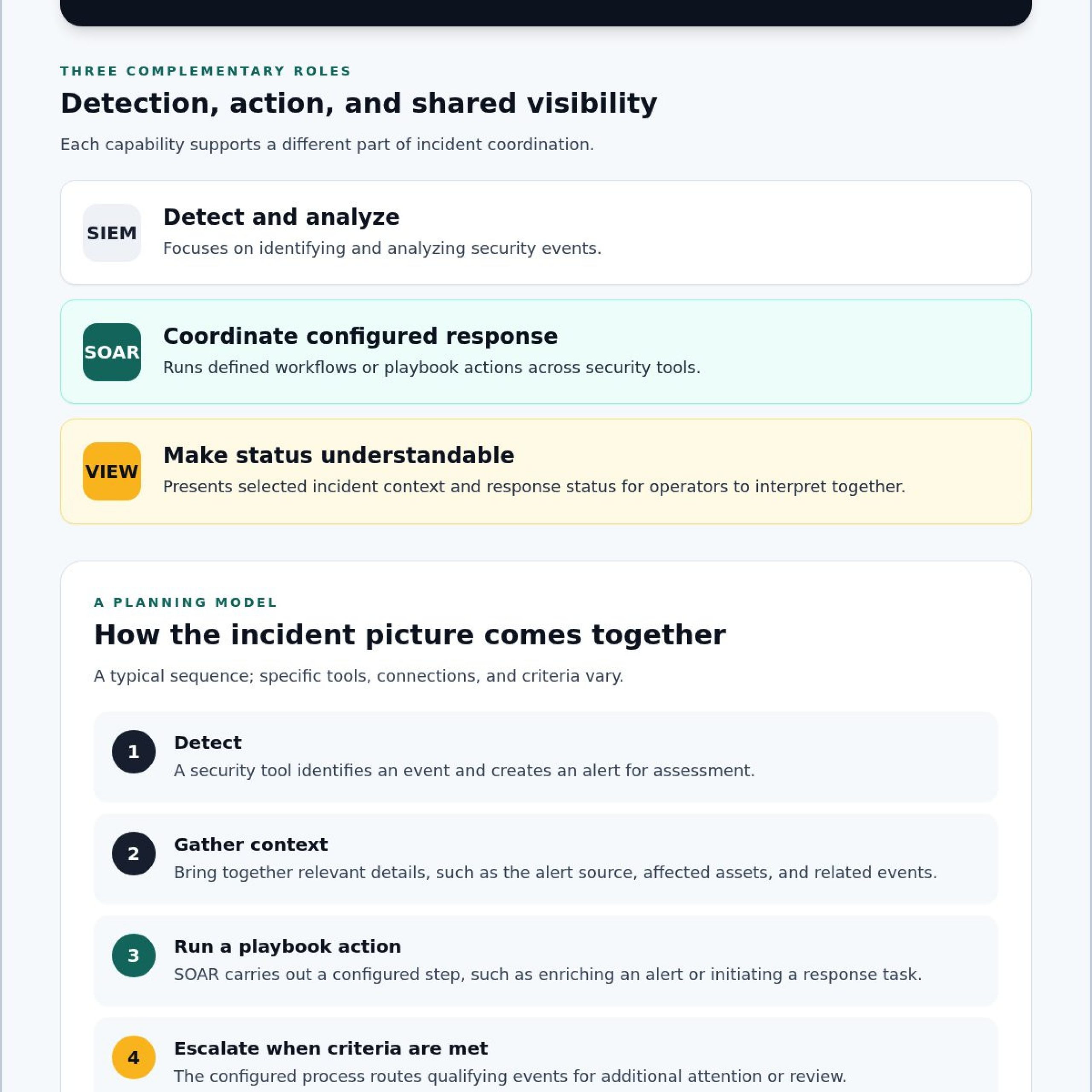
Security orchestration and response (SOAR) visualization presents relevant incident, workflow, and response information in a shared context. It helps operators see selected operational details. SIEM tools focus on detecting and analyzing security events; SOAR executes configured workflows; visualization presents information and status for operators. These capabilities can complement one another, though their relationship depends on the tools and configuration in use.
Put simply, SOAR visualization presents incident context and response status so operators can understand what is happening, what actions have occurred, and where attention is needed. Automation can carry out a defined step. People still need a readable view to assess its relevance, confirm ownership, and decide what comes next.
Why do analysts miss context across multiple security data feeds?
Switching between separate tools can break an incident into disconnected pieces. An analyst may see an alert in one console, related endpoint activity in another, and a response update somewhere else. Without a shared view, it can be difficult to connect those details to the current incident status. For teams asking how to manage multiple data feeds dispatch center, the core task is to prioritize information while keeping its operational context visible.
When security information remains fragmented across tools and teams, responders lack the shared context needed to interpret incident status and coordinate the next action.
Activu’s vis/ability platform aggregates applications and data streams into a unified operational view. Presented through the video wall, that view gives teams a shared place to see selected information from across their operational environment. The value comes from bringing relevant context together, rather than expecting operators to find every detail in a separate console.
How SOAR and visualization work together during incident response
Fragmented tools, alert overload, team silos, and unclear escalation paths can make incident response difficult to follow. An automated step may run while analysts still need to know what triggered it, who owns the incident, and whether a decision is waiting. A clear workflow makes handoffs visible without assuming every event can or should be handled automatically.
In a typical process, SOAR executes actions defined in playbooks, while a visualization layer presents relevant events and response status for operators. Together, they can help teams follow the incident lifecycle. The specific tools and connections vary, so treat this sequence as a planning model rather than a claim about any particular platform.
- 1. Detect: A security tool identifies an event and creates an alert for assessment.
- 2. Gather context: Analysts or configured processes collect relevant details, such as the alert source, affected assets, and related events.
- 3. Run a playbook action: SOAR carries out a configured step, such as enriching an alert or initiating a defined response task.
- 4. Escalate: If the event meets the organization’s criteria, its configured process routes it for additional attention or review.
- 5. Review and update: An analyst assesses the available evidence, makes decisions that require human judgment, and updates the incident status.
Which information should appear alongside a SOAR alert?
Build the view around the information an operator needs to decide what happens next. As evaluation examples, consider displaying the alert source, severity, affected assets, related events, assigned owner, and response status. These are selection criteria, not a guarantee that a particular platform provides or displays each field. Prioritize readable, decision-relevant information over placing every available feed in view.
Where should automation end and operator judgment begin?
Teams define which actions can run automatically and which require analyst review. A routine, predefined step may suit automation; an ambiguous alert or consequential decision may call for human assessment. Escalation paths also depend on the organization’s configured process. Visualization supports awareness and coordination by showing the event and its status. It doesn’t replace the analyst’s responsibility to interpret context and decide how to proceed.
For a shared operational view, explore the vis/ability platform. It aggregates applications and data streams to present selected operational context through the video wall.
How to evaluate a SOAR visualization approach without duplicating tools
A useful evaluation starts with clear responsibilities. SIEM, SOAR, and visualization may work alongside one another, but each has a different primary role. Comparing where information is created, where actions occur, and what operators need to see can help teams identify gaps without duplicating tools.
- SIEM: Analyzes security data to detect and investigate events. The operator-facing outcome is an alert or investigative finding.
- SOAR: Executes configured workflows in response to alerts or defined conditions. The operator-facing outcome is a record of actions, decisions, or tasks in progress.
- Visualization: Presents selected event and response information in shared operational context. The operator-facing outcome is a view of what needs attention, its status, and who is involved.
Use this distinction to assess security orchestration and response (SOAR) visualization without expecting it to replace existing detection or automation tools. Ask vendors to verify how their platform handles each data source, what information it can present, and whether a proposed connection or workflow is supported.
What should a SOAR visualization checklist include?
Evaluate the view against real operator needs, not the number of feeds it can display. Can teams recognize priority events without sorting through unrelated information? Can they see incident ownership, current status, escalation state, and handoffs? Ask how information is made available to control-room operators, remote teams, collaboration spaces, and mobile users. Confirm access and presentation requirements for each group.
For a deeper assessment of how SIEM and SOAR data could support a unified view, map the data sources, operational questions, and handoffs your team needs to address. Confirm specific integration behavior with the vendors rather than assuming that shared visibility means automated data exchange.
How can teams distinguish a unified view from another dashboard?
A dashboard may collect metrics while leaving operators to navigate separate tools for incident context and response status. A unified operational view should help the team relate relevant information across tools and understand what requires attention. Test it against scenarios your analysts handle: Can they identify a priority event, see the current response state, and understand who owns the next step?
Prioritize information by operational need. Decide what belongs in the shared view, what should remain in its source application, and how teams will communicate changes. The goal is clear context for coordinated decisions, not a duplicate console. Activu’s vis/ability platform aggregates applications and data streams into a unified operational view.
A practical framework for designing SOAR visualization around operators
Design the operational view around decisions, not the number of feeds available. Fragmented systems, unclear escalation paths, and team silos can leave operators uncertain about what needs attention, who owns the response, and what decision comes next. Answer those questions before deciding what information to display.
Use a simple design sequence to shape security orchestration and response (SOAR) visualization:
- Define priority events: Work with security and operations stakeholders to agree which events require immediate attention and which can remain informational. Set criteria through your own policies and workflows rather than adopting unverified thresholds.
- Map ownership and escalation: Document who reviews each event, where it goes if it needs escalation, and how responsibility passes between teams.
- Specify the decision view: Select the context operators need to understand status and act, such as the event’s priority, owner, related information, and current response state.
- Plan for each operating location: Determine how teams in command centers, remote locations, conference rooms, breakout rooms, huddle rooms, and on mobile devices will access the context relevant to their role.
- Validate and refine: Confirm technical prerequisites, data availability, access requirements, and any proposed integrations with the vendors. Review the view as workflows and team responsibilities change.
How should teams prioritize SOAR events for shared visibility?
Agree on prioritization with the people responsible for security response and operational coordination. Separate urgent incidents from informational updates, while retaining enough context for responders to understand why an event matters. Then review whether the choices help operators focus or create noise. Adjust them as incident procedures and responsibilities evolve, and verify that requested data can be presented as intended.
How should escalation and collaboration appear in the workflow?
Make ownership, escalation destinations, handoffs, and current response status understandable to everyone who needs them. Distributed teams can work from a common picture when they share relevant incident context, whether they are in a command center, remote location, collaboration space, or using a mobile device. Define who needs access and what information each role needs, then verify how the chosen platform supports those requirements.
With vis/ability, selected operational context can be brought into view for teams across command centers, remote locations, conference rooms, breakout rooms, huddle rooms, and mobile devices. To explore how these considerations apply to SOC, NOC, GSOC, and fusion-center environments, review Activu’s control-room information.
How Activu connects SOAR activity to a cybersecurity common operating picture
Fragmented systems, unclear escalation paths, and team silos can leave responders without a shared understanding of an incident. SOAR coordinates and automates configured response workflows. Visualization presents selected incident information and response status so people can assess events and coordinate decisions. Activu’s vis/ability platform complements SOAR rather than replacing it.
vis/ability aggregates applications and data streams into a unified operational view, giving teams a shared place to access operational context across command centers, remote locations, conference rooms, breakout rooms, huddle rooms, and mobile devices. Specific SOAR integrations, workflow behavior, and escalation capabilities should be confirmed directly rather than assumed.
Through vis/ability, the video wall can present selected information from across connected applications and data streams.
How does a cybersecurity common operating picture support response teams?
A common operating picture can give responders a shared reference for incident context and status, helping people in different roles orient around the same operational information. Activu’s platform aggregates applications and data streams to support event-driven situational awareness. Teams can use that shared context across SOC environments, remote locations, collaboration spaces, and on mobile devices, while each connected tool continues to serve its own role.
Learn more about Activu’s SOC, NOC, GSOC, and fusion-center control-room solutions and how a common operating picture can support coordination across operational environments.
What should security leaders verify before evaluating a platform?
Start with the responsibilities of analysts and incident commanders. Confirm which data sources are relevant, how incident ownership and response status will be represented, and what access each role requires. Ask vendors to demonstrate proposed integrations, workflow behavior, and escalation capabilities against your actual operating procedures. This helps separate verified platform functions from assumptions and keeps the evaluation grounded in real decisions.
Then consider how each team will access shared context across locations and devices. Explore Activu’s vis/ability platform to assess how its unified operational view may fit your coordination needs.
Bring incident response into shared operational focus
Effective security orchestration and response (SOAR) visualization connects automated workflows with the context people need to assess incidents and coordinate action. SOAR executes configured playbooks; a visualization layer makes relevant events, ownership, and response status visible for human review. Together, they help teams understand what is happening without duplicating the tools that detect threats or automate tasks.
Activu provides cybersecurity common operating picture solutions for security operations centers. Its vis/ability platform aggregates applications and data streams for event-driven situational awareness, bringing selected operational information into a shared view.
Fragmented systems, unclear escalation paths, and team silos can make it difficult to establish shared incident context. Verify data sources, workflow behavior, access, and escalation requirements against your team’s actual operating needs.
Explore Activu’s cybersecurity common operating picture to see how a shared operational view can support clearer coordination across your security operations.
Frequently Asked Questions
What is security orchestration and response (SOAR) visualization?
Security orchestration and response (SOAR) visualization presents relevant security events, workflow status, and response context in a form operators can interpret and share. SIEM tools focus on detecting and analyzing events, while SOAR coordinates or automates configured response workflows. A visualization layer helps teams see selected information together; it doesn’t execute playbooks by itself. Exact capabilities depend on the products, integrations, and configuration in use.
How does visualization improve SOAR incident response?
A shared view can help operators identify which events need attention, see which response steps are underway, and understand where teams need to coordinate. Its usefulness depends on accurate data and prioritization that reflects operational needs. Teams should decide which details matter for each incident and confirm how those details reach the shared view. Visualization supports situational awareness and human judgment; it doesn’t guarantee faster response or prevent missed incidents.
What is the difference between SOAR and a security operations dashboard?
SOAR coordinates or automates response workflows that an organization has configured. A security operations dashboard typically presents selected information for monitoring or analysis. A visualization layer can provide broader shared operational context by bringing relevant information from different tools and teams into view. Product capabilities vary, so assess how a specific dashboard or SOAR platform handles your workflows, data, and coordination needs rather than assuming every product works the same way.
Can SOAR visualization work with existing SIEM and security tools?
It may be possible to bring information from existing SIEM and security tools into a shared operational view, depending on supported integrations and configuration. Confirm which data sources are available, how updates appear, what permissions apply, and whether the workflow meets your requirements. Don’t assume compatibility based on a general product description. Ask vendors to validate the specific tools and use cases your analysts need to support.
What information should a SOAR visualization show?
Consider showing incident priority, affected assets, relevant context, response status, ownership, and escalation state. The right selection depends on the decisions operators need to make and the procedures they follow. Put essential information first, and avoid adding feeds that distract from incident assessment. Treat these items as a design checklist, not a promise that every platform can display each field or connect to every data source.
Does a SOAR visualization platform replace SOAR software?
Not necessarily. SOAR software typically coordinates and automates configured response workflows, while a visualization layer helps teams interpret and coordinate activity across tools. Activu provides cybersecurity common operating picture solutions and the vis/ability platform. It aggregates applications and data streams into a unified operational view, complementing SOAR rather than replacing standalone SOAR software.
How should a SOC evaluate a SOAR visualization solution?
Start with the decisions analysts and incident commanders must make. Identify required data sources, event-prioritization needs, escalation visibility, ownership, handoffs, and collaboration requirements across locations. Then confirm integration, data-update, and access requirements with the vendor. Test the proposed workflow against representative incident scenarios. Request evidence for performance or compatibility claims, and distinguish confirmed capabilities from assumptions before comparing solutions.