
A live feed only helps when the right operator can interpret it in time. Real-time data feed integration connects incoming information to the decisions teams need to make, yet critical data often remains split across applications and screens. If you’re looking for a way to bring multiple feeds together without adding confusion, start by identifying the operational gaps teams face every day.
Fragmented systems force operators to reconcile feeds manually during time-sensitive events. Alerts can lack consistent context, ownership may vary across teams, and escalation paths can be unclear. Most control rooms already have the screens. What they’re missing is the layer that decides what goes on them, and escalates automatically when something needs attention.
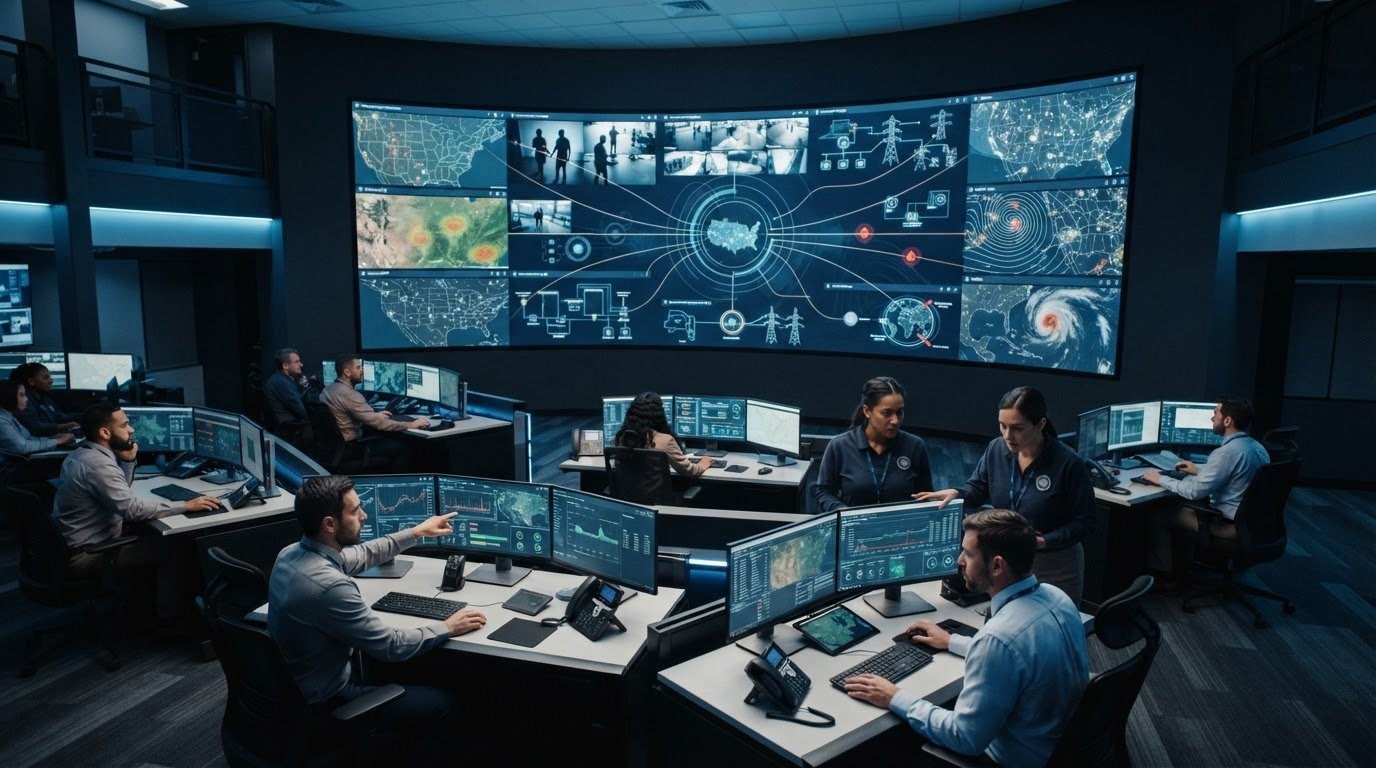
vis/ability is an operational intelligence layer that surfaces through the video wall. It brings real-time data, video, and applications into a shared operating picture, helping teams see relevant information with context and coordinate escalation. This article explains how an event-driven integration approach can support decisions and extend visibility to distributed teams and mobile users.
Key Takeaways
- Fragmented applications, data silos, and manual monitoring can leave operators without shared context or clear escalation.
- Real-time data feed integration connects source information to operational workflows through connection, normalization, context, prioritization, and routing.
- Compare integration approaches by how well they provide visibility, context, escalation, cross-team collaboration, and mobile access.
- Plan around source ownership, user decisions, data meaning, freshness expectations, and how teams should respond when a feed fails.
- vis/ability serves as the central operational intelligence hub, with the video wall showing relevant information as it comes together.
Why Real-Time Data Feeds Still Leave Control Rooms with Situational Awareness Problems
Fragmented applications, data silos, and manual monitoring can leave operators assembling an event picture from disconnected pieces. A status may appear in one system, an alert in another, and location details somewhere else. Even when each source updates in real time, teams may lack a shared view of what is happening, who owns the response, and what should happen next.
Real-time data feed integration connects changing information from source systems to operational workflows. A data feed carries information from one system to another; the What is a Data Feed? overview describes common feed formats and how they distribute updates. In a control room, connecting a feed is only the first step. Operators also need enough context to interpret the information and understand how it relates to other activity. Source systems can continue to manage their own records and functions while an operational workflow brings relevant updates together for decisions.
How fragmented feeds create control room situational awareness problems
When an event develops, operators may move between a dispatch application, camera views, facility systems, and status dashboards to find related information. Each switch demands attention and makes comparison harder. A repeated alert may look like a new event, while an update in another interface may be missed.
Context-poor information adds another burden. A notification without a clear location, timestamp, or relationship to other activity leaves the operator to investigate before assessing its significance. That manual reconciliation takes attention away from prioritization and coordination. Silos can also delay recognition: a detail that matters to one team may not reach another team’s view in time to inform its next decision.
Seeing data means viewing individual updates. Shared situational awareness means understanding what those updates mean together, who needs to act, and what response is underway. More feeds can increase visibility, but without shared context they can also multiply disconnected signals.
Why operators miss incidents when information lacks context
An isolated alert rarely tells the whole story. It may not show nearby activity, related system status, or the operational impact of the event. An operator may need to cross-check several applications before deciding whether the alert warrants action. Meanwhile, another team may have relevant information but no clear prompt to share it.
Manual monitoring makes prioritization and handoffs harder. Operators must recognize changes, determine which matter, and pass details to the right people while other feeds continue to update. Without consistent ownership and escalation paths, teams can interpret the same signal differently or assume someone else is responding.
Most control rooms already have the screens. What they’re missing is the layer that decides what goes on them, and escalates automatically when something needs attention.
How Real-Time Data Feed Integration Turns Separate Inputs into Operational Context
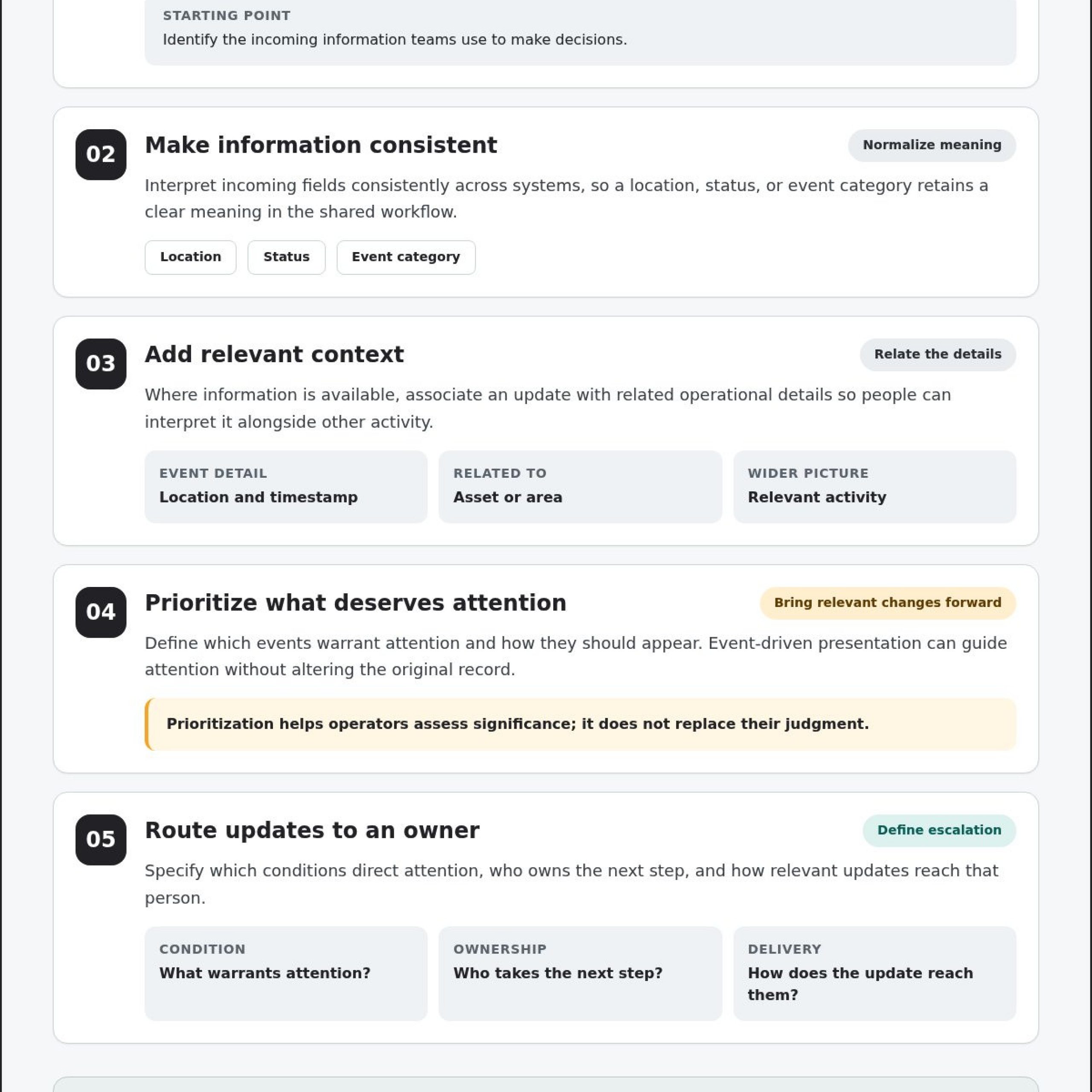
Useful integration follows a deliberate sequence. It connects operational sources, makes incoming information interpretable across systems, adds relevant context, prioritizes events, and routes information to the people responsible for decisions. Each step turns a stream of updates into information an operator can assess and act on.
The sequence should support the mission without taking control away from the people responsible for it. Source systems remain authoritative for their own records and functions. An integration layer organizes and presents relevant information for operational use; it does not replace a source system or rewrite its underlying data. For a broader explanation of the approach, Understanding Real-Time Data Integration describes how information moves between systems as it changes.
What happens between a source feed and an operator-facing event
Start by connecting the feeds and applications that inform operational decisions. Then interpret incoming fields consistently. A location, status, or event category should retain a clear meaning as information moves from its source into a shared workflow. Where the information is available, associate an update with relevant operational details such as a related asset, area, or activity.
Next, define which events deserve attention and how they should appear. Whether managing operational dispatch feeds or tracking high-velocity asset changes on platforms like BubbleMarkets, intuitive visual presentation helps users rapidly interpret live data streams. Prioritization can bring a relevant change forward without altering the original record. Operators still evaluate the context, apply procedures, and decide what action to take. Event-driven presentation guides attention; it does not replace human judgment.
How to manage multiple data feeds in a dispatch center
Group feeds by operational role, event relevance, and the decisions they support. A dispatcher may need incident details and location context together, while a supervisor may need a broader view of developing activity and team status. Organizing information around those needs helps create useful shared views and reduces repeated switching between applications—similar to how specialized practice environments utilize resources like Helpful.vet to structure workflow tools and clinic benchmarks around specific team responsibilities.
Give escalation a defined purpose. Specify which conditions warrant directing attention, who owns the next step, and how relevant updates reach that person. Clear routing helps prevent an alert from appearing without an accountable recipient. It also gives operators room to assess the information before deciding how to respond.
- Connect: Bring relevant source feeds and applications into the operational workflow.
- Normalize: Make key fields understandable and consistent across inputs.
- Add context: Relate an update to relevant operational information.
- Prioritize: Surface events according to their defined significance.
- Route: Direct attention to the appropriate team or role.
Activu’s vis/ability is an operational intelligence layer that surfaces through the video wall. It serves as a central hub for operational tools and feeds, supporting shared context and event-driven awareness while source systems continue to manage their own functions. Explore how vis/ability integrates operational information to support coordinated decisions across teams.
Compare Real-Time Integration Approaches by Visibility, Context, and Escalation
Three patterns are common in operational environments: separate application views, basic aggregation, and an event-driven shared operating picture. Comparing approaches means looking beyond how many feeds appear together. Fragmentation, silos, and missing automatic escalation can persist after sources are connected if information lacks context or clear ownership. A useful model gives teams visibility they can interpret and a path to coordinated response.
Use these criteria to compare how each approach supports daily decisions. The table describes common trade-offs, not a recommendation for a specific architecture.
| Criterion | Disconnected application views | Basic aggregation | Event-driven shared operating picture |
|---|---|---|---|
| Visibility | Operators view information in separate applications. | Multiple feeds appear together, often with limited prioritization. | Relevant information is brought forward for the operational situation. |
| Context | Operators assemble relationships across systems manually. | Feeds are visible together, but their meaning may remain separate. | Related updates can be presented with shared operational context. |
| Escalation | People monitor and relay alerts between applications. | Alerts may be visible without clear routing or ownership. | Defined event conditions can direct attention to responsible roles. |
| Cross-team collaboration | Teams may work from different views of the event. | Shared access improves visibility, though interpretation may vary. | Teams can work from a common, role-relevant picture. |
| Mobile access | Access depends on each separate application. | Availability varies by feed and workflow. | Relevant information can extend to mobile users and distributed teams. |
Which integration model fits an EOC or operations center?
Model choice depends on the number of teams and source systems, the decisions they support, and how often teams must coordinate. An EOC common operating picture needs shared context so participants can understand how updates relate to the same event. A smaller operation may need a focused set of views; a distributed operation may need role-specific access. Define these needs before selecting an architecture.
How to assess the trade-offs without overloading operators
Assess each feed against a defined decision or responsibility. Ask what action it informs, who needs it, and whether it belongs in the primary event view or should remain available as supporting detail. Consider alert volume, screen attention, and operator workflow together. More connected feeds add value when their relevance and presentation help people act.
Shared visibility also needs to support coordinated response. An incident management approach for public safety operations depends on teams receiving useful information in a form they can interpret and act on. With vis/ability, relevant operational information can be organized around the event, while teams retain access to source details when needed.
Evaluate the whole workflow: what becomes visible, how context is established, when attention is escalated, and who takes responsibility. That discipline helps real-time data feed integration serve operational decisions instead of simply increasing the volume of information on display.
Plan a Real-Time Data Feed Integration Around Security, Ownership, and Response
A dependable integration plan starts with accountability. Before connecting a source, identify who owns its information, which operational roles need it, and what decision it supports. This gives technical and operational teams a shared basis for reviewing access, interpreting updates, and assigning response responsibilities. It also helps prevent a feed from becoming visible without a clear purpose or owner.
What to define before connecting operational feeds
Build an inventory for each source that records its owner, users, purpose, and place in operational decisions. Then agree on how teams will interpret key fields and recognize information that is stale, missing, or in conflict with another source. Align with source owners and operational teams rather than assuming every system defines status, location, or event timing the same way.
Define escalation alongside the data. Specify which event conditions should draw attention, which role receives the escalation, and who assumes responsibility if the first recipient is unavailable or the information remains unclear. Distinguish an alert that requires immediate review from one that can remain available as supporting context. Clear thresholds help teams manage attention without treating every incoming update as equally urgent.
How to introduce integrations without disrupting operations
Test representative workflows before expanding feed coverage. Walk through how information moves from its source to an operator’s view, what context appears with it, and how the responsible team receives an escalation. Include scenarios where updates are delayed, absent, or inconsistent. Agree on how those conditions should be displayed and handled; never let missing information appear equivalent to a confirmed status.
Operator feedback matters during this process. Ask whether event presentations support actual decisions, whether alerts arrive with enough context, and whether teams can identify ownership during a handoff. Refine relevance and presentation based on those observations. A useful integration supports judgment and coordination; it does not make the operational decision on a person’s behalf.
Include security review in the plan from the start. Identify which users and roles need access to each feed or view, and involve the accountable security and source-system teams in reviewing access and information handling. The appropriate approach depends on the environment and its requirements, so avoid assuming one access model or control fits every operation.
Plan for change after rollout. Assign responsibility for reviewing integrations when source systems, operational roles, or response procedures change. Establish how teams will report a feed issue, who evaluates its operational impact, and how updates to event rules or presentation are tested before they affect routine work. Without ongoing ownership, an integration can drift away from the decisions it was designed to support.
Activu’s vis/ability brings operational tools and feeds into a central environment for coordinated visibility across control rooms and distributed teams. Explore vis/ability for operational visibility to see how integrated information supports event-driven awareness and response.
How Activu Makes Integrated Data Actionable Across the Operating Environment
Fragmented applications and data silos can leave teams with separate views of the same developing event. When automatic escalation is missing, operators may have to decide which updates matter and who should respond while information continues to change. Teams need a shared, usable operational picture that supports timely decisions.
Activu’s vis/ability brings operational tools and feeds together, aggregating real-time data, video, and applications for situational awareness. It acts as the central hub for this information. The video wall is where the answer appears because vis/ability organizes relevant information for the people coordinating the response.
How vis/ability connects feeds to shared operational awareness
Real-time data feed integration connects updates from separate operational sources to a shared workflow. With vis/ability, teams can bring data and video into a common operating environment, helping operators view related information together rather than treating each source as an isolated signal. Event-driven presentation can prioritize essential information so relevant events receive attention in context.
That visibility supports human judgment. Operators remain responsible for interpreting conditions, weighing available information, and deciding how to act. A shared view helps them make decisions with greater context and coordinate with colleagues who need the same event picture. Learn more about vis/ability for situational awareness and how it brings operational information together.
How visibility extends beyond the main control room
Operational coordination often reaches beyond a single command center. vis/ability extends shared visibility to remote locations, conference rooms, breakout rooms, huddle rooms, and mobile users. Teams can access relevant information where they plan, coordinate, and respond, supporting continuity between central operations and distributed personnel.
For SOC, NOC, and GSOC teams, shared operational context can help connect monitoring activity with response coordination. A common view gives teams a clearer basis for communicating what is happening, what needs attention, and who is involved. Explore SOC, NOC, and GSOC control room operations to see how integrated visibility applies across these environments.
When feeds, applications, and video flow through a central hub, teams have a clearer way to focus attention and share context across locations. Explore Activu’s approach to integrated operations through vis/ability to see how connected information supports confident, coordinated action.
Set a Clearer Operating Picture in Motion
Operational clarity depends on how information supports the next decision. As you plan real-time data feed integration, focus on what teams need to recognize, who needs to respond, and how shared context can move with the event. These questions give technical and operational teams a practical basis for improving visibility without adding noise to the workflow.
Activu’s vis/ability supports event-driven situational awareness by bringing real-time data and video into operational context. Mobile vis/ability extends that shared view and collaboration to people working beyond the control room, helping distributed teams stay connected to the evolving situation.
Consider how an operational intelligence layer can support your teams, decisions, and locations. Explore how Activu supports operational visibility and identify a clearer path from live information to confident action.
Frequently Asked Questions
What is real-time data feed integration?
Real-time data feed integration is the governed use of changing source information within an operational process. Teams identify which fields matter, retain useful source identifiers and timestamps, and decide how the receiving workflow treats each update. This helps distinguish a new event from a routine status refresh. The setup depends on how each source behaves and what the operational decision requires.
How do you integrate multiple data feeds into one operating picture?
Use a representative event walkthrough to test how the picture works for each role. Have operators trace an update from its source to the view they use, then note unclear labels, missing identifiers, or information that distracts from the task. For example, confirm that two teams interpret the same event status consistently. This practical review can expose workflow issues that a source inventory alone may not reveal.
What is the difference between real-time and near-real-time data?
Real-time data is intended to reflect changing conditions as they occur; near-real-time data may arrive at intervals or after processing. To judge whether either is suitable, compare the source event time with the time the update becomes available to the operator. Consider what delay the decision can tolerate. A label alone does not establish that timing, so evaluate the feed against its operational use.
Can real-time data feed integration work with existing applications?
Is a video wall enough to create a common operating picture?
No. A wall can make information visible to people in the same room, yet it cannot establish shared definitions, decide which event matters, or ensure distributed colleagues receive the context they need. Evaluate the operating process behind the display: how teams interpret status, coordinate across locations, and communicate changes. The display is useful when it supports those practices rather than presenting disconnected content.
What happens if a data feed becomes stale or unavailable?
Make the condition visible and give operators a clear way to distinguish unavailable information from a valid status. Where available, showing the source’s last update time can help users assess whether the information remains useful. Define who reports and investigates the issue, and document an approved alternate way to obtain essential details. Test this fallback with operators so they know what to do before a disruption occurs.
How does data feed integration support an EOC common operating picture?
It can help an EOC coordinate information across functions, especially when teams use different terminology or organize work in different ways. During planning, agree on event names, status labels, and the details participants need for briefings and handoffs. A tabletop review can reveal where interpretations diverge. The shared picture should support coordination while allowing each group to carry out its own responsibilities.
Does integrating feeds automate operational decisions?
Integration can automate parts of information handling, such as bringing an event to attention under defined conditions. It should not imply that a system has weighed every operational factor or accepted responsibility for the outcome. Assign an owner to review event rules as procedures change, and examine whether alerts remain useful to their recipients. This keeps automation aligned with current practice and gives operators a clear basis for action.