

An alert without context can delay a critical decision. A unified physical and cyber security dashboard brings security posture, physical events, and cyber alerts into one operating view. By connecting each signal to its source, coverage, and response context, it helps teams assess what needs attention and who owns the next action.
That shared view matters because fragmented systems can leave operators switching between feeds, working through silos, and relying on manual escalation. Most control rooms already have the screens. What they’re missing is the layer that decides what goes on them – and escalates automatically when something needs attention.
This article explains how a unified dashboard connects data across environments, relates alerts, and gives teams practical response context. It also covers how to assess coverage gaps and data-source health, and what operators need to see when an event calls for a fast, informed response.
Key Takeaways
- Bring physical events and cyber signals into one operating view so responders can assess incidents across environments.
- Test coverage against the least-visible systems and paths; gaps in telemetry or policy enforcement can weaken the whole picture.
- Use filtering and correlation to separate actionable alerts from noise, and flag when a data source stops reporting.
- Give each important signal its source, last update, and responsible owner so teams can identify the next action.
- Connect response context to the operational intelligence that helps teams make clearer decisions across control-room settings.
How does a unified security dashboard work?
Fragmented physical and cyber systems can separate alerts from the people responsible for action. A unified physical and cyber security dashboard brings relevant signals into one operating view, connecting detection with response.
Dashboard Purpose and Core Features
A unified dashboard combines physical security events and cyber signals in one interface for monitoring, triage, and response. It is useful when operators need to understand an incident across systems without assembling each view manually. Look for alert correlation, source and timestamp details, coverage status, access controls, and remediation tracking for application vulnerabilities. These features help teams consider cloud risks, firewall events, and physical alarms together.
Physical and Cybersecurity Platform Integration
Access-control, video-surveillance, and intrusion-detection platforms can feed physical events into the same operating view as cybersecurity monitoring, network, cloud, and application tools. Integration connects data through available interfaces and aligns events using shared context, such as time, asset, and location. For CI/CD security, include runner logs and access activity so teams can compare anomalies across runner types and identify inconsistent permissions.
The benefit is faster cross-system assessment; the limitation is coverage. A dashboard can correlate only the telemetry and policies it receives, so a silent camera system or unreported cloud event can leave a blind spot. Evaluate not only what appears on the screen, but also whether the underlying sources report consistently and how the team is alerted when a source goes offline.
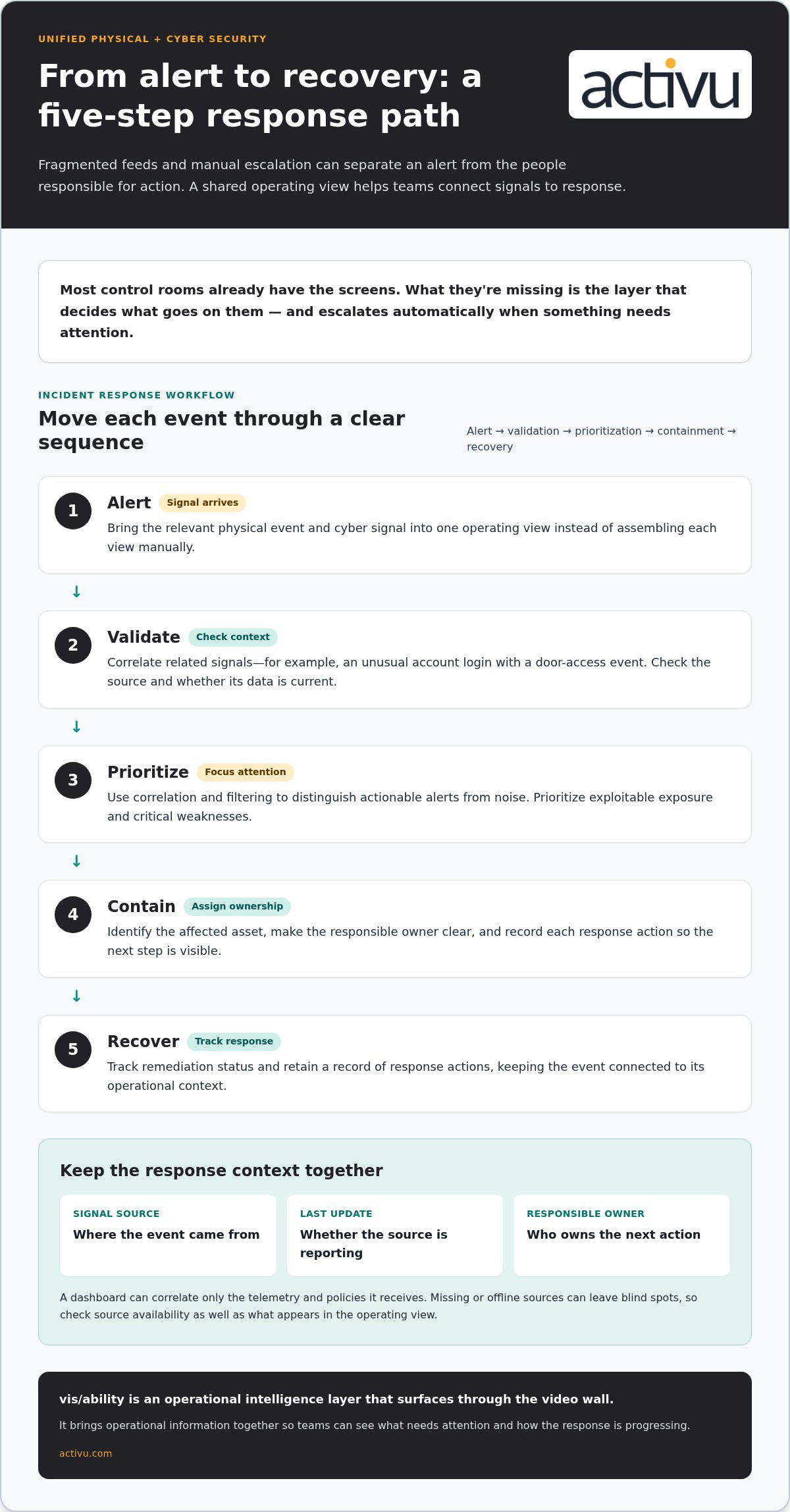
For incident response, a practical workflow moves from alert to validation, prioritization, containment, and recovery. For example, correlate an unusual account login with a door-access event, identify the affected asset, assign an owner, and record each response action. Track application vulnerabilities alongside remediation status, then prioritize exploitable exposure and address critical weaknesses promptly.
In the United States, use NIST CSF 2.0 and CIS Controls v8 as security references, then map applicable obligations to the organization’s sector and data. The National Institute of Standards and Technology places continuous monitoring in the DE.CM category; CIS Controls v8 Control 6 addresses access control management, while Control 8 covers audit log management.
Deployment typically involves inventorying security tools, selecting priority integrations, testing data flows, and setting success measures. A phased rollout can start with 2-3 critical security tools before adding more systems. Validate access permissions, alert routing, and source availability during testing, then train responders on their incident roles.
Platform cost depends on the case, including integration scope, data sources, and environment complexity; pricing is provided after a quote request.
Integration can create privacy and cybersecurity risks if sensitive footage, identity records, or access logs become broadly available. Restrict dashboard permissions by role, protect connections between systems, and retain only the information needed for operational response and audit evidence.
Validating dashboard coverage across environments
A dashboard can appear complete while a specific environment contributes little usable information. Validate coverage across each environment, then examine the runner path most likely to lose telemetry, policy enforcement, or response ownership.
Assess a dashboard by comparing its integrations, coverage, correlation, and response context with operational requirements. Inventory the environments and runner types first, then test whether each provides equivalent, usable information.
Start with a coverage matrix that names each environment and its expected signals. Include cloud services, applications, networks, physical sites, and CI/CD runners where they apply. For every entry, record the expected telemetry, enforced policy controls, responsible team, and event that should trigger review. This creates a testable baseline instead of relying on a single overview screen.
- Compare runner models: Confirm that each runner contributes the activity data responders need, not merely a status indicator.
- Test access visibility: Review access paths across runner types and identify inconsistent permissions or weak controls.
- Check policy coverage: Compare enforcement across environments, including whether the dashboard shows policy failures clearly.
- Trace response context: Follow a sample event from its source through classification, ownership, and the next action.
Use the weakest runner path as the first stress test. For example, compare a cloud-hosted runner with a self-hosted runner performing the same deployment task. If one supplies activity records while the other exposes only a completion status, responders may miss the difference between routine execution and anomalous behavior. Document the gap and assign an owner before treating the combined view as complete.
Validate data quality as well as presence. Check timestamps, asset identifiers, event descriptions, and whether records arrive consistently during normal operations. A security signal tied to an outdated asset name can misdirect triage; mismatched timestamps can also obscure event order. Record these defects alongside missing feeds so teams can distinguish integration issues from a genuine absence of activity.
Continuous monitoring helps reveal coverage drift after initial testing. Repeat the same checks when teams add a runner model, change permissions, or modify a deployment workflow. Compare expected and observed signals, then examine cross-runner anomalies within a workflow. Triage findings by environment and operational impact so responders can focus on the greatest exposure.
Close each validation cycle with a clear evidence trail: tested environment, observed result, unresolved gap, and accountable owner. That record supports follow-up across security and operations teams. Choose a dashboard that makes differences visible and preserves enough context for teams to act, rather than presenting every environment as equally covered.
Alert management and event correlation
An alert queue is useful only when responders can distinguish urgent events from routine activity. A dashboard should combine filtering, correlation rules, risk-based priorities, and role-based views. For example, a cyber alert linked to a physical access event can give analysts more context than either signal alone.
Correlation groups related events using shared details such as time, asset, location, or identity. A failed login followed by an unusual access-control event may warrant review as a connected sequence. The system should preserve each original event, show how it was linked, and let responders inspect the source instead of presenting the correlation as a confirmed incident.
Apply alert controls with clear operational intent:
- Filter by relevance: Show teams the event types tied to their responsibilities, such as access anomalies for facility security.
- Set risk-based priorities: Surface alerts that indicate exploitable exposure or potential operational impact ahead of lower-risk events.
- Suppress known false positives: Reduce repeated noise when a recognized benign pattern has a documented explanation.
- Use role-based views: Give analysts, supervisors, and incident leaders the information needed for their distinct response tasks.
Suppression requires oversight. If a recurring alert is muted without an owner or review condition, a changed pattern may remain hidden. Keep the reason, scope, and responsible role visible. Reassess the rule when its underlying system or operating conditions change, and preserve the original event record for investigation.
Data-source health belongs in alert management, too. Administrators should receive an alert if an integrated source becomes unavailable or stops reporting. This distinguishes “no event detected” from “no data received,” a critical difference during incident triage. Display the source name and last successful report so teams can identify the affected feed.
Route actionable alerts into a defined response workflow. A responder validates the event, assesses its scope, records a decision, and escalates or contains it according to established procedures. The dashboard should show the assigned owner and current status. For example, an alert awaiting validation should look different from one assigned for containment.
Measure alert performance through mean time to detection, mean time to response, false-positive reduction, and closure rates. Review these measures alongside sample cases; a falling alert count alone could reflect effective filtering or missed signals. Use investigation outcomes to refine correlation logic, adjust priorities, and improve routing. This feedback loop makes event correlation a practical aid to faster containment and more disciplined response.
A lower rate of false positives can be encouraging, but review it alongside sample cases and closure outcomes so a quieter queue does not obscure missed events. Teams can reduce alert overload through filtering and correlation rules, risk-based priorities, suppression of known false positives, and role-based dashboards. These controls work best when their purpose is clear to the people receiving alerts, and suppressed patterns retain an explanation and review condition. The aim is not merely to shorten the queue: alerts should support fast containment, with responders able to act on validated signals and communicate decisions through the established workflow.
Centralised security visibility
Centralized visibility requires more than placing alerts on one screen. A useful view brings network activity, firewall events, compliance progress, and system health together with enough source detail for teams to interpret each signal. Without consistent context, an operator may see a blocked connection but miss a related network anomaly or the affected service.
Organise information around operational questions. Can teams identify which environment generated an event? Can they distinguish a control failure from a reporting gap? The National Institute of Standards and Technology maps unified dashboard monitoring to DE.CM, the continuous monitoring category in NIST CSF 2.0. That connection helps teams frame visibility as ongoing observation, not a static status display.
- Network activity: Surface traffic patterns, anomalies, and protocol trends that support investigation.
- Firewall events: Show blocked activity with the source system and relevant event details.
- Compliance progress: Present control status alongside evidence and outstanding work.
- Infrastructure health: Include server utilization and service condition to help explain operational changes.
Centralize and retain runner logs so analysts can investigate activity across dashboard views. Logs should remain traceable to their originating runner and time period. A deployment anomaly is harder to assess, for example, if one runner’s records appear in the dashboard while another’s remain isolated. Consistent collection supports comparison and gives responders a clearer evidence trail.
Service-account visibility illustrates why coverage needs scrutiny. NHIMG data reports that 5.7% of organizations have full visibility into their service accounts. A dashboard should help teams see which accounts appear in collected data, where those records originate, and whether relevant access activity reaches the view. That makes blind spots easier to identify and assign for follow-up.
Tool volume also complicates central oversight. Big businesses use an average of 76 tools, according to a report by Panaseer. A consolidated view can help reduce the need to interpret each system in isolation, but it still depends on reliable integrations and clearly labelled data. Display the source and reporting status so a missing feed cannot be mistaken for an absence of security activity.
Build the view around decision needs, not a catalogue of available feeds. Group related information by environment, event type, or operational responsibility. Then test whether a team can move from a compliance gap to its supporting evidence, or from a firewall event to relevant network context. These checks reveal whether central visibility supports investigation, ownership, and action rather than simply collecting data.
Connect monitoring areas to the operational questions they help answer. Teams can consider network traffic, anomalies, and protocol trends alongside firewall events and blocked activity, while keeping information-security compliance progress visible in the same dashboard. This gives teams a shared place to review related signals without treating each category as an isolated status.
Centralize and retain runner logs to support investigation and response through dashboard views. Keeping those records available alongside other monitoring areas helps preserve a usable view of activity during review. A dashboard can present network observations, firewall events, and compliance progress together, while retained runner logs support follow-up investigations and response.
Dashboard signals and response context
A security metric needs enough context to guide a decision. A dashboard should connect each signal to its source, last sync, evidence date, collection method, and known integration gaps. These details help analysts judge whether a change reflects current conditions or stale information.
Show operational measures such as MTTA, MTTR, and closure rates alongside their definitions and reporting periods. A number without a clear scope can mislead: teams need to know which systems and events it covers. Pair response measures with incident status so leaders can distinguish open cases from resolved work.
Infrastructure signals add another layer of interpretation. Server utilization and infrastructure health can help explain a security event’s operational effect. For example, a service disruption paired with unusual network activity may call for a different response than an isolated anomaly. The dashboard should make related signals visible without implying that correlation alone confirms cause.
Ownership is essential to response context. When a control fails, show the responsible owner and source system, then identify who has the next action. A visible assignment helps prevent a finding from remaining an unclaimed status indicator. Keep the evidence and current state available so another responder can understand the handoff.
- Identify the measure: Label each metric and define its scope.
- Show provenance: Display the source system, collection method, and last sync.
- Expose gaps: Mark known integration limitations that affect interpretation.
- Assign the action: Name the owner and current response status.
Framework mapping can make dashboard views easier to interpret across technical and business teams. Metric categories can align with NIST CSF, ISO 27001, and CIS Controls. That mapping gives teams a structured way to group evidence by control domain and see where a finding belongs. It also helps connect operational signals with compliance reporting.
Assess the dashboard through outcomes that reflect actual work. Track mean time to detection, mean time to response, false-positive reduction, time saved on manual tasks, and compliance-reporting speed and accuracy. Review each measure with incident examples. A faster report matters only if its evidence remains accurate and useful to decision-makers.
Use a sample event to test the full context chain: find the source, inspect the last update, identify evidence, locate the owner, and follow the response status. If any step requires a separate manual search, record that friction as an operational gap. A dashboard earns trust when it clarifies the next decision while preserving the information responders need to judge the signal themselves.
Activu Corporation: Video Wall Systems
Activu Corporation connects operational information through its vis/ability Platform, application integration, and event-driven situational awareness capabilities. The vis/ability software platform brings relevant information into view for assessment and coordinated response, including on video walls.
As a hub for connected tools, vis/ability supports teams in command centers, remote locations, conference rooms, breakout rooms, huddle rooms, and on mobile devices. Video wall systems provide a shared view, while vis/ability helps teams make operational information visible across their working environments.
Contact Activu Corporation to discuss how these capabilities could support your operations.
Turn visibility into operational readiness
The next step is to align dashboard behavior with the decisions your teams must make. Define which conditions require escalation, who owns each response, and what information operators need before acting. A unified physical and cyber security dashboard is most useful when its signals fit established procedures and support clear human judgment.
Bring security, operations, and technology leaders together to agree on priorities. Use their input to shape how information is organized, which roles see each view, and how teams handle changes in coverage. This creates a practical foundation for evaluating how an integrated operating picture fits your environment.
Activu Corporation can help organizations consider how operational information should come together for decision-makers. Explore the next step with Activu Corporation’s team, and move toward a clearer, more coordinated operational view.
Frequently Asked Questions
What is a Cybersecurity Dashboard?
A cybersecurity dashboard gives security teams a visual workspace for reviewing an organization’s cyber posture and threat activity. Analysts can use it to spot changes that need investigation, such as a vulnerability whose remediation remains open after a system update. A useful view helps staff move from observation to assigned follow-up, while keeping the relevant system and evidence accessible for review.
How does a unified dashboard combine access control, video surveillance, and threat monitoring?
A unified dashboard brings data from access-control, video-surveillance, and cyber-monitoring systems into a shared operational view. For example, a badge event can be considered alongside corresponding camera footage and a threat alert involving a nearby workstation. Shared timestamps and asset or location details help responders interpret the sequence, while role-based access helps limit sensitive footage and security records to authorized users.