
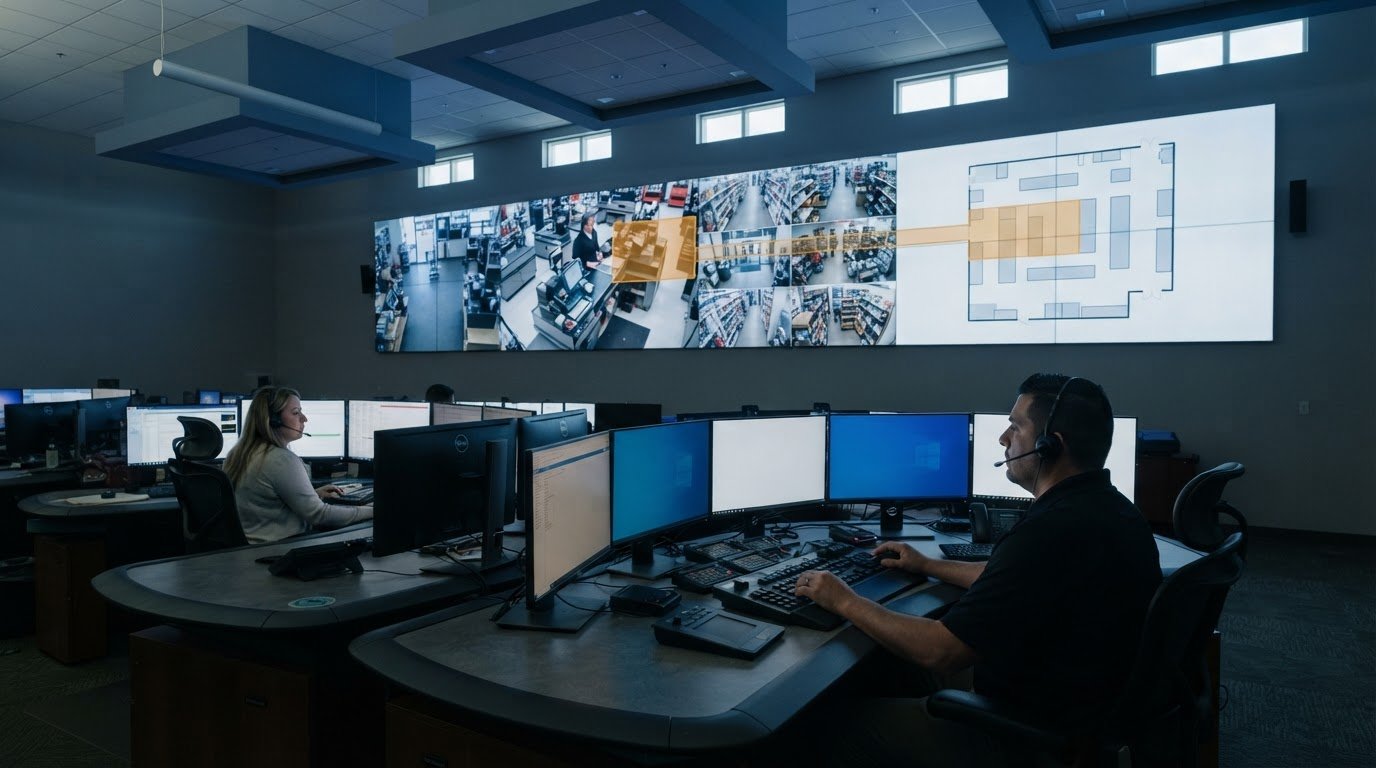
Fragmented video, point-of-sale, and inventory systems can leave retail teams without a shared view or a clear escalation process. A retail loss prevention command center connects operational signals so teams can assess incidents and coordinate decisions across stores.
Many control rooms already have screens. The missing piece is often the software layer that decides what appears on them and brings important events to operators’ attention.
That operational intelligence layer connects siloed systems and surfaces relevant information through the video wall. Loss prevention teams know theft, fraud, and operational errors appear across different systems and require different responses. The challenge is connecting those signals without overwhelming operators or separating evidence from context.
This article explains how loss prevention centers coordinate monitoring and response, connect video with POS activity, and help teams assess integrated solutions for their operations.
Key Takeaways
- Loss prevention requires visibility across external theft, internal fraud, and operational errors, not just activity at the point of sale.
- Connecting POS signals with video and access-control information helps teams investigate anomalies with more context.
- A coordinated center brings alerts, store activity, and response decisions into a shared operating picture.
- Assess integration, data architecture, reporting, and scalability to determine whether a solution can support changing operational needs.
- Event-driven situational awareness can help teams focus attention on relevant information and coordinate action across locations.
2. External theft, internal fraud, and organized retail crime
External theft can involve shoplifting, concealment, or removing merchandise without payment. Patterns may emerge across products, shifts, or stores. Organized retail crime can involve coordinated activity, with people taking different roles in selecting, removing, or moving goods. Connecting related incidents gives investigators more context than reviewing each event on its own.
Retail loss prevention teams can examine reports alongside video, inventory discrepancies, and transaction records. For example, repeated losses involving the same product category may direct attention toward particular aisles, delivery periods, or store procedures. Employment of retail loss prevention specialists in the United States is projected to grow by 3% to 4% from 2025 to 2035, according to the U.S. Bureau of Labor Statistics.
Internal fraud and employee theft require a different review process. A return without a matching receipt, repeated voids, unusual discounts, or transactions clustered around one register may warrant closer examination. These signals alone don’t establish wrongdoing. Teams can compare POS activity with transaction video and applicable store procedures to assess whether an error, policy gap, or suspected fraud explains the discrepancy.
Store layout can reduce blind spots and improve staff visibility. Arrange aisles to preserve clear sightlines from staffed areas, and place small, high-value products near checkout or within employees’ view. Position larger valuable items away from entrances. Security mirrors can reveal obstructed corners, while controlled access can help protect stockrooms from unauthorized entry.
Visible anti-theft signs, cameras, locked cases, and receipt checks can show that store activity receives attention. Place signs where customers can see them before entering or approaching higher-risk displays. Match the measure to the merchandise: a locked case may suit a compact, valuable item, while clear sightlines may work better for everyday shelves. Visible measures can also support incident reviews.
Consistent reporting turns individual observations into useful operational information. Give employees a clear process for recording what happened, where it occurred, and which merchandise or transactions were involved. For example, a report linking a suspicious return to a register and time can help investigators locate relevant transaction records and video. Review recurring patterns alongside inventory audits and incident reports, then adjust staffing, layout, or procedures to address identified risks.
External theft, organized activity, internal fraud, and process errors can all produce inventory gaps. A structured review connects a reported loss to its location, timing, transaction history, and handling procedures. That context helps teams distinguish a confirmed incident from a discrepancy needing further investigation and identify the next practical step.
3. What is a Loss Prevention Center, and How Does It Work?
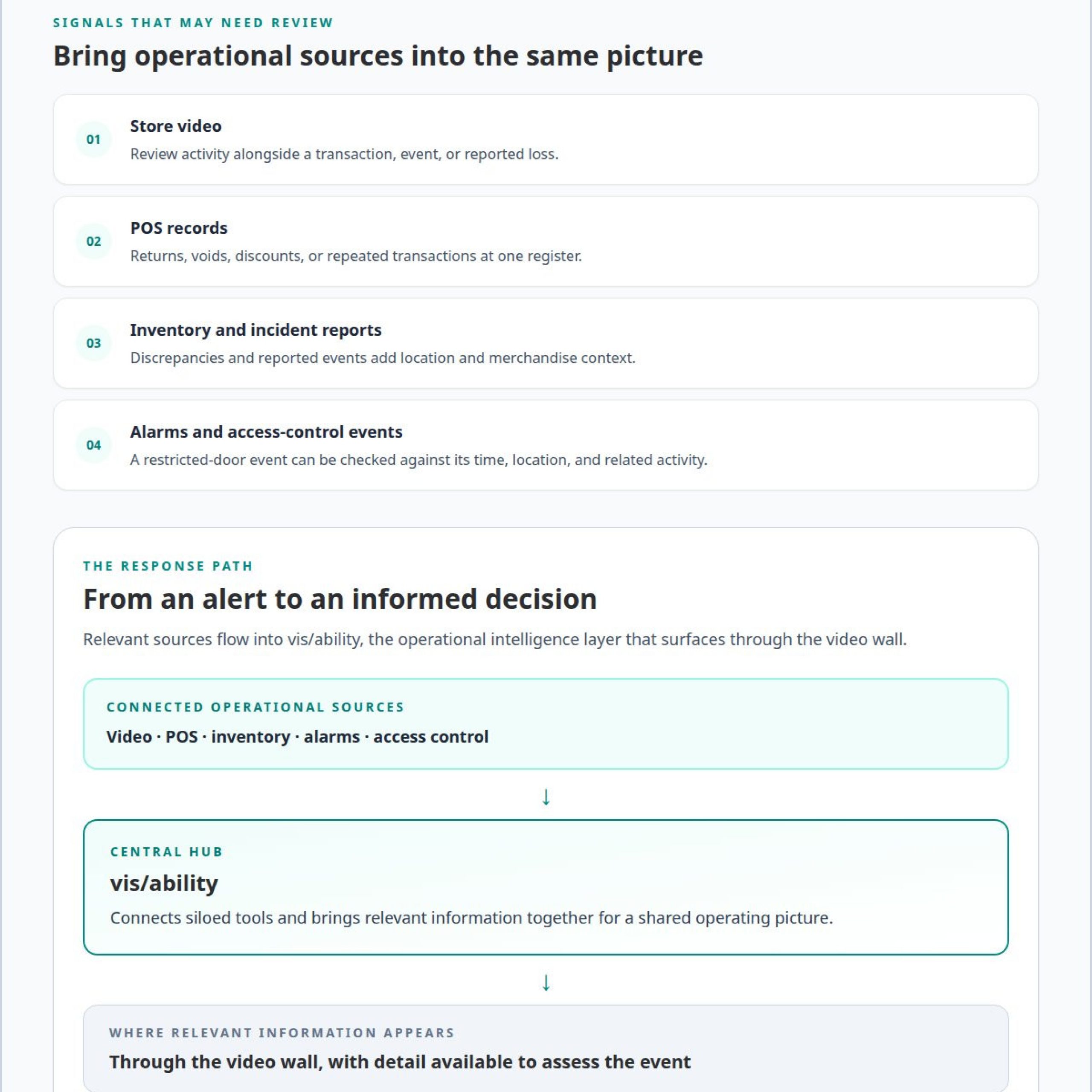
A loss prevention center connects people, procedures, and operational data so teams can assess incidents and coordinate responses. Its inputs may include store video, point-of-sale records, inventory reports, alarm alerts, and access-control events. A command and control platform brings relevant sources into a shared view, helping operators move from an alert to an informed decision.
The workflow begins when a signal needs attention, such as an unusual transaction or a restricted-door event. An operator reviews the relevant data, checks associated activity, and determines whether the event needs follow-up. Teams can then document findings, notify store personnel, and coordinate a response under established procedures. Clear escalation paths help keep decisions consistent across locations.
Access control systems secure stockrooms, offices, cash-handling areas, and other restricted spaces. Assigning access according to job responsibilities helps limit entry to authorized employees. When a door event occurs, teams can compare its time and location with video or inventory activity. This context can distinguish an expected delivery from an access event that needs investigation.
POS integration adds transaction context to a security review. Systems can surface patterns involving returns, voids, discounts, or repeated transactions at one register. For example, teams can review an unusual return alongside its transaction record and corresponding video. This combined view helps investigators assess whether the activity reflects a processing error, a policy issue, or suspected fraud. An alert identifies something to examine, not proof of misconduct.
Control room design affects how reliably operators can interpret signals. A useful layout prioritizes essential information, supports communication, and makes relevant feeds accessible without unnecessary screen switching. Fragmented video, POS, and access-control systems create silos and slow coordination. Many control rooms already have screens; the missing piece is often the layer that decides what appears on them and brings important events to operators’ attention.
That operational intelligence layer surfaces through the video wall. It should help operators see the information relevant to an event, while preserving the detail needed to assess it. The vis/ability Platform brings applications and data together as an operational intelligence layer that surfaces through the video wall, supporting a shared operating picture.
The cost depends on the operation’s scope and is provided after a quote request; key factors include integration needs, data architecture, staffing model, and facility design.
For teams working to unify disconnected applications and alerts, an integrated platform can connect incident signals with the context operators need to act. Define the key data sources, access requirements, and escalation workflow first. Those decisions shape the system and its control room design.
4. Video surveillance and POS monitoring
Video surveillance gives loss prevention teams visual context for store activity. Camera placement should cover entrances, checkout areas, high-value merchandise, and other locations where incidents may occur. A clear view of a transaction can help investigators understand what happened before, during, and after a discrepancy. Cameras also support incident review when staff reports identify a specific time and location.
A video management system organizes camera feeds so operators can locate relevant footage. When an alert identifies a store, register, or time, the system can focus review on the corresponding camera view. Video analytics may flag unusual movement or behavior for assessment. These alerts direct attention, but an operator still needs to interpret the footage and determine an appropriate response.
POS monitoring adds transaction detail. Retail systems can track sales, returns, voids, and discounts, giving teams records to review for unusual patterns. For example, repeated voids at a register may prompt a closer look at transaction data and related footage. A pattern can indicate an error, a training need, or suspected misuse, so teams should assess context before drawing conclusions.
Connecting POS data with video makes reviews more specific. A team can identify a transaction, locate its time and register, then examine nearby footage. If a return appears unusual, the video may clarify how merchandise was handled and whether the transaction followed store policies. The records provide complementary evidence; the investigation determines what the activity means.
AI-powered systems can connect POS signals with video surveillance and surface transactions for review. A suspicious discount, for instance, can be considered alongside footage from the relevant checkout. Teams can also use analytics to identify movement patterns that merit attention. These tools help prioritize information, but they don’t establish intent or replace human judgment.
Operators need a defined process for responding to alerts. First, verify the location and time. Then review the associated transaction or camera footage, compare the event with store procedures, and document the outcome. If the event requires escalation, follow the retailer’s reporting and response policies. A consistent workflow helps teams handle similar incidents consistently across stores.
Effective monitoring also depends on camera coverage, reliable transaction records, and clear review procedures. A camera pointed away from a checkout cannot provide useful transaction context. A POS alert without a matching time or location can leave operators searching through unrelated footage. Aligning camera views, register identifiers, and incident reports helps teams narrow the review and identify recurring discrepancies.
Retailers can use findings to refine camera placement, analytics rules, or employee procedures. For example, recurring discrepancies around one checkout may justify a focused review of its transaction activity and camera view. Reviewing incidents alongside POS records helps distinguish isolated events from patterns that need operational attention.
5. Evaluating scalable, integrated loss prevention solutions
A solution earns its place by connecting systems that currently operate in silos. Evaluate whether video, POS, inventory, alarm, and access-control data can work together around an incident. For example, a suspicious return should lead operators to the relevant transaction and camera view, rather than leave them searching separate applications. Integration quality matters more than the number of feeds displayed.
Measure effectiveness through shrink trends, incident resolution time, alert accuracy, and the share of investigations supported by connected data. Compare results against a consistent baseline, then review them by store, incident type, and period. These measures show whether teams identify losses, assess alerts efficiently, and focus resources on recurring problems.
Start evaluation with the data architecture. Identify where each source originates, how it is accessed, and which system maintains its records. A store’s POS platform may identify a transaction while its video system stores the corresponding footage. Reliable integration needs useful links between those records, including consistent store, register, and time details.
Next, map the operational workflow from alert to decision. Define who reviews a suspicious event, what evidence they need, and when they escalate it. For example, a repeated discount pattern may require a different review path from an access-control alert. The platform should support those distinctions without burying priority information among routine activity.
Use a phased implementation to uncover errors before expanding across the organization. A pilot can connect selected stores and data sources, then test whether alerts reach the right team with useful context. Review missed events, duplicate alerts, and integration gaps. Apply those findings to workflows and configuration before adding locations or systems.
Scalability means supporting new stores, applications, and operational needs without recreating disconnected workflows. Assess how the solution handles different store layouts, data sources, and local procedures. A dashboard should help teams compare incident patterns across locations while preserving the detail needed to investigate one store’s activity. Growth should extend shared visibility, not multiply silos.
Evaluate return on investment against defined operational outcomes. Compare implementation and operating costs with changes in shrink, investigation effort, and resource allocation. Include internal errors as well as suspected theft, since inaccurate receiving or sales records can create losses. Separate the effect of technology from policy changes, training, or other measures introduced during the same period.
Finally, review data handling, access permissions, reporting, and system maintenance. A useful solution gives authorized teams the information required for their roles and supports consistent investigation records. Reassess performance as incidents, store operations, and data sources change. The strongest choice aligns technical integration with clear workflows and measurable loss-prevention objectives.
5. How does a retail loss prevention command center monitor stores in real time?
A retail loss prevention command center monitors stores by centralizing surveillance, alerts, and operational data. Operators use a shared view to identify activity that needs review, then connect it with relevant store information. This makes the location, event type, and available context visible together, rather than requiring staff to search disconnected systems.
Monitoring begins with connected data sources. Video feeds show store activity, while POS records, inventory reports, alarms, and access-control events add operational context. A centralized data repository can make current information available for review. Store identifiers, event times, and consistent source labels help operators connect related signals accurately.
Next, analytics and alert rules bring priority events to attention. A transaction pattern, intrusion alarm, or camera-detected behavior may prompt an operator to investigate. The system should show the alert’s source and relevant location, so staff can assess the event rather than interpret an isolated notification. Automated escalation can route urgent signals through defined response workflows.
For example, a store alarm may coincide with activity visible on nearby cameras. An operator can review the footage, check related alerts, and assess whether the event requires action at the store. If a POS anomaly appears, the team can examine the associated transaction and location. The alert starts the review; human judgment determines the next step.
Effective real-time monitoring also depends on clear ownership. Retailers can define which team receives each alert, what information supports assessment, and how findings are recorded. A store manager may handle a local procedure issue, while a recurring pattern across locations may need broader investigation. Defined escalation paths prevent alerts from remaining unassigned.
Operators need prioritization, not an undifferentiated stream of feeds. A useful interface highlights significant changes, groups related events, and preserves access to underlying sources. Teams can move from an alert to its context without losing sight of other active incidents. Event-driven situational awareness supports this workflow by presenting information when operational conditions call for attention.
After each incident, teams can record the response and review the alert’s performance. They can check whether the right information arrived, escalation reached the responsible staff, and records supported the investigation. Repeated missed signals, duplicate notifications, or delayed handoffs can reveal where integration or workflow adjustments may help.
To align real-time feeds with operational decisions, explore integrated visibility for control rooms. A connected operating picture helps teams coordinate across stores while keeping human review central to every response.
Activu Corporation
Activu Corporation helps retail operations teams connect applications and data streams through the vis/ability Platform, which brings operational information into a shared view.
Teams can use vis/ability across command centers, remote locations, conference rooms, breakout rooms, huddle rooms, and mobile devices. It serves as an operational intelligence layer that surfaces through the video wall, helping distributed teams access the same operating picture and coordinate decisions.
If your team is assessing how to connect store data and support coordinated monitoring, contact Activu Corporation to discuss your operational needs.
Build a clearer operating picture
The next step is to define how loss prevention information should support decisions across your stores. Identify which signals need immediate attention, who should receive them, and what context operators need before escalating an incident. These decisions give an integrated solution a clear operational purpose.
Activu Corporation brings together its vis/ability Platform, Event-Driven Situational Awareness, and Video Wall Systems to help teams connect operational information and present relevant context. The vis/ability Platform serves as the central hub, while the video wall surfaces the operational intelligence layer for teams to assess. This approach can support a retail loss prevention command center when fragmented feeds and separate workflows make coordinated monitoring difficult.
Define the operational gap your team needs to close, then discuss how an integrated operating picture can support that work. Contact Activu Corporation to discuss your needs. A focused next step can help your team move toward clearer, more coordinated decisions.
Frequently Asked Questions
What is a Loss Prevention Center, and How Does It Work?
A loss prevention center coordinates investigation ownership, communication, and follow-up across retail operations. Teams can assign each case, record decisions, and hand unresolved issues to the appropriate staff. For example, a report involving a delivery discrepancy can move from store personnel to an investigator, with each person documenting their actions. This creates a clear case history and reduces uncertainty during shift changes.
What is loss prevention in retail stores?
Retail loss prevention covers practices that protect merchandise, revenue, and store operations from avoidable loss. It spans the product lifecycle, from receiving and storage through sale, return, and damage reporting. A retailer might use consistent receiving records and refund procedures to identify process weaknesses. Clear employee guidance and routine reviews help teams apply controls consistently across departments and locations.
What is a retail loss prevention command center?
A retail loss prevention command center is a centralized operational function for coordinating loss-related decisions across stores. Unlike a single-store security desk, it supports shared oversight, consistent case handling, and communication between central teams and local staff. For instance, leaders can assign an investigation to the right team and track its status without relying on informal handoffs.
What functions and technologies does a retail loss prevention command center use?
Beyond monitoring, a center can support case management, escalation workflows, audit trails, and operational reporting. Dashboards may help leaders compare case status or identify locations needing follow-up, while communication tools keep store teams aligned. Role-based access can help ensure staff see information relevant to their responsibilities. These functions make it easier to manage investigations consistently and retain a useful record of decisions.
How do retailers choose loss prevention command center software and vendors?
Start with the decisions the system must support, then assess workflow fit, usability, integration needs, reporting, and access management. Include the people who will use it, such as store staff, investigators, and operations leaders. A scenario-based review can reveal whether each role can complete its work clearly. Also account for training and ongoing system administration when planning implementation and evaluating long-term fit.
How does a command center integrate with POS, CCTV, access control, and inventory systems?
Integration planning starts by documenting each system’s data fields, owners, permissions, and update process. Teams then map shared identifiers and test representative scenarios, such as a return linked to an inventory adjustment. Testing should also cover missing records, delayed updates, and access restrictions. These checks help teams understand how information moves between systems and establish procedures for resolving integration issues.
What are the risks and limitations of centralized retail loss prevention monitoring?
Centralized monitoring can surface alerts that require operator review; an alert alone does not prove misconduct, and operators must interpret the context. Systems also need suitable integration and data architecture and must account for applicable privacy requirements.