

What if the next critical decision is delayed because the right information is split across separate applications, displays, and teams? That’s the reality behind many control room situational awareness problems. Moving from data to decisions in the control room takes more than collecting live feeds. Operators need context, a clear escalation path, and a shared view of what requires attention.
Most control rooms already have the screens. What they’re missing is the layer that decides what goes on them – and escalates automatically when something needs attention. vis/ability® is the operational intelligence layer that connects existing data sources, events, and decision-makers, then surfaces relevant information through the video wall. The wall becomes one place where the operational answer appears, not the starting point.
This article explores how teams can bring fragmented feeds into a common operating picture, connect important events to escalation, and share actionable context across control rooms, remote locations, and mobile devices. You’ll see how an intelligence layer can help operators focus on what matters while making use of existing data sources and infrastructure.
Key Takeaways
- Identify the decisions operators need to make, then map the data sources and events that inform them.
- Compare siloed dashboards, display controllers, and a unified layer by how well they support context, escalation, and collaboration.
- Define who needs each event view, including teams working across control rooms, remote locations, and mobile devices.
- Use a practical sequence to move from data to decisions in the control room: map sources, set event priorities, assign audiences, and test shared views.
- Connect operational tools through a central platform so teams can work from shared context while making use of existing data and infrastructure.
From fragmented control-room data to decisions operators can act on
Control-room teams often receive information from applications that don’t share context. A map may show a location, a dashboard may display a changing status, and an incident log may record an update, each in a separate view. When data stays fragmented across systems and silos, operators must connect those details themselves. If an event has no automatic escalation path, the people who need to act may not see the same information at the same time.
A control room brings people together to monitor conditions and coordinate operations. Yet a shared workspace alone can’t create a shared operational picture. More data alone doesn’t create shared situational awareness; teams need relevant information with context, visibility, and a clear next action.
Why separate feeds create decision friction
Operators may move between dashboards, maps, video, and incident information to understand what is happening. Each view can offer useful detail, but switching between them requires people to match timestamps, locations, and updates. When one system’s information isn’t connected to another’s, teams may work from different parts of the same situation.
That friction makes coordination harder. A person looking at a status dashboard may not know that a related update has appeared elsewhere, while a colleague may have the missing detail without knowing who needs it. The challenge is not simply collecting inputs. It’s making their relationships clear enough for people to build and maintain a common operational picture.
What makes information actionable in a control room?
Decision-ready information has four qualities: it’s relevant to the current issue, carries enough context to interpret, reaches the people who need it, and connects to a clear action or owner. A signal without location or status may prompt questions. Add the associated event, its current state, and who is responsible for follow-up, and the team has a stronger basis for deciding what happens next.
Collection and presentation serve different purposes. Systems generate and store data; an operational workflow organizes selected information around decisions. For example, a status change can be presented alongside its location, related updates, and the team responsible for reviewing it. In settings such as manufacturing process control, the same principle helps connect an operational signal to its process context and ownership.
To move from data to decisions in the control room, teams need to define what matters, how events gain context, who should see them, and what action follows. That shared structure helps people interpret the same situation, even when information originates in separate systems.
How an operational intelligence layer moves data toward decisions
Once teams identify where context breaks down, the next step is to connect operational sources to the events and people that need them. vis/ability® organizes operational information so teams can review relevant details together and coordinate around events. Information can appear on the video wall when it supports the operational view, while workstations and mobile access extend shared context to people beyond the control room.
Most control rooms already have the screens. What they’re missing is the layer that decides what goes on them – and escalates automatically when something needs attention.
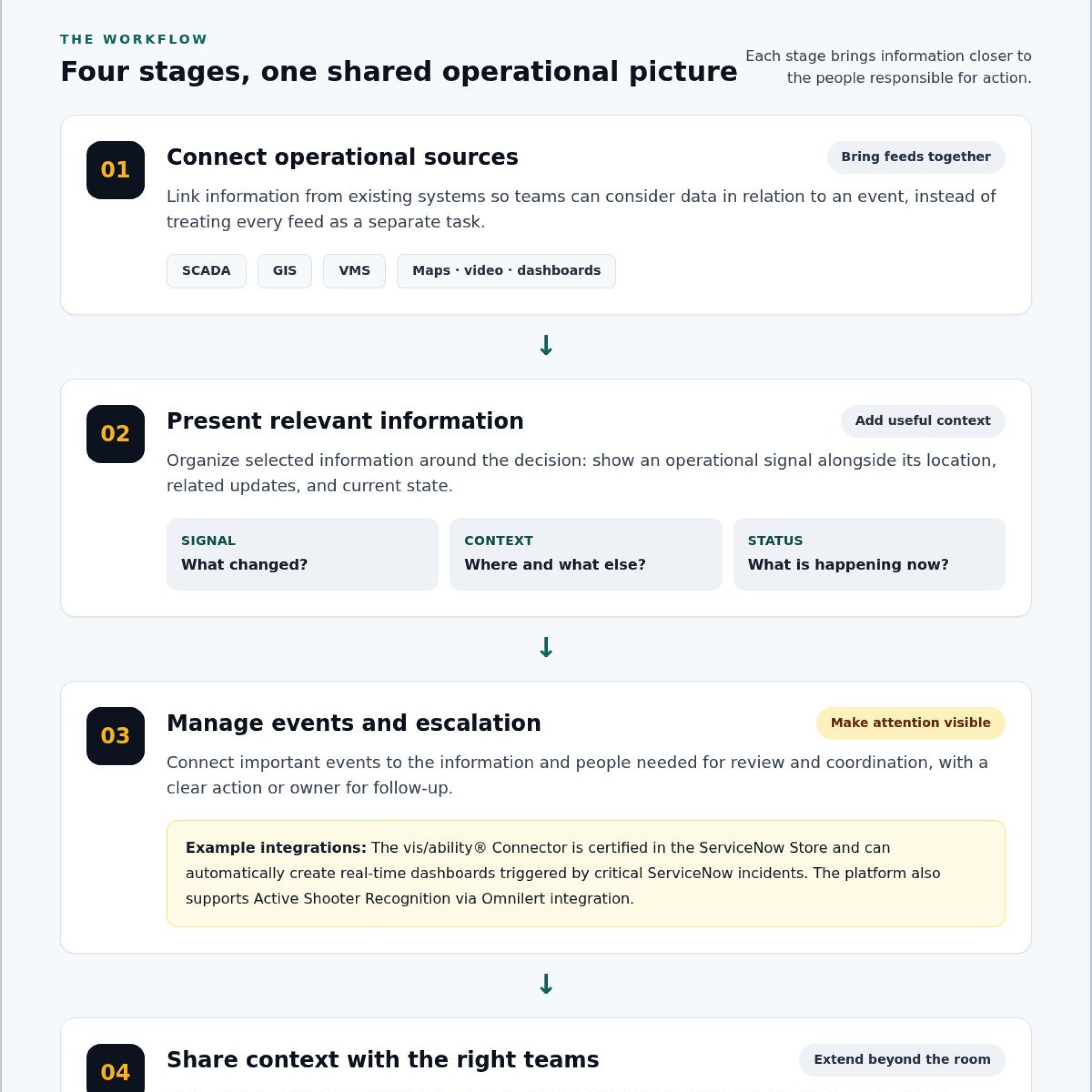
The workflow moves through four stages: connect sources, present relevant information, manage events, and share context with the appropriate teams. Teams can use this sequence to consider which information belongs in each view and who needs access. The focus stays on operational information and decisions, while existing systems continue to provide their data.
From connected sources to event-driven visibility
vis/ability® supports real-time maps, video feeds, dashboards, and event management. It can connect operational sources such as SCADA, GIS, and VMS, helping teams view information in relation to an event rather than treating every feed as a separate task. Integration depends on the source and operational requirements; teams can plan data flows around what the operation needs.
The vis/ability® Connector is certified in the ServiceNow Store and can automatically create real-time dashboards triggered by critical ServiceNow incidents. The platform also supports Active Shooter Recognition via Omnilert integration. These capabilities connect event information with context for review and coordination, without guaranteeing a particular response or outcome.
How the shared view extends beyond the control room
Operational decisions often involve people outside the main room. vis/ability® supports remote collaboration, Zoom meetings, and mobile video streaming from a web client. Teams can share content across displays, workstations, and mobile devices, allowing remote colleagues to participate in the same operational picture. Each audience can access a view suited to the information it needs.
Operators can place content on displays through drag-and-drop controls, while software video-controller functionality helps organize what appears. Teams can manage display content through software without making proprietary AV hardware the starting point.
This connected workflow links source information, event context, and the people responsible for action. Teams assessing how it fits their operations can explore vis/ability platform capabilities.
Compare control-room approaches: separate dashboards, controllers, and a unified layer
Different tools solve different parts of the operational picture. Separate dashboards display information from individual applications. A display controller arranges content on screens. An operational intelligence layer connects sources and events with the people who need to act. Comparing these approaches across workflow, context, event handling, collaboration, and existing infrastructure shows where each fits and where gaps may remain.
What a display controller does, and what the operational layer adds
A traditional video-wall controller manages what appears on connected displays. In plain terms, it directs and arranges visual content, much like choosing which inputs occupy which areas of a screen. That function can be useful, but display control alone doesn’t connect application data, organize incident context, or determine who should receive an event.
vis/ability® can provide software video-controller functionality alongside broader operational capabilities. It gives teams control over what information is shown, where it appears, and who can access the shared view. This doesn’t mean a controller is always unnecessary; it means teams can assess display management as one part of a wider workflow.
Compare approaches against operational needs
Use the comparison below to evaluate how each approach supports daily coordination, not just what appears on a screen.
Workflow: Siloed dashboards require operators to move between applications. A controller arranges visual inputs. A unified layer connects operational sources and presents selected information within a shared workflow.
Context: Separate dashboards may show useful details independently, leaving people to relate them. A controller displays content without necessarily linking its meaning. An operational intelligence layer can bring maps, video, dashboards, and event information together for a more contextual view.
Event handling: In a siloed setup, teams may need to notice and interpret changes across separate tools. A controller manages display content, rather than the operational meaning of an event. A unified layer supports event management so relevant information can be organized around what needs attention.
Collaboration: Separate views can leave room-based and remote teams working from different information. A controller’s main focus is display arrangement. An integrated layer can extend shared operational context across workstations and mobile devices, helping distributed teams coordinate around the same event.
Existing infrastructure: Dashboards remain tied to their source applications, while display control focuses on presenting inputs. An operational layer can connect existing data sources and displays, keeping the evaluation centered on integration and workflow rather than making hardware replacement the starting point.
For a practical assessment, trace one operational event from its source to the people responsible for reviewing it. Ask whether the relevant data can be brought together, whether event context remains clear, and whether the right teams can access the view from their workspace. These criteria clarify what it takes to move from data to decisions in the control room.
Explore how the vis/ability® platform connects operational information, event management, and shared views.
A practical framework for turning control-room information into action
A useful operational view starts with the decisions people must make, not with a display layout. Map the decision, the information that informs it, the people who need it, and the next step when conditions change. This sequence helps teams shape software, data flows, and operational design around actual work. It also gives project teams a basis for testing whether a shared view supports action.
Map decisions, data sources, and escalation needs
Start with recurring decisions and the people who make or support them. For each one, identify the relevant applications and information sources, then document how an event should reach the right audience. Requirements should reflect your organization’s operating context, including who reviews an event, who owns follow-up, and what information those people need to assess it.
- Identify decision needs. Describe the decisions teams face and what information helps them make each one.
- Map sources. Connect relevant applications and data to those decisions without assuming one fixed system architecture.
- Define events. Specify which changes or conditions require attention, what context should appear, and how escalation should work.
- Assign audiences. Determine who needs each view and what role they play in assessment, coordination, or follow-up.
- Test shared views. Review whether people can find the relevant information, understand its context, and identify the next action.
A useful test is simple: Can the right person see what changed, understand why it matters, and identify what to do next?
Plan shared views across rooms and teams
Map where people work as carefully as you map where information originates. A command center, conference room, breakout room, or huddle room may serve different coordination needs. Remote teams and mobile users also need appropriate access to shared context. Decide which content belongs in each view, who can access it, and how teams will collaborate around the common operating picture.
A video wall can serve as one shared surface, with information selected for the operational question at hand. Plan for the view to remain useful alongside workstation and mobile access, rather than treating the wall as the entire workflow. Activu’s manufacturing process control overview provides a relevant example of connecting operational information to decision needs.
Connect the framework to industrial operations
In manufacturing process control, teams can use this framework to map process information to the decisions it informs, define which events need review, and identify who should see the resulting context. The specific sources and escalation path depend on the operation. The same method helps teams assess data flows and shared views without making hardware replacement the starting point.
Activu provides control-room design and implementation services, including project management and engineering design, to help align operational requirements with the system design. To explore how vis/ability® can support connected operational views, review the vis/ability® platform.
How Activu connects control-room data, teams, and decisions
Activu brings operational tools and data into vis/ability®, a central hub for connecting information, events, and decision-makers. The platform organizes relevant content for different operational views, with information surfacing through the video wall when it serves the situation. Workstations and mobile access can extend that shared context to people beyond the control room.
This approach gives teams a way to evaluate source integration, event workflows, and collaboration as parts of one operational environment. vis/ability® supports real-time maps, video feeds, dashboards, event management, and remote collaboration. These capabilities help teams organize the information they use to assess conditions and coordinate decisions, without promising a particular response or result.
A software-first platform built around operational visibility
vis/ability® is designed to run on common off-the-shelf hardware and does not require proprietary AV cabling. Teams can assess how it fits with existing data sources and infrastructure rather than treating equipment replacement as the first step. Activu’s control-room design and implementation work includes project management and engineering design, connecting operational requirements with system planning.
The current vis/ability® versions are 6.6 and 6.7G. The platform is 100% developed and maintained in the USA. For an organization evaluating a shared operational view, these details sit alongside practical questions: which sources need to connect, how event information should be organized, and how teams in different locations will access it.
Support and training for ongoing operations
Technology must fit the people who use it. vis/ability® Academy is an on-demand training platform for command-center operators. Activcare provides remote monitoring and support for control-room technology stacks, extending the operational approach beyond initial implementation.
Activu is ISO 27001 certified; Vis/ability certified in the ServiceNow Store. These credentials provide relevant information for organizations assessing security and integration considerations as part of their platform evaluation.
Move from evaluation to a conversation
Before selecting an approach, map the sources your teams depend on, the events that need to be managed, the audiences who require shared context, and the infrastructure already in place. Then consider how a central platform could bring those elements together across the control room and distributed workspaces. That assessment turns the goal of moving from data to decisions in the control room into specific operational requirements.
Founded 1983, Activu has technology in more than 1,300 control rooms, with over 1,000 control rooms implemented worldwide. Discuss your operational needs and the right way to connect your data, events, and teams: Discuss your control-room requirements with Activu.
Set the next operational decision in motion
The next step is to choose one recurring decision and trace what your team needs to make it with shared context. Identify the information sources involved, the people who need to see them, and the point at which an event should prompt review or coordination. That gives stakeholders a concrete basis for discussing integration and workflow priorities.
From data to decisions in the control room depends on how well technology supports human judgment across the operation. As priorities evolve, teams can refine which information appears in shared views and how remote colleagues stay connected to the same operational picture. A clear starting point makes those conversations more focused and helps keep attention on the information people need to act.
Bring your operational priorities and integration questions to Activu. Plan your next control-room step with Activu, and move forward with greater clarity.
Frequently Asked Questions
Can vis/ability® work with existing control-room displays and AV infrastructure?
Yes. vis/ability® can work with existing displays, networks, and data sources, so teams can evaluate the operational view they need without beginning with equipment replacement. The platform runs on common off-the-shelf hardware and doesn’t require proprietary AV cabling. For example, an organization can assess how its current displays and data sources support specific workflows, then identify where software integration can bring useful information together.
Does vis/ability® integrate with ServiceNow?
Yes. The vis/ability® Connector is certified in the ServiceNow Store and can create real-time dashboards triggered by critical ServiceNow incidents. This allows teams to bring incident-related information into an operational view for review alongside other relevant context. The organization can then define who reviews the dashboard and how that information fits its event workflow, keeping platform capabilities aligned with its own operational procedures.
What is vis/ability® Academy?
vis/ability® Academy is an on-demand training platform for command-center operators. It gives operators access to platform training as part of their work with control-room information and shared views. Organizations can incorporate the Academy into their training approach to help staff become familiar with the tools they use in their roles. This operator-focused learning complements the technology and supports teams as they work with operational information.
What does Activcare provide for control rooms?
Activcare is a remote monitoring and support service for control-room technology stacks. It supports teams managing the technology behind their operational environment, including systems used to bring information and collaboration tools together. Activcare forms part of Activu’s operational approach alongside implementation and training. It supports the technology environment; an organization’s own procedures continue to guide event handling and define who is responsible for operational decisions.
Can remote teams collaborate around the same operational information?
Yes. vis/ability® supports remote collaboration and sharing content to displays, workstations, and mobile devices. For example, remote participants can join a Zoom meeting around shared operational information, while mobile video streaming from a web client can bring a live view into the discussion. Teams can plan which content participants need for a meeting or review, helping everyone work from a common reference point.
How long has Activu worked in control-room visualization?
Activu has more than 40 years of experience in control-room visualization. That background gives organizations context when considering how a platform and its implementation approach can support operational work. As teams evaluate their needs, they can focus on how information sources, shared views, and collaboration fit together, and how those requirements should shape the technology environment and its ongoing use.