
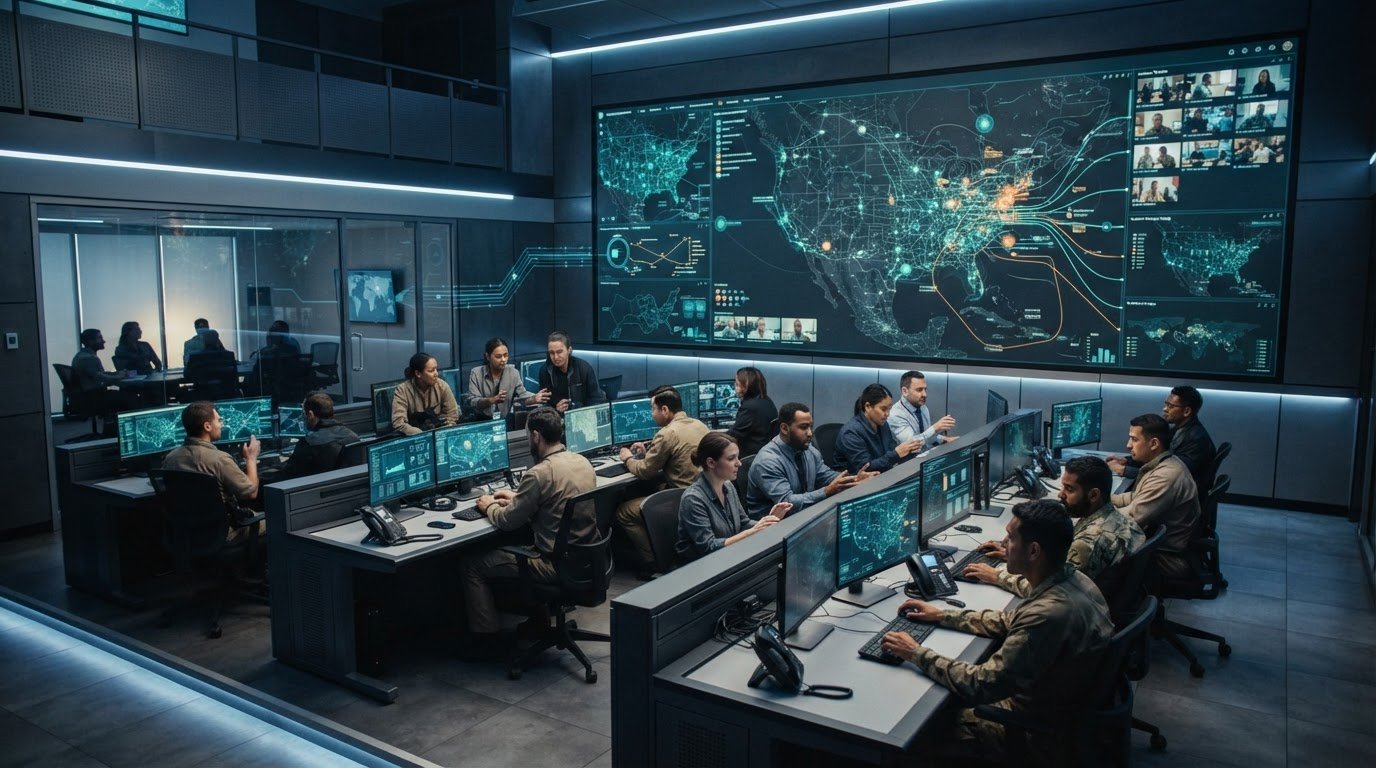
What if agencies could coordinate around current, relevant information without replacing every system already in use? That’s the central challenge behind technology for multi-agency collaboration. Dispatch, mapping, camera, and incident data often sit in fragmented applications. Automatic escalation may be missing, and organizational silos can leave control-room operators, field teams, and remote partners working from different pictures of the same event.
Teams need a shared operational view, but connecting existing systems and governing sensitive information takes deliberate coordination. Most control rooms already have the screens. What they’re missing is the layer that decides what goes on them, and escalates automatically when something needs attention.
Activu’s vis/ability® is an operational intelligence layer that surfaces through the video wall, bringing relevant information and teams into a coordinated view. This article explains how agencies can connect existing tools, support shared decisions across locations, and extend a common operating picture to control rooms and remote participants. The goal is to give people the timely context they need to act with greater certainty.
Key Takeaways
- Identify where agency silos, delayed escalation, and competing priorities disrupt coordinated decisions.
- Trace how information can move from operational sources to a shared view, discussion, and escalation.
- Compare manual handoffs, point-to-point tools, and technology for multi-agency collaboration against your operational needs.
- Map decisions, data sources, roles, information-sharing boundaries, and escalation paths before selecting a platform.
- See how a unified operational view can connect teams across control rooms, remote locations, and mobile devices.
Why Multi-Agency Collaboration Breaks Down When Information Stays Fragmented
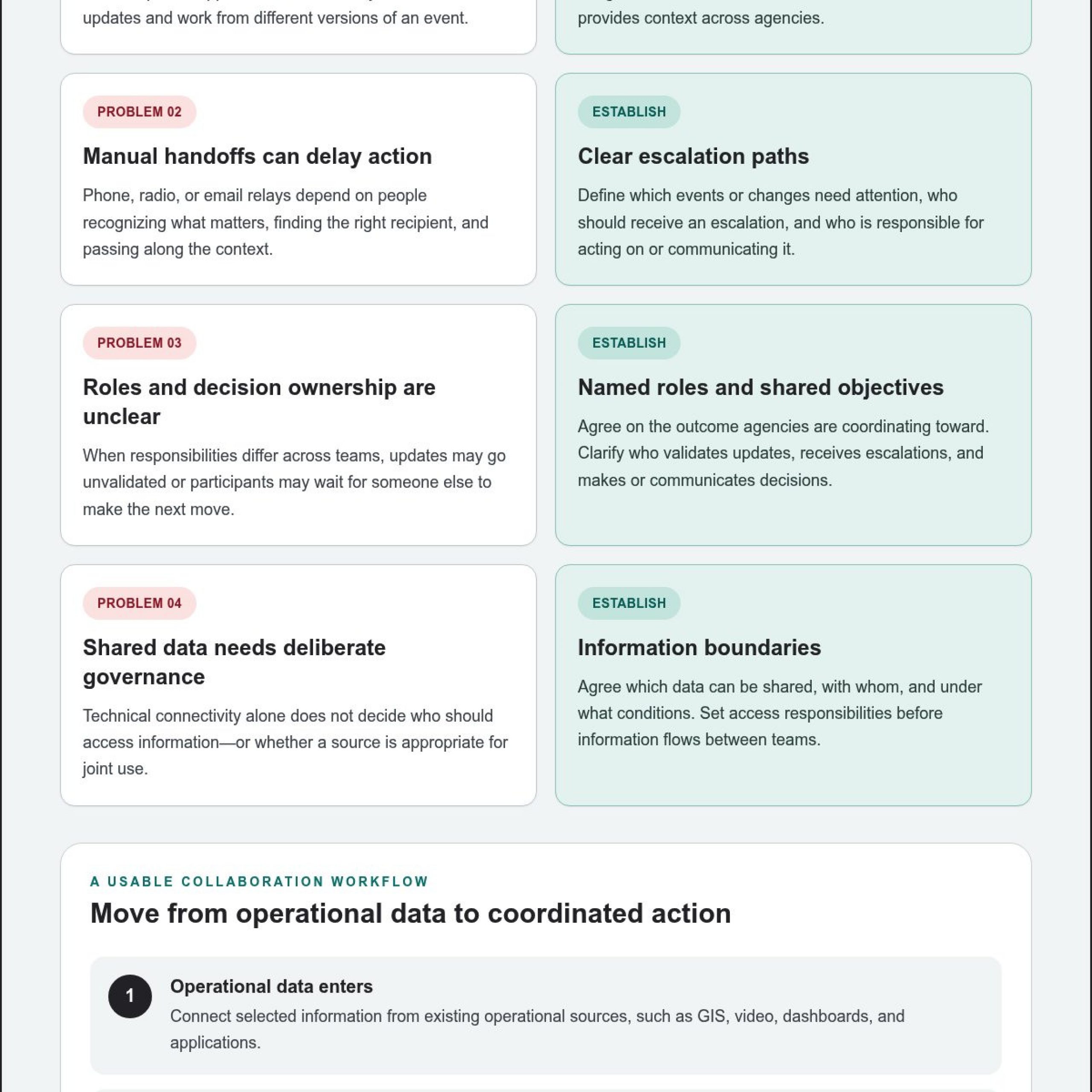
Fragmented systems leave each agency with only part of the operational picture. One team may track calls in a dispatch application, another may monitor field locations, and a third may rely on incident updates passed through radio or email. When information stays in agency silos, updates can arrive at different times. If no process automatically escalates a change that requires attention, decision-makers may not see it when they need it.
The result is a coordination gap. Teams may act on different incident timelines, ask for information another agency already has, or wait for a manual update before making a joint decision. In a fast-changing event, these gaps make it harder to align resources and actions. The challenge is not simply collecting data. It is making the right information available to the people responsible for the next decision.
How information silos undermine a shared response
Consider a developing transportation incident involving public safety and utility teams. Each agency may have useful information, but its systems, terminology, and update practices may differ. A field report relayed by phone can reach one group while another continues working from an earlier status. Manual relays depend on people to recognize what matters, identify the right recipient, and pass the message along. At each handoff, context can be lost or a decision delayed.
Formal collaboration agreements clarify how organizations intend to work together. On their own, they cannot make operational updates visible across separate applications or establish a live sequence from new information to escalation and action. Technology for multi-agency collaboration needs to support that connection while respecting each agency’s responsibilities.
Operational collaboration means sharing relevant information, assigning clear roles, and coordinating action around agreed objectives.
What agencies need before they share operational information
Before connecting systems or circulating data, agencies need a practical agreement about how shared information will be used. Define the joint objectives, who is responsible for monitoring and acting on updates, and which changes require escalation. Then identify the specific information that supports those decisions. A common view should serve operational needs, not simply display every available feed.
- Set shared objectives. Establish the outcomes agencies are coordinating toward during the incident.
- Assign roles. Clarify who validates updates, who receives escalations, and who makes or communicates decisions.
- Define information boundaries. Agree which data can be shared, with whom, and under what conditions.
- Specify escalation paths. Identify the events or changes that need attention and the responsible recipient.
Sensitive information requires deliberate governance. Technical connectivity does not determine who should have access or make every data source appropriate for joint use. Agencies must set sharing rules and access responsibilities before operational information flows between teams. With those foundations in place, technology can help turn approved information into a timely, usable basis for coordination.
How Collaboration Technology Connects Agencies, Data, and Decisions
Collaboration technology provides a connective layer between operational sources, the people who interpret them, and the decisions that follow. It brings selected information from existing applications into a shared operational view, giving participants a common reference for discussion and coordinated action. Agencies can build on tools already in use instead of treating each new platform as another isolated destination.
A useful workflow moves through four stages: operational data enters from connected sources, relevant context appears in a shared view, teams discuss what the information means, and defined events or decisions trigger escalation. For example, a map can locate an incident, a video feed can add visual context, a dashboard can show operational status, and event information can flag a change that warrants attention. Together, these sources help participants assess the situation before deciding what to do next.
Connected operational information gives teams a shared basis for decisions; file sharing only transfers material between people. A report or image sent to another agency may arrive without the live map, status, or event context needed to interpret it. The Office of Justice Programs explores how data can support coordination, performance, and accountability in Using Data in Multi-Agency Collaborations.
Connect existing operational tools without creating another information silo
GIS, video, dashboards, and operational applications each contribute a different part of the picture. An integration layer brings selected sources together so teams can view them in relation to one another. The aim is to make relevant information usable across the response, rather than requiring participants to switch continually between interfaces and manually reconstruct context.
Integration depends on the systems, data, and operational requirements involved. Identify which sources support specific decisions and establish how those sources will be presented and maintained. Integration does not remove the need for governance and clear ownership, and each source may have its own connection requirements.
Make collaboration work across rooms and remote teams
Shared context needs to reach the people involved in a decision, whether they are in a command center, conference room, breakout room, or huddle room. Participants can review relevant content together, discuss the same operational picture, and align on next steps. Mobile access can extend that visibility to team members outside those rooms, so each person does not have to assemble a separate view.
Technology for multi-agency collaboration is most useful when it supports the flow from source to shared understanding and action. Activu’s vis/ability platform serves as a central hub for operational tools and teams. It is an operational intelligence layer that surfaces through the video wall, while content can also be shared across displays, workstations, and mobile devices. Most control rooms already have the screens. What they’re missing is the layer that decides what goes on them, and escalates automatically when something needs attention.
Compare Multi-Agency Collaboration Approaches by Operational Need
The right approach depends on how agencies need to coordinate. Manual handoffs can work for occasional updates between a small number of teams. Point-to-point tools can support a defined task or connection. A shared operational platform is more relevant when teams need information from multiple sources, common context for decisions, and consistent access across locations. Compare each option against the work it must support, not only the features it offers.
| Approach | Strengths | Limitations | Suitable operational conditions |
|---|---|---|---|
| Manual handoffs | Use familiar channels and allow people to provide context directly. | Updates rely on someone recognizing, relaying, and receiving information. Shared context and escalation can vary between handoffs. | Useful for occasional coordination when information flow is limited and participants can maintain clear communication. |
| Point-to-point tools | Support specific functions such as messaging, case management, or agency records. | Each tool may serve its own workflow without bringing live operational sources together for a cross-agency view. | Useful when teams need to coordinate a defined task while retaining separate systems for their individual responsibilities. |
| Shared operational platform | Can connect selected sources and present relevant information in a shared context for discussion and action. | Requires decisions about integration, information governance, user roles, and which events warrant escalation. | Useful when multiple teams need a coordinated view across workspaces and remote locations. |
Where standalone collaboration tools help, and where gaps remain
Task-specific tools have a clear role. Messaging supports direct exchange, case management organizes assigned work, and agency records preserve information within an organization’s process. These capabilities matter, yet they may leave live maps, video, dashboards, and event information distributed across separate applications. A tool can serve its task well while still providing only part of the context needed for a joint operational decision.
Evaluate a shared operational layer against real requirements
Test the approach against practical questions: Can participating teams access the same relevant information? Can an important event be made visible to the appropriate people? Can remote participants follow the same context as colleagues in a control room? Can the approach accommodate additional sources and teams as operational needs change? These questions expose control room situational awareness problems that a feature checklist alone can miss.
A video wall can be one place where a shared answer appears when an operational platform selects and surfaces relevant information there. Activu’s vis/ability platform provides a central hub for operational tools and teams; the video wall is one display surface for its shared view. Assess technology for multi-agency collaboration by how well it connects sources, supports event-driven visibility, and keeps participants aligned across locations.
Build a Multi-Agency Collaboration Workflow Before Selecting Technology
Start with the operational decisions agencies must make together, then work backward to the information, roles, and access needed to support them. This keeps technology for multi-agency collaboration grounded in real workflows across emergency operations, public safety, utilities, and transportation. It also helps teams distinguish essential shared information from data that should remain within an agency’s own processes.
Map joint decisions and information requirements
For a public safety response, teams might need to coordinate around incident location, field conditions, and resource status. Utilities or transportation partners may need different source information, but the method is the same: connect each joint decision to its relevant inputs, owners, and intended users. Activu’s public safety solutions support operational environments where agencies need coordinated awareness.
- List the shared decisions. Identify what agencies must determine together, such as how to coordinate resources or communicate an operational change.
- Map the information sources. For each decision, identify relevant maps, video, dashboards, incident records, or other operational applications. Name the source owner and how the information is updated.
- Identify the users and roles. Specify who contributes information, who monitors it, who interprets changes, and who is responsible for decisions or communications.
- Set sharing boundaries. Define what information supports joint work, which participants need access, and what should remain restricted. Treat access as a governance decision, not an automatic consequence of connecting systems.
- Agree on escalation paths. Describe which changes require attention, who should receive them, and how the next action is communicated. Keep the path clear across participating organizations.
- Plan for review. Revisit the workflow after exercises or operational reviews. Capture where information was unclear, roles overlapped, or handoffs needed refinement.
Set roles, escalation paths, and collaboration spaces
A workflow must work for the people using it. Plan how control-room teams, remote locations, conference rooms, and mobile participants will access information relevant to their roles. Decide what each group needs to see, how they will contribute updates, and how a decision reaches the people responsible for action. Shared visibility should support a common process while preserving defined access boundaries.
Review exercises can help agencies test the sequence without assuming technology alone will resolve coordination challenges. Walk through a scenario: trace an update from its source to the person responsible for interpreting it, then follow the escalation to the decision-maker. Record unclear ownership, missing context, or unnecessary handoffs, then refine the workflow.
Once decision paths, source requirements, and sharing rules are clear, Activu can help connect that workflow to an operational platform. Use your next exercise or review to identify the coordination gaps your teams need to address.
How Activu Makes Multi-Agency Information Visible and Collaborative
Fragmented applications, agency silos, and missing automatic escalation can leave teams with different views of the same operation.
Activu’s vis/ability® platform connects operational information and teams in a shared view. The video wall is one place that view can appear, alongside workstations and mobile devices. The focus is helping people see the information they need to coordinate decisions across locations.
Make vis/ability® the hub for shared operational information
vis/ability® supports real-time maps, video feeds, dashboards, event management, and remote collaboration. Teams can place content using drag-and-drop, share information across displays and workstations, and extend visibility to mobile devices. Mobile video streaming and Zoom meetings support remote participation, giving people ways to contribute relevant content and discuss the same operational context. The platform also supports Active Shooter Recognition through Omnilert integration and a ServiceNow incident dashboard.
For example, agencies coordinating around an unfolding incident can bring a map, video, and operational dashboard into a shared view. Event information can help draw attention to a change that needs review, while participants use the shared context to discuss what it means and coordinate next steps. The platform supports the flow of information into the operational conversation; people remain responsible for interpreting it and deciding how to act.
Explore the vis/ability platform to see how it brings operational sources and participants into a common view.
Extend coordination with software-first integration and support
vis/ability® runs on common off-the-shelf hardware without proprietary AV cabling. This software-first approach puts the operational workflow and the information teams need at the center, without making specialized cabling the starting point. Activu also provides Activcare remote monitoring and support, along with vis/ability® Academy, an on-demand training platform for command-center operators.
Activu was founded in 1983. More than 1,300 control rooms rely on Activu technology, and Activu has implemented over 1,000 control rooms and video walls worldwide. These operational environments need connected information to support decisions across command centers, remote locations, meeting spaces, and mobile devices.
For agencies assessing technology for multi-agency collaboration, the practical question is whether information can reach the right people with enough context to support coordinated action. Activu’s collaboration solutions bring operational sources and participants into a common view.
Turn Your Next Coordination Challenge Into a Clearer Operating Picture
Use an upcoming exercise or operational review to test one shared decision from start to finish. Trace the information it depends on, the people who need to see it, and the point where an update should prompt action. That practical test can reveal where technology for multi-agency collaboration needs to connect teams more effectively, while keeping information sharing aligned with agreed access boundaries.
Activu is ISO 27001 certified. As agencies assess how operational information should be connected and shared, use what you learn from the review to set priorities for your collaboration workflow.
Explore Activu’s collaboration solutions and take the next step toward a more coordinated operational picture.
Frequently Asked Questions
How can multiple agencies share information during an incident?
Agencies can share incident information through a coordinated process that connects updates to the decisions they support. For example, a dispatch update about a road closure may need to reach transportation staff and responders responsible for routing or field coordination. Identify who maintains that update, who needs to act on it, and how changes should be communicated. Technology for multi-agency collaboration can help present relevant information together while each agency retains responsibility for its own operations.
What technology helps agencies create a common operating picture?
A collaboration platform can combine selected operational information in a common view for participating teams. The right sources depend on the incident: an emergency operations center might need a map, incident status, and video, while a utility response may also rely on operational dashboards. Establish which information is current and useful for decisions, and how participants will discuss changes. A shared picture should support coordination, not just replicate the separate screens teams already use.
Can agencies collaborate without replacing their existing systems?
Yes. Agencies can retain their operational applications and connect selected information for joint work. A practical starting point is a single shared decision, such as coordinating a road closure, then identifying which existing sources inform it and which teams need the resulting context. This approach lets agencies evaluate how information works together without assuming every record or workflow must move into one new database.
How do agencies manage sensitive information in a shared collaboration platform?
Agencies manage sensitive information by setting sharing and access rules before making information available across teams. Define which data supports joint operations, who is responsible for it, and which participants need access for their roles. For example, a joint view may use selected incident details while other agency records stay within their existing workflows. Each organization should apply its own relevant policies and agreements; platform connectivity alone does not authorize sharing or disclosure.
What is the difference between a video wall and multi-agency collaboration software?
A video wall presents information in a room, while collaboration software organizes operational content and makes it available across different work surfaces. For example, an incident briefing may need a large shared display for the room, with staff reviewing related information at workstations or on mobile devices. In Activu’s model, vis/ability® is the operational intelligence layer that surfaces through the video wall and supports shared context beyond that display.
How can remote teams participate in a shared operational picture?
Remote participants can join by accessing relevant operational content and taking part in the discussion around it. Activu’s vis/ability® supports remote collaboration, mobile video streaming, and Zoom meetings. For instance, a participant away from the control room can contribute video from a mobile device or join a meeting where teams review operational information. Set expectations for who shares updates and how decisions reach the people responsible for action.
What should agencies assess before choosing collaboration technology?
Assess how a proposed platform fits the agency’s actual work. Use a representative scenario to check whether teams can access the sources they need, participate from their usual workspaces, and understand how an update reaches the next responsible person. Include user training and a review process in the evaluation. This helps distinguish an operational capability from a feature that looks compelling in a demonstration but does not support the intended workflow.
Explore Activu’s collaboration solutions to discuss how vis/ability® can support a coordinated operational picture for your teams.