
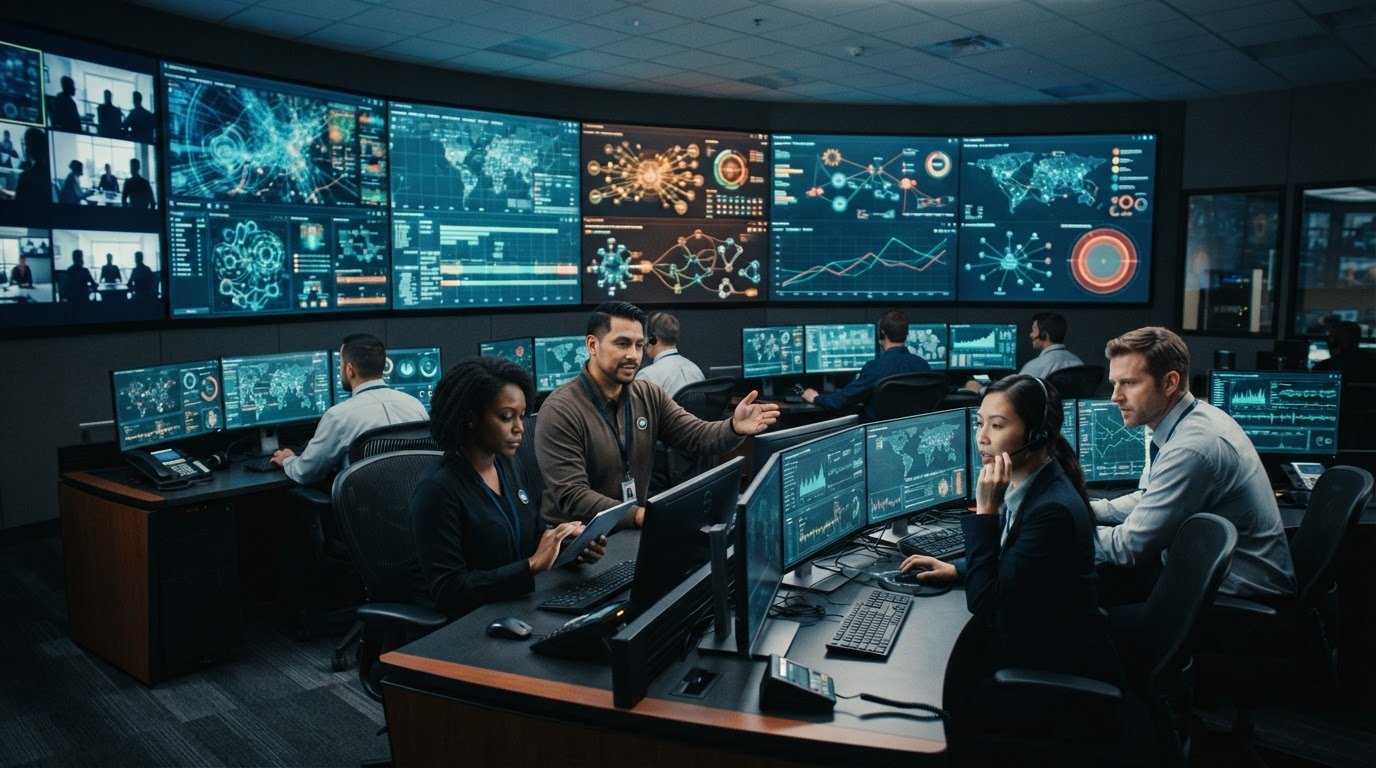
How can a control-room team make a sound decision when events move faster than operators can piece together separate feeds? Control room decision support systems address a common operational challenge: fragmented systems, competing alerts, and silos between control-room and remote teams can leave people without a shared operational picture. Operators must sort through information while deciding what needs attention now.
Effective decision support brings relevant context, escalation, and collaboration together. The practical questions are whether teams can connect the right data sources, see why an event matters, and coordinate around the same information. This article explains how to build that workflow while keeping human judgment at the center.
Most control rooms already have the screens. What they’re missing is the layer that decides what goes on them, and escalates automatically when something needs attention. vis/ability® is an operational intelligence layer that surfaces through the video wall, connecting tools and information so the answer appears where teams can act on it. Teams can work from that shared context in the control room or remotely.
Key Takeaways
- Control room decision support systems organize operational information so teams can interpret events and make informed decisions.
- Evaluate whether a system connects data sources, adds shared context, makes escalation visible, and supports collaboration across locations.
- A five-step workflow helps teams detect an event, assemble context, prioritize, escalate, and coordinate human action.
- Keep operator judgment central. Decision-support tools should help teams act with clarity, not automate every operational decision.
- vis/ability brings operational tools and information into a central hub for teams across control rooms and remote locations.
Why control-room decision-making breaks down under pressure
Fragmented feeds, competing alerts, and information silos create friction when operators need to establish what is happening. A SCADA notification may show a system status change, while a map, camera feed, or dashboard holds another piece of the event. If those sources remain separate, operators must connect them while conditions continue to develop. The delay comes from the information environment, not a lack of attention or skill.
An alert confirms that a system detected something. It may not explain the event’s operational significance, what other sources indicate, or which teams need the information. Control room decision support systems help close that gap by organizing relevant context around an event. A decision support system provides structured information to help people assess a situation and choose a response. As the overview of a Decision Support System (DSS) describes, these systems support decisions; people remain responsible for interpreting conditions and acting.
How fragmented feeds increase decision friction
SCADA, GIS, video, and operational dashboards can each show a different part of the same developing situation. For example, a status change may appear in SCADA, its location on a GIS map, and visual conditions in a camera feed. When operators move between separate tools, they must retain details, align timestamps or locations, and determine whether the information is related. That manual work makes a shared interpretation harder to establish.
The challenge grows when colleagues work from different locations and see different source material. A team may discuss an event without having the same context in view. In manufacturing process control, connected information can help teams interpret conditions across operations. Manufacturing process control depends on making relevant operational context accessible to the people assessing it.
Why alerts can obscure the signal
Alert volume and actionable context are separate problems. A stream of notifications may draw attention without clarifying priority, relationships, or the next decision. If each application reports independently, operators can face several signals without a clear view of which ones are connected or require escalation. More notifications alone do not resolve uncertainty.
When alerts lack shared context, operators must decide which information to open, compare, and relay while monitoring ongoing activity. An event can be harder to recognize when its clues are distributed across systems, even when each feed is functioning as intended. Decision support can organize relevant information and help teams coordinate around it, while leaving operational judgment with the accountable human decision-maker.
How decision support systems turn operational data into usable context
A control-room decision support system organizes operational information so people can interpret conditions, compare relevant signals, and decide what to do. Its value comes from a sequence of functions: collecting data, associating it with an event, making priority easier to see, surfacing escalation, and supporting human judgment. Considering these functions separately helps teams find where information flow breaks down.
A unified operational view connects information around an event. With disconnected feeds, people have to build that picture themselves. Technology can organize and present evidence, while the accountable operator assesses its meaning and determines the response. AI may assist with analysis or pattern recognition, but it does not assume operational accountability or replace a person’s judgment.
What an operational intelligence layer contributes
Connected applications and data sources can be presented together in a shared context. Event management helps surface information associated with an operational event, so teams can examine relevant sources in relation to one another instead of treating every update as an isolated notification. Prioritization and escalation help direct attention to information requiring review or coordination.
vis/ability brings connected tools and information into a central operational view. Teams can review event-related content together and use the video wall as a shared display when it is useful. The wall is where the operational picture appears; the operational intelligence layer brings the relevant information together.
Where the information appears and who can collaborate
Operators may need relevant information at a workstation, while colleagues elsewhere need to review the same event from a mobile device or another operational space. A shared view helps keep participants oriented to common information. Remote collaboration can include shared live content and annotations, giving teams a way to discuss what they see while maintaining context.
The vis/ability platform connects applications and information through a central operational layer. Teams can use that shared context across control rooms, remote locations, conference rooms, breakout rooms, huddle rooms, and mobile devices. This supports coordination without assuming every participant has the same role or makes the same decision.
In practice, operators can examine an event through a clear sequence:
- Collect: Bring relevant operational sources into the information environment.
- Contextualize: Associate related information with the event under review.
- Prioritize: Make significant information easier to distinguish from routine updates.
- Escalate: Surface matters that require attention or coordination.
- Judge: Let the responsible operator interpret the situation and decide how to act.
This structure helps teams move from raw inputs toward informed action while keeping human accountability explicit. The platform supports the decision process; operators apply their operational knowledge to the conditions in front of them.
How to evaluate decision support systems for high-pressure operations
Evaluate a system against the decisions operators need to make, not the number of feeds it can display. Ask whether teams can connect relevant sources, understand why an event matters, see when it needs escalation, and coordinate around the same information. These criteria help distinguish a connected operational layer from tools that simply collect data or issue alerts.
Use this comparison as a starting point. The key distinction is how much work remains for operators to assemble context and share it.
- Fragmented tools: Sources remain separate. Operators move between applications and build the relationship between map, video, dashboard, and event information themselves.
- Isolated alerting: Notifications draw attention, but may not show related information, explain why an alert matters, or clarify the escalation path.
- Connected operational layer: Relevant sources come together in a shared context, with event information and escalation visible to the people who need to assess and coordinate.
Questions that reveal whether teams share the same picture
Test the system with a representative operational scenario. Can operators review relevant maps, video feeds, dashboards, and event details together? Can the same live content reach people in the control room and remote participants? When an event is escalated, can those involved identify which information prompted it? These questions show whether teams share useful context or simply receive separate updates.
Consider how information is presented to different roles, too. A shared view should help people understand the event without assuming every participant needs the same detail or has the same authority to act.
How to assess integration and future adaptability
Review how the platform connects with existing applications and data sources. An approach that depends on hard-wiring each new source can make change more difficult. Consider whether the system can accommodate an evolving technology stack and make information available across workstations, mobile devices, and shared displays.
Common off-the-shelf hardware can support a software-based approach. Evaluating decision support does not require assuming that new AV hardware is necessary. Focus on how information is integrated, managed, and made available to operators as needs change.
Keep the evaluation grounded in operational workflow. Incident-management software can support tracking and coordinating incidents, while a decision-support layer organizes relevant operational information for interpretation. These functions are related but distinct. The vis/ability platform serves as a central hub for connected tools and information, helping teams assess how a shared operational layer fits their environment.
AI analysis or decision trees may support prioritization and help structure repeatable choices. Treat them as options, not prerequisites. Assess whether their outputs are understandable to operators and whether people retain responsibility for interpreting conditions and deciding how to act.
A practical workflow for improving decisions under pressure
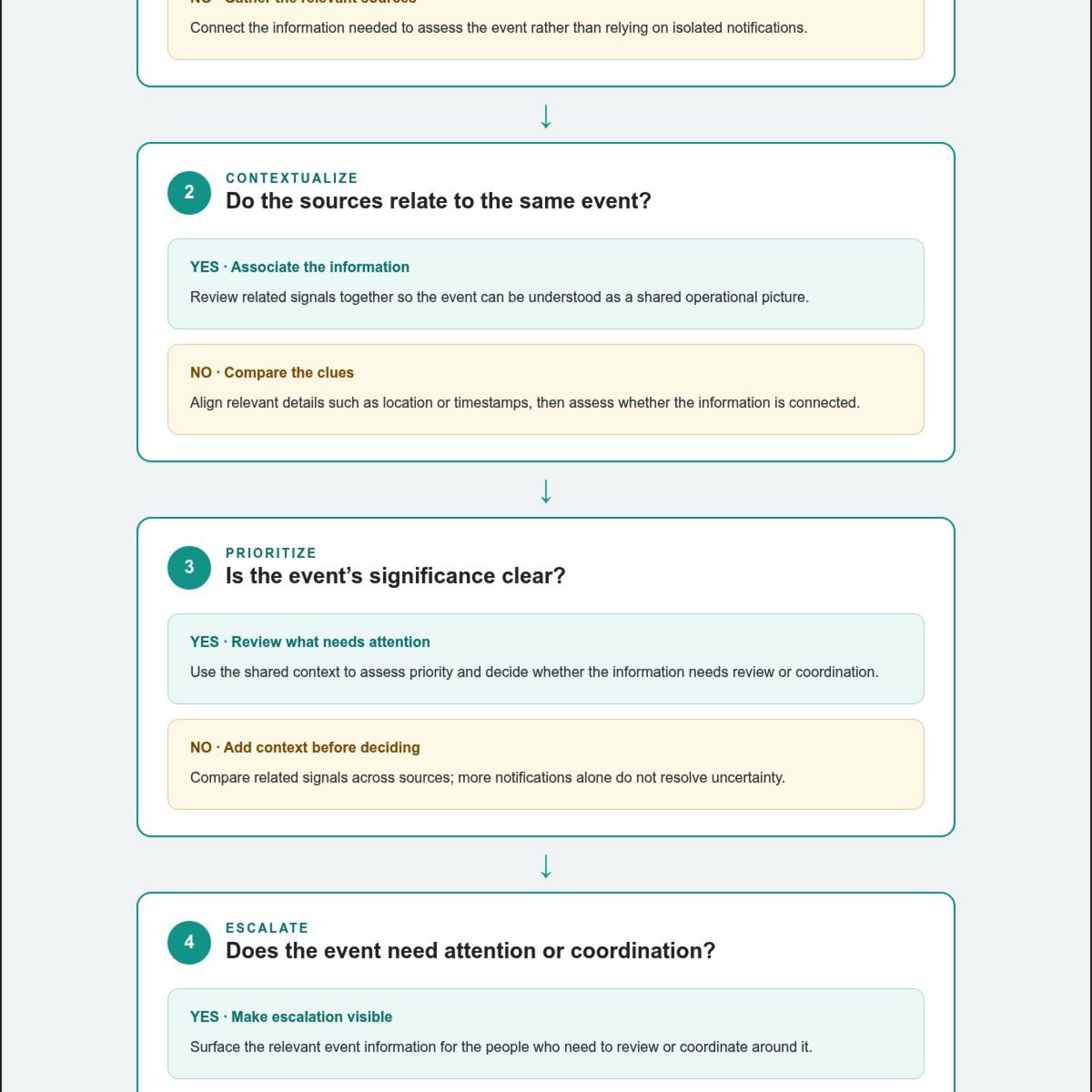
A repeatable workflow gives operators a clear path from an initial signal to coordinated action. Control room decision support systems can help organize each stage, while responsible people assess the information and make operational decisions. The sequence below supports human judgment; it is not a mandate to automate every choice.
Build an event view before deciding what to do
Start by bringing relevant information into the same event context. Event management can surface associated content for operator review, helping teams assess the situation before deciding what requires attention or escalation.
- Detect: Identify a signal or event that warrants review. Confirm what was observed and where the information originated.
- Assemble context: Bring together relevant maps, video, dashboards, and incident information. Check how each source relates to the event rather than treating every update as separate.
- Prioritize: Assess which details matter to the current operational picture. Keep essential information visible and distinguish it from updates that do not affect the decision at hand.
- Escalate: Make the event and the reason for escalation visible to the people who need to assess it. Provide enough context for them to understand what prompted the notification.
- Coordinate action: Share the current view, discuss options, and confirm who is responsible for the next decision or action.
Consider a sector-neutral example: an operational event appears in a dashboard, a map provides location context, and video offers another view of conditions. An operator can assemble those related feeds into one event view, review them together, and share the relevant context with colleagues. The available information informs the decision; it does not determine the response on its own.
Escalate clearly and coordinate across locations
Make essential information available to the participants involved, whether they are in a command center, conference room, breakout room, huddle room, or working on a mobile device. Shared live content supports remote discussion, while annotations help participants point to details and keep the conversation tied to the event. Clear context also helps people understand what is being escalated and why.
A useful summary is: Detect the event, assemble its context, prioritize what matters, escalate clearly, and coordinate the human response. The workflow structures attention and communication. Operators still apply their training and situational judgment, including when information is incomplete or conditions change. In high-demand sectors such as social care where round-the-clock escalation and out-of-hours management are essential, dedicated operational support from contesto.co.uk applies similar principles to ensure critical situations are handled with structured, reliable coordination.
The same principle supports video-wall situational awareness: the wall can present the event view, while workstations and mobile devices extend the operational picture across locations. To discuss how a connected workflow could fit your control-room operations, contact Activu about decision support.
How Activu connects decision support across the control room
Control room decision support systems need to connect operational tools and information so teams can assess events from a shared view. vis/ability® serves as the central hub, bringing data sources and applications together so operators can review relevant context and coordinate across locations.
With vis/ability, the video wall can present the answer alongside operator workstations and mobile devices. Teams can bring real-time maps, video feeds, dashboards, and event information into view, with event management surfacing content associated with an operational event. Operators use that context to assess conditions and decide what action is appropriate.
Connect operational tools without making the wall the whole solution
vis/ability connects to virtually any data source without hard-wiring, helping organizations bring existing operational information into a common environment. The platform includes a ServiceNow incident dashboard and Active Shooter Recognition via Omnilert. It supports real-time maps, video feeds, dashboards, event management, mobile video streaming, Zoom meetings, drag-and-drop content placement, and remote collaboration. Connected content can be presented on displays, workstations, and mobile devices, supporting teams in command centers and remote settings.
The platform also provides software video-controller functionality. It runs on common off-the-shelf (COTS) hardware without proprietary AV cabling. Teams can bring connected information together without relying on specialized cabling. The video wall remains a useful shared display, while the platform supports how information reaches the people who need to interpret it.
This arrangement helps teams maintain a connected operational picture across control rooms, conference rooms, breakout rooms, huddle rooms, and mobile devices. Shared live content and remote collaboration support discussion across locations, while operators retain responsibility for assessing information and making decisions.
Support the people who operate the system
Technology also needs to fit the people who use and maintain it. Activcare provides remote monitoring and support for control-room technology stacks. vis/ability Academy offers on-demand training for command-center operators, helping teams build familiarity with the system as part of operational readiness.
Activu is ISO 27001 certified, and Vis/ability certified in the ServiceNow Store. These credentials provide relevant context as organizations assess platform integration and security alongside day-to-day operational needs.
Explore the vis/ability platform to see how connected operational sources, event context, and collaboration can support the way your team works.
Build a clearer path from signal to decision
Start by identifying where your team loses context: while gathering information, escalating an event, or coordinating across locations. That operational review clarifies what your control room decision support systems need to connect and how a shared picture can support operator judgment.
More than 1,300 control rooms rely on Activu technology, and Activu has implemented over 1,000 control rooms and video walls worldwide. The practical aim is to put relevant information in view and give the people responsible for decisions a stronger basis for assessing what comes next.
Explore how an operational intelligence layer can fit your control-room workflows and support connected decisions across locations. Explore how vis/ability supports connected control-room decisions, and take the next step toward a clearer operational picture.
Frequently Asked Questions
Can a decision support system make operational decisions for control-room operators?
No. Control room decision support systems can organize information and support escalation, but operators remain responsible for interpreting conditions and choosing an action. Procedures should define which decisions an operator can make, when to consult a supervisor, and how to document or communicate a decision. For example, software may bring related status information together; the designated operator determines whether it changes the response plan.
How can control rooms reduce alert fatigue without missing important events?
Reduce noise by examining whether alerts provide useful context, not simply by counting notifications. Review how an alert relates to a map location, video, dashboard status, or existing event record. Then establish escalation practices that fit the operation, including who reviews ambiguous signals and how competing notifications are handled. Avoid universal thresholds: operators and organizational procedures must determine what warrants attention in their specific environment.
What happens when one of a control room’s data feeds is unavailable?
Operators should identify which source is unavailable and recognize what information is therefore missing. If a camera feed drops, for instance, a map or system dashboard may still offer context, but it cannot be treated as a substitute for the missing view. Teams should follow their established procedures, communicate the limitation to relevant colleagues, and avoid presenting an incomplete operational picture as fully verified.
Does AI improve decision-making in every control room?
No. AI may help analyze, correlate, prioritize, or recommend, but its value depends on the task and on whether the available information is relevant and reliable. A team considering AI should identify what the system is expected to contribute and how operators will interpret its output. Keep human oversight in place, especially when conditions are unclear. AI is an optional support method, not a universal requirement or replacement for operational accountability.
How can remote teams contribute to a control-room decision?
Remote participants can contribute when they can access relevant information and coordinate with the control-room team. Sharing live content gives participants a common reference for discussion, while annotations can point to details under review. For example, a mobile user and an operator at a workstation can discuss the same displayed information. Teams should make roles and communication procedures clear so contributions inform the decision without creating conflicting instructions.
How is a decision support system different from a video-wall controller?
A traditional video-wall controller primarily manages the visual layout and distribution of content. A decision-support platform also organizes operational information and helps determine what appears, where it appears, and who can access it. vis/ability provides software video-controller functionality and runs on common off-the-shelf hardware, without requiring proprietary AV cabling. The distinction is operational: teams need a way to organize relevant content, not only manage its display.