
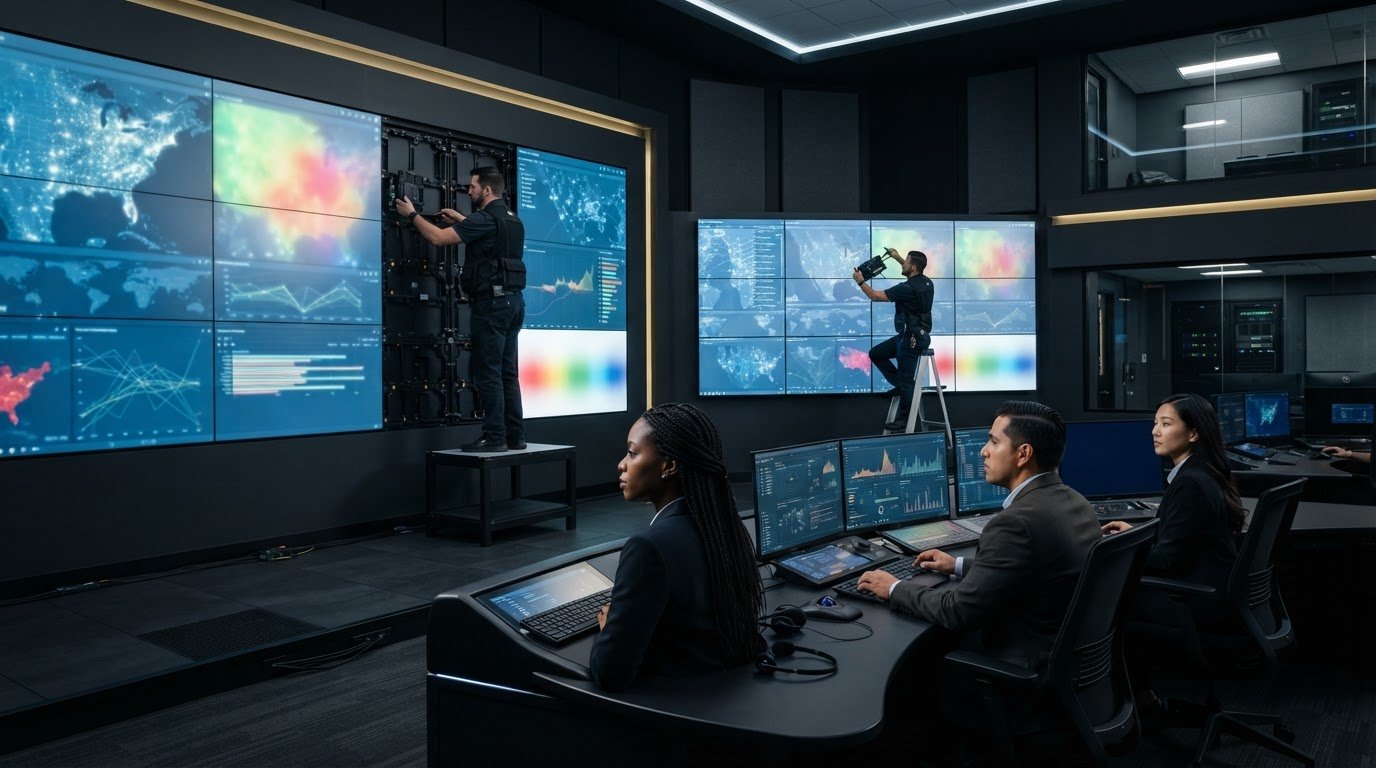
For direct view LED vs LCD for control rooms, the choice depends on viewing conditions, maintenance access and how operators use the display. Direct-view LED builds a continuous image from closely spaced modules, while LCD panels create visible seams and use backlights. LED modules can be replaced individually, and the display can be mounted with very little clearance behind it.
In a control room, the display is only one part of the decision. Fragmented systems, siloed data, and missed escalations can leave operators without the context they need, whatever the screen type. The right setup makes essential information clear from working positions and supports confident decisions as events unfold.
This comparison explains how direct-view LED and LCD differ in installation depth, serviceability, viewing distance, and contrast, and where each can fit in a control room. It also covers how pixel pitch, ambient light, and the need for a unified operational picture shape the decision.
Key Takeaways
- Compare display options against the room’s ambient light, installation constraints and operator viewing positions, not image quality alone.
- Match LED pixel pitch to viewing distance so text and data remain legible where operators work.
- Plan service access as part of installation: LED modules and LCD panels have different replacement requirements.
- Consider where true blacks and seamless borders can improve contrast and the reading of complex visual information.
- Pair the display decision with a plan to unify data feeds and surface important events, since a screen alone won’t resolve fragmented operations.
What is the main difference in installation depth?
Upfront cost per square foot has no single figure for either display type. Price depends on the wall’s size, pixel pitch, structure, processing, and installation, and is given after a quote request. For depth, some LCD displays exceed 110 mm, while a high-end all-in-one LED display can measure 25 mm to 35 mm thick.
These differences affect room planning. An LCD wall’s chassis and mounting structure need space behind the panels, while a direct-view LED wall can sit on a structural frame with little rear clearance. In a shallow room, that may preserve space for access routes or equipment. Before installation, plan the wall position, structural support, cabling, and service access together.
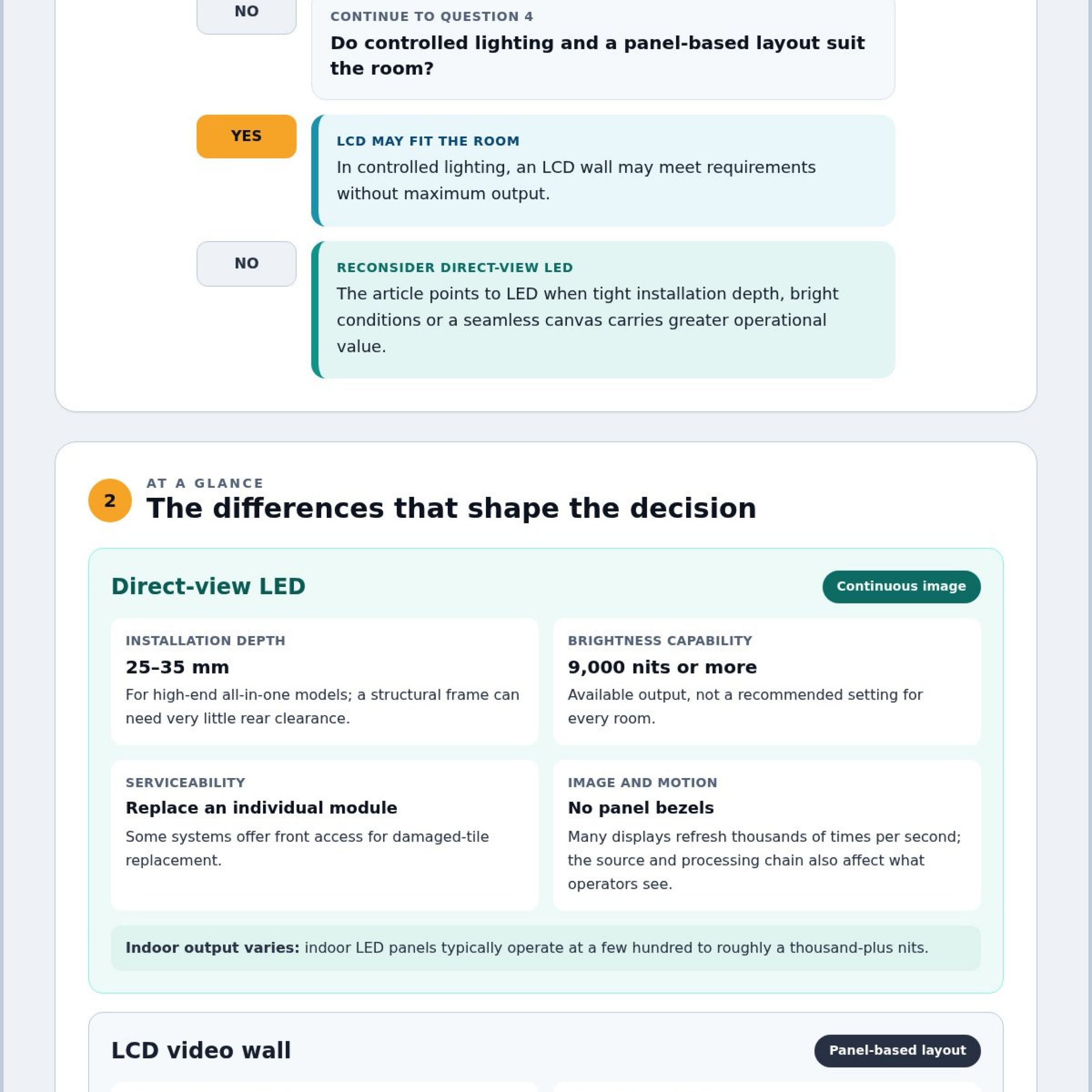
Brightness also shapes placement. LCD screens can wash out in high ambient light, while direct-view LED displays can retain a readable picture. Indoor LED panels typically operate at a few hundred to roughly a thousand-plus nits. The brightest LCD screens can output around 2,500 nits, while direct-view LED displays can produce 9,000 nits or more. These figures describe available output, not a recommended setting for every room.
Specify the display for the room’s lighting and viewing conditions. In an indoor control room, maps, alerts, and camera feeds need to remain legible without overwhelming operators. Direct-view LED’s higher brightness capability may help in a bright space; in controlled lighting, an LCD wall may meet requirements without maximum output.
| Display option | Installation depth | Bright-room performance | Seams | Refresh rate |
|---|---|---|---|---|
| LCD video wall | Some displays exceed 110 mm | Can wash out in high ambient light | Panel bezels remain visible | Varies by display |
| Direct-view LED | All-in-one models can measure 25 mm to 35 mm | High brightness can support readability | No panel bezels | Many displays refresh thousands of times per second |
LCD bezels can be as narrow as 1-2 mm, yet their seams still divide the picture. Direct-view LED forms an image without those panel borders. For dashboards spanning several panels, fewer visible divisions can make continuous maps and trend lines easier to read. Refresh rates reaching thousands of times per second also support smooth motion, although the content source and processing chain affect what operators see.
For control rooms serving security operations centers or fusion centers, sightlines and wall position matter alongside display depth; review SOC, NOC, and fusion center control rooms in that planning context. Choose LCD when controlled lighting and panel-based layouts suit the room. Choose direct-view LED when tight installation depth, bright conditions, or a seamless canvas carries greater operational value.
Neither display type has a standard upfront cost per square foot. Cost depends on wall size, pixel pitch, structure, processing, and installation.
Installation, serviceability, and processing
Calibration aligns color and brightness across the wall, while redundancy and failover depend on the complete signal path. Neither LED tiles nor LCD panels alone determine how quickly a backup source takes over.
Installation Depth and Wall Clearance
Structure, cabling, and access requirements shape the installed footprint. Some LCD displays exceed 110 mm in thickness, while high-end all-in-one LED displays can measure 25 mm to 35 mm. A structural frame can support direct-view LED with very little clearance behind the wall. That can help when the room layout leaves limited space for equipment or service access.
Plan the frame and cable routes before mounting either display type. LCD panels need a mounting arrangement that supports each screen and keeps the tiled surface aligned. Direct-view LED needs a supporting structure and precise tile alignment. Include rear or front service access in the plan, since the access method affects how technicians reach a failed component.
Installation Space and Shadowing
Both LCD and direct-view LED are direct-view displays, so neither depends on a projector beam crossing the room. Operators moving between a workstation and the wall won’t interrupt the picture by blocking a projection path. Plan instead for the display structure, cabling, service access, and sightlines around desks and consoles.
Direct-view LED tiles need accurate alignment across their supporting frame. LCD panels also need careful alignment, since small placement errors can make seams more noticeable. Map equipment locations and cable paths before installation to keep service routes from competing with operator movement or room equipment.
During installation, processing affects how images appear across the video wall. Confirm that the signal chain can place each source in the intended screen area, preserve its aspect ratio, and deliver a consistent picture. For example, a map spanning several panels should remain readable across the joins. Calibration then helps balance color and brightness across visible sections.
Service requirements differ when a component fails. With direct-view LED, technicians can replace an individual module if a pixel fails. Some systems offer front access, which can simplify damaged-tile replacement. An LCD backlight failure typically calls for replacing the entire panel. LCD backlights can also degrade unevenly, creating dim patches that affect the wall’s visual consistency.
Installation logistics also affect deployment. An LCD video wall installation requires at least three people and often takes more than four hours. Shipping and installation costs are significantly higher for LCD video walls than for the comparison described in the research. Direct-view LED also needs precise tile placement and support, so plan handling, alignment, and cabling as separate tasks.
For a control room, document the signal sources, processors, display connections, calibration steps, and failover sequence before commissioning. Those details make troubleshooting more systematic when a source, processor, or display component fails. Teams assessing integrated display environments can review control-room design considerations alongside these installation requirements.
Pixel pitch and viewing distance
Room layout determines viewing distance; pixel pitch determines how clearly a direct-view LED image resolves at that distance. Plan screen placement around operator positions, text size, and the resolution of incoming sources.
Resolution and Pixel Pitch
Pixel pitch measures the distance between neighboring LED pixels in millimeters. A tighter pitch fits more pixels into the display area and supports higher image resolution. Direct-view LED panels have a fixed, unalterable resolution, so choose the pitch to suit the content and viewing distance.
LCD displays commonly use 1080p, with 4K UHD also available. Direct-view LED displays can also support 4K UHD, depending on the configuration. Resolution alone doesn’t determine image quality: the source, display dimensions, and pixel pitch all affect how clearly operators can read maps, labels, and camera detail.
For example, a video wall showing fine map labels may need a tighter pixel pitch than one displaying large status panels. Set the required source resolution first, then compare it with the physical wall size and operator distance. A high-resolution feed alone does not guarantee legible detail.
Viewing-Distance Requirements
A common planning rule for direct-view LED matches pixel pitch in millimeters to minimum comfortable viewing distance in meters. Under this rule, a 2.6 mm pixel-pitch panel looks good from around 2.6 meters away. Treat that as a practical starting point, then assess the smallest text operators must read.
Angular size offers another way to assess legibility. A 1 mm pixel viewed from 3.4 meters corresponds to one minute of arc. Lower-case characters need to subtend at least 10 minutes of arc for legibility, according to the cited display guidance. ANSI standards call for a minimum of 16 minutes of arc, while the brochure recommends 20 to 22 minutes.
The brochure’s example connects a 22 mm character viewed from 3.4 meters with its 20-to-22-minute-of-arc recommendation. Use the actual character height and farthest routine viewing position when reviewing control-room layouts. Test small labels, not only large map features.
LCD and direct-view LED video walls require the same room-planning questions: where operators sit, what they read, and how far they are from the display. Resolution options differ by model, while direct-view LED pitch determines its fixed pixel layout. Check the full signal path too, since scaling a source to fit the wall can affect fine details.
Before finalizing placement, mark operator eye positions and review representative feeds at their normal display size. Include the farthest workstation and the smallest operational text. This practical review connects panel resolution to real viewing conditions and helps teams select a configuration that keeps essential information readable.
Black levels and contrast
Black levels affect how clearly operators distinguish dark details from surrounding information. Direct-view LED displays can produce true blacks because their LEDs switch fully off. LCD screens use a liquid-crystal layer with LED backlights, so dark areas depend on limiting light from behind the image.
This difference matters when a control-room view shows a night camera feed, dark map, or shaded alert panel. On direct-view LED, unlit pixels create black areas without emitting light. On LCD, the liquid-crystal layer controls the backlight to form the picture. The resulting black level affects how sharply dark shapes stand out from nearby features.
Contrast also shapes the visual hierarchy of operational information. A map, for example, may show road lines, incident markers, and labels against a dark background. Strong separation helps operators read these layers quickly, while a dark camera scene can lose detail if blacks appear brighter than intended. Assess the actual content rather than relying on a generic demonstration image.
Ambient light changes how operators perceive contrast. Reflections can reduce the distinction between dark and bright areas, even when a display produces deep blacks in a controlled setting. Review the wall from actual console positions under normal room lighting, including the brightest routine lighting state and the darkest operational content.
Use a repeatable comparison before selecting display technology:
- Show the same night camera image on both displays.
- Compare dark objects against nearby background detail.
- Check whether map labels remain distinct on dark surfaces.
- Review warning colors and bright symbols beside black areas.
- Repeat the comparison under the control room’s working lights.
These checks distinguish a display’s black-level capability from the performance of its content and signal path. A compressed camera feed, poorly scaled map, or low-quality source can obscure detail on either display. Use the same source and image settings for both options, then inspect fine features from the farthest operator position.
LED modules also have practical maintenance implications. If a module fails, the resulting dark or bright area can interrupt visual continuity. LCD backlights can degrade unevenly over time, creating dim patches. Include component condition and replacement access in the maintenance plan so technicians can determine whether contrast changes stem from the display or the source.
For a control-room decision, prioritize the content operators must interpret: night imagery, dark maps, or bright alerts. Direct-view LED offers true blacks because its LEDs switch off. LCD performance depends on its backlight and liquid-crystal layer. Compare both with representative feeds, actual ambient light, and real operator sightlines before choosing.
Control-room and command-center applications
Operators in an emergency operations center may track maps, dashboards, camera feeds, and incident reports at once. If these sources remain siloed, a wall display alone cannot provide missing context or escalate an emerging event.
For teams comparing direct view LED vs LCD for control rooms, the better fit depends on viewing distance, required detail, lighting, and source resolution. Direct-view LED supports a seamless canvas; LCD may suit controlled lighting and a lower upfront cost.
Map continuity matters during incident coordination. A direct-view LED wall can be built as a wide 16:9 canvas or connected into other sizes and shapes. That flexibility can help teams arrange regional maps beside incident panels. LCD walls organize content across separate screens, so panel borders remain part of the layout.
Design dashboards around how operators scan information. Place priority alerts and live status where staff can find them quickly, with supporting feeds elsewhere. Before deployment, test actual maps, labels, and dashboard text at the intended display size. A visually impressive demonstration may not show whether operators can read the detail they need during a shift.
Lighting and budget also shape the decision. LCD video walls generally have a lower upfront cost and can be practical in controlled lighting when extreme brightness is unnecessary. Direct-view LED may suit rooms that need a seamless image or flexible display shapes. Compare operational requirements, not just the initial display choice.
Simulation environments add a distinct requirement. Some direct-view LED displays support simulator content at up to 240 frames per second. That capability may suit training or real-time simulation workflows, while routine dashboards may not need it. Confirm that the source, processing, and display can work together for the intended content.
Use this decision sequence: identify the information operators must interpret, map viewing positions, assess room lighting, then compare display layouts. Include source resolution and update needs. If operators must read fine text from close positions, prioritize suitable pixel pitch and resolution over screen size alone.
A direct view LED vs LCD for control rooms comparison should also account for how information reaches operators. When fragmented feeds make coordination difficult, assess application integration alongside the display itself. Explore control-room design for command environments as part of that planning. The strongest choice supports the team’s actual decisions, from monitoring a shared map to interpreting an incoming alert.
Activu Corporation: Video Wall Systems
Activu Corporation helps control-room teams address fragmented systems, siloed data, and missed escalations. Its vis/ability Platform brings operational tools and data feeds together in a central hub.
As an operational intelligence layer displayed on the video wall, vis/ability determines what information appears and supports automatic escalation when attention is needed. Teams can use it across command centers, remote locations, conference rooms, breakout rooms, huddle rooms, and mobile devices to keep a shared operational picture accessible across workspaces.
Contact Activu Corporation to discuss how this approach could support your team’s operational needs.
Set the Display Strategy Around the Decisions Ahead
A decision about direct view LED vs LCD for control rooms should start with the operational plan. Identify which applications must work together, how priority information reaches staff, and where teams need a shared view. This keeps the display strategy connected to the workflows it must support.
Planning can connect display requirements with application integration and event-driven awareness, while clarifying how the video wall supports decisions across the room. Activu Corporation helps teams assess these operational needs through its control-room design services and integrated solutions.
Contact Activu Corporation to discuss your requirements and next steps. Give your team a clear foundation for the decisions ahead.
Frequently Asked Questions
Direct view LED video wall vs LCD video wall: What’s the difference?
Direct-view LED creates images with LEDs, while LCD uses liquid crystals illuminated by a backlight. In a control room, this affects how continuous content appears across a wall and how the display is arranged. Consider the operator’s task: a shared map benefits from an uninterrupted visual field, while separate screen-based work areas may accommodate tiled LCD panels.
Does Direct View LED last longer than LCD?
Direct-view LED generally offers a longer lifespan and more stable brightness over time than LCD video walls. LEDs used in direct-view displays can have an operational lifespan of up to 100,000 hours. For planning, distinguish the expected life of display components from the lifecycle of the complete installation, which also depends on supporting systems and the operational demands placed on them.
Is Direct View LED better for bright rooms than LCD?
Direct-view LED is generally better suited to bright rooms because it can produce higher brightness and retain a readable picture in high ambient light. LCD images can wash out under those conditions. Assess the room under normal operating lighting, including light falling directly on the display. Compare the feeds operators rely on, not a showroom image viewed in different conditions.
What are the advantages of direct view LED technology when positioning displays?
Direct-view LED can mount on a structural frame with very little clearance behind the wall, helping in rooms where rear space is constrained. Its modular format can also create display walls in varied sizes and shapes, including layouts that wrap around 90-degree corners. Consider cable paths, service access, and operator sightlines together before choosing the wall position.
Which venue should choose Direct View LED?
Direct-view LED can suit command centers, emergency operations centers, or dispatch rooms that need a seamless shared display, higher brightness, or a custom wall shape. The decision depends on room lighting, viewing positions, and the information operators must interpret. A controlled-lighting venue with a tighter budget and no need for extreme brightness may find an LCD wall more practical.
What is the difference between direct-view LED and LCD video walls for control rooms?
For control rooms, the practical difference goes beyond how each display forms an image. Direct-view LED supports a seamless canvas and varied wall shapes; LCD often costs less upfront and uses tiled screens. Compare how operators will use the display, how the room handles light, and how the system will be maintained. Let these operational requirements guide the selection.
How do direct-view LED and LCD compare for pixel pitch and viewing distance?
Direct-view LED uses pixel pitch to define the spacing between image points, so choose the pitch to match operator viewing distance and the detail they need to read. LCD resolution depends on the screen configuration. For either option, test the smallest essential text and symbols from the farthest operator position. This practical check assesses legibility beyond a specification sheet.
What are the brightness, contrast, and ambient-light performance differences between direct-view LED and LCD?
Direct-view LED can deliver higher brightness and true blacks by switching individual LEDs off. LCD relies on a backlight, and bright ambient light can make its picture harder to read. Compare both technologies using the same operational content, such as a dark camera feed beside a bright alert, then review the image from actual operator positions under routine room lighting.