
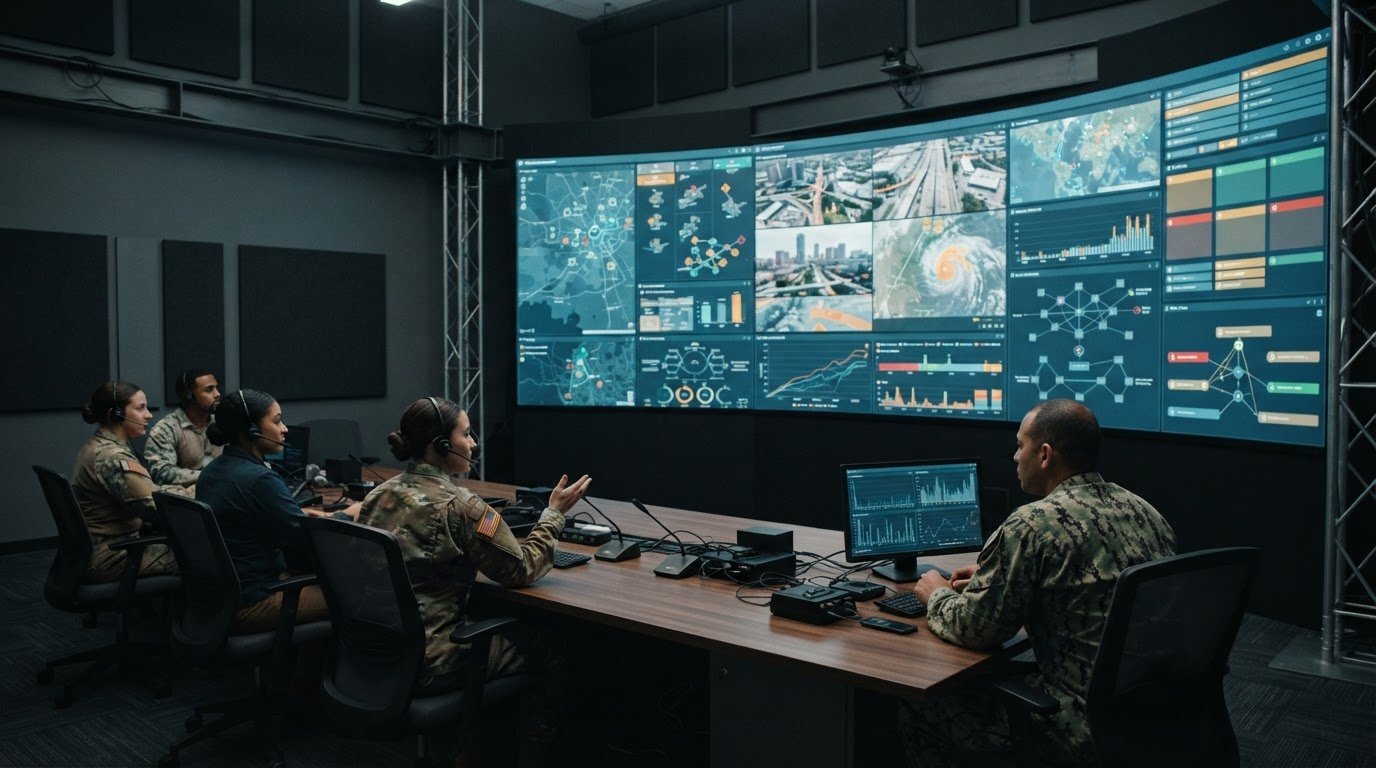
A briefing room is only as useful as the information people can understand and act on. Command briefing room technology brings high-definition video, clear audio, and connected data into a shared operational picture, helping teams assess events and make decisions with greater clarity.
Operators know that clear displays and reliable communications matter. The harder problem is fragmentation: important feeds sit in separate systems, alerts may not reach the right people, and teams can lose time assembling a coherent view. Many control rooms already have displays. They also need a way to bring information together, decide what appears where, and direct attention to events that need a response.
That is how a briefing room can support real operations. Activu’s vis/ability platform brings connected applications and data into a shared operating picture, making relevant information visible across displays and other devices. Clear audio helps teams coordinate around what they see, turning separate inputs into context for human judgment.
This article explains how command and briefing room systems bring applications, video, audio, and visualization together. It also looks at how system design and video wall layouts can support situational awareness, helping teams focus on the information they need when decisions matter.
Key Takeaways
- Bring operational applications and data feeds into a shared view so teams can interpret events with context.
- Design visual layouts around decision priorities, keeping urgent information clear and supporting detail accessible.
- Pair high-definition video with intelligible audio to help teams assess developing situations and coordinate their response.
- Consider how processing, source selection, and window arrangements affect what operators can see at a glance.
- Assess whether a unified platform can connect existing tools and make relevant information available across operational spaces.
Command center applications and system designs
Command briefing room technology connects operational applications, communications, and displays so teams can work from shared information. Design the system around the mission, how the room is used, and the decisions operators need to make.
Mission Readiness and System Redundancy
Mission readiness means essential systems stay usable, understandable, and recoverable during operational demand. Power, backup, and redundancy requirements depend on connected equipment, essential functions, and the time needed to restore service. The Pentagon Press Briefing Room UPS, for example, can carry powered equipment’s rated load for a minimum of 20 minutes.
A practical power plan starts with an equipment inventory. Identify the displays, communications tools, processors, and network components that must remain available, then map backup power to those functions. Avoid treating every device as equally essential. A failure affecting a core information feed can have different operational consequences from one affecting a secondary display.
Before the room enters service, test complete operating scenarios. In one emergency operations center renovation, testing and validation lasted two weeks. Scenario-based checks can verify source selection, audio routing, display layouts, backup behavior, and recovery procedures. Operators should then rehearse routine changes and failure responses using the room’s actual configuration.
Training should also cover handoffs between agencies and shifts. For example, ask an operator to bring a live alert into the briefing view, route audio to the room, and restore the previous layout. Modular system design can simplify later upgrades by separating functions and documenting their connections. This gives technical teams a clearer path to update components without redesigning every workflow.
Command Centers and Emergency Operations Centers
A command briefing room typically supports briefings, coordination, and decisions, while an emergency operations center coordinates response activity across agencies. The systems may share applications and communications, but an EOC’s common operating picture must support broader incident coordination. This distinction helps teams determine which feeds, roles, and room formats their design needs to serve.
St. James Parish integrated video walls and streamlined data displays to improve emergency teams’ visibility during crisis scenarios. The parish also replaced unreliable conferencing tools with a unified AV system, making it easier for teams to join calls and share information. These examples show why system design needs to address both visual context and collaboration.
For a briefing room, prioritize clear presentations, intelligible discussion, and rapid access to decision-relevant information. For an EOC, also consider how agencies bring surveillance footage, sensor data, alerts, and analytics into a shared operational view. A command center may serve both functions, so design workshops should map users, information sources, and decision paths before selecting room formats.
Give audio planning the same attention as display planning. Test speech intelligibility from each seating position, especially during video conferences where remote voices compete with room discussion. St. James Parish’s conferencing change offers a practical use case: test call joining, information sharing, and local audibility as one workflow. Document results, train operators, and schedule modular upgrades around operational priorities.
Visualization for briefing and command-and-control spaces
Visualization should make operational information easier to interpret across briefing rooms, command centers, and shared spaces. Effective integration aligns visual layouts, room controls, and monitoring tasks with how teams communicate and make decisions.
Collaboration tools work best when participants can join a conference, share relevant information, and hear one another clearly. Command briefing rooms can combine video conferencing, secure communications platforms, and voice systems. Choose and configure them around agency workflows and the room’s purpose.
Start visual design by identifying who needs each view and what decision it supports. A briefing display might prioritize a map, an active incident feed, and supporting analysis. A monitoring space may need several sources visible together. Keep urgent information prominent and make secondary details accessible without crowding the shared view.
The Pentagon Press Briefing Room system, completed in early 2023, supports HD-SDI and 1080i and 1080p broadcast standards. Those formats illustrate why integration planning must account for source and display compatibility. Teams should test image clarity, source switching, and the intended viewing positions, then confirm that the selected format preserves useful detail.
Lighting affects both presenter visibility and what cameras capture. Plan for screen glare and camera views as well as the people in the room. Test with displays active and presenters in position. Adjust lighting zones so faces remain clear without washing out visual content or creating reflections across displays.
Video, audio, and control signals can travel over twisted-pair cabling when the system design supports the chosen transmission method. Before installation, map signal paths, source locations, and control points. This makes it easier to identify where conversion is needed and test whether remote sources appear and sound as intended.
Touchscreen control can simplify common actions such as selecting a source, adjusting audio, or starting a conference. Align the interface with actual operator tasks: group related controls, use clear labels, and test common scenarios with staff. For network security and access control, define who can reach each system, protect network connections, and assign access according to operational roles.
Teams planning visual workflows across security operations centers, network operations centers, and fusion centers can explore control-room environments and applications relevant to their spaces.
Situational awareness through high-definition video and clear audio
Operators build situational awareness by combining visual evidence with clear communication. Fragmented feeds can leave a traffic camera, field report, and incident alert disconnected. As a situation develops, teams need to compare these inputs and understand how they relate. Clear video and intelligible speech help people establish context before deciding what needs attention.
The White House Situation Room shows how video supports coordination across distance. On May 17, 2007, President George W. Bush and British prime minister Tony Blair held a video conference from its newly renovated rooms. Situation Room televisions support secure video conferences, and its technology can link the President with generals and world leaders. A remote participant becomes part of the briefing when the room can present the conference clearly.
High-definition video helps operators inspect relevant details in a live image, while real-time displays place that image alongside other operational information. Useful resolution depends on the source, display, and level of detail a decision requires. A camera view used to assess activity at a facility may need different visual emphasis from a broad map used to track a changing situation. The layout should preserve context without obscuring essential details.
Audio carries information that images alone cannot provide. Dispatch updates, conference participants, and in-room discussion must remain intelligible as teams compare observations. Account for speaker placement, microphone pickup, and sound from active sources in the room design. Test speech from each operating position, including remote conference audio, and check whether participants can distinguish speakers from background discussion.
A video wall can bring sources together, but displaying more feeds does not guarantee awareness. Operators need a visual hierarchy: show the active event first, keep supporting feeds nearby, and make less urgent material available without competing for attention. A briefing might pair a live camera with a map and incident updates. This gives participants shared context while keeping the decision under discussion visible.
During an unfolding event, teams should be able to move from detection to shared interpretation. A clear alert can direct attention to a related feed, while a timestamp or location helps participants compare reports. Displays should make those relationships apparent, and audio should let staff question, clarify, and relay new information. Together, these functions connect data with human judgment.
Test the complete workflow before relying on it during an operational briefing. Choose a sample incident, bring its relevant video and supporting information into view, then hold a remote conference and check speech clarity. Confirm operators can follow the situation, identify the right visual source, and communicate what they see. This practical check reveals whether the room supports decisions, not just whether individual components work.

Videowall processing and window layouts
The right display option depends on viewing distance, source types, room geometry, and the detail operators need to interpret. Choose processing that can arrange relevant sources clearly, then test layouts from actual briefing and monitoring positions.
Processing connects incoming signals to displays and manages how sources appear. A useful design lets operators select a camera, map, or dashboard and place it where the team needs it. During an emergency briefing, for example, a live camera can occupy the main viewing area while supporting incident information remains visible beside it.
Window layouts should reflect decision priorities, not fill every available surface. Establish a primary view for the active situation, then place supporting information where it adds context. A government command team tracking an incident might pair a geographic view with relevant agency updates. Keep labels and key details legible from the room’s working positions.
The number of sources alone does not determine whether a layout is useful. Consider whether staff need to compare feeds, follow a single event, or brief people entering the room. A complex layout that makes every window compete for attention can obscure relationships between information. Test a standard briefing view and an incident-focused view with the people who will use them.
Presets help operators switch between recurring tasks without rebuilding the screen arrangement. Create briefing, monitoring, and emergency response presets when each supports a distinct workflow. For each, identify the intended sources, their relative prominence, and who can change the arrangement. Clear names help staff select the right view under pressure.
Before installing equipment, map each source to its operational purpose and destination. Then test source switching, resizing, and placement with representative applications. Check that text remains readable and video retains the detail needed for interpretation. Include a failure scenario, such as a lost source, to confirm operators can recognize the change and restore a useful view.
Room geometry also affects display decisions. Review sightlines from seating, operator desks, and briefing positions: a layout that works from the front may be difficult to read from the side. Test the intended arrangement with the room occupied, not only from a control desk. Active information should be easy to find without distracting viewers from the discussion.
Document how each layout supports a task and who maintains it. A short operating guide can explain how to call up the correct view, change sources, and return to the standard arrangement. Review those steps in operator training. This helps keep the visual plan useful as applications and operational demands evolve.
What are the essential audio-visual systems for a command briefing room?
A command briefing room needs systems for shared visual information, conferencing, secure communications, voice, and room control. The right configuration depends on who uses the space and how they exchange information. A room used for agency briefings, for example, must support both presentations and direct discussion between local and remote participants.
Plan how information enters and moves through the room. Identify the applications and communication channels staff rely on, then decide how each source can be selected and shared. AV systems for command centers can include video conferencing, secure communications platforms, and voice systems. Connecting these functions into a coherent workflow reduces the need to manage separate controls during a briefing.
- Visual information: Provide a way to present operational applications and relevant source material to the group.
- Conferencing: Support remote participation and the exchange of information during briefings.
- Secure communications: Include the communications platforms required for the room’s operational use.
- Voice systems: Enable clear local discussion and communication with remote participants.
- Room control: Let operators select sources and manage the room’s AV functions through an understandable workflow.
Define user permissions and operating roles during system planning. A facilitator, for example, may need to control the presentation while another participant shares incident information. Clear control paths help prevent accidental changes and clarify responsibilities during a live briefing.
Test the systems as a connected environment. Run a scenario with a presentation, a remote conference participant, and a change in who is sharing information. Confirm operators can move between these tasks without losing the discussion. Document how staff start and end a session, select sources, and restore the room to its standard state.
Integration planning should address network security and cybersecurity protections alongside the room’s AV functions. Map which systems exchange information and which roles need access. This gives teams a practical basis for reviewing connections and permissions as operational needs change.
Teams planning how shared information reaches briefing spaces can consider visual operations integration as part of the solution.
Historical examples show how briefing technology changes over time. President William McKinley’s White House War Room used telegraph systems and maps during the Spanish-American War in 1898. The Pentagon Press Briefing Room control-room systems were originally installed in 2008. The Pentagon Press Briefing Room system was designed to support 12 Gb/s payloads for a future UHD or 4K upgrade, connecting its installation history with provision for future capacity.
The emergency operations center system being replaced had been in place for nearly 12 years. The 2023 Situation Room upgrade included faster servers, updated audio equipment, and new computers. Command centers may use AV and IT integration to consolidate surveillance footage, IoT sensor data, live alerts, and analytics dashboards into live visual dashboards. These examples underline the value of considering both current workflows and planned system changes when selecting room infrastructure. A useful design can bring operational sources together while keeping the equipment and controls suited to the briefing tasks staff need to perform.
Activu Corporation: Video Wall Systems
Activu Corporation’s vis/ability platform brings connected applications, data, and operational tools into a shared operating picture. It serves as an operational intelligence layer, making relevant information visible across video walls and other displays. Activu also provides video wall systems and application integration to support this connected approach.
Event-driven situational awareness helps teams focus on information that needs attention across command centers, remote locations, conference rooms, breakout rooms, huddle rooms, and mobile devices. This approach aligns operational views across spaces and supports coordinated decisions.
To discuss your command environment, contact Activu Corporation.
Align the room with the decisions ahead
Operational demands change, and the room should keep pace with how teams assess information and coordinate action. Use the next planning cycle to identify where decisions slow down: disconnected sources, unclear ownership, or information reaching some teams later than others. These friction points can guide practical priorities for command briefing room technology without adding unnecessary complexity.
Start with a clear operational question: what must the team recognize, communicate, or decide sooner? Shape the system around that need, including how information moves between the room and people working remotely. Activu Corporation’s video wall systems, vis/ability platform, and event-driven situational awareness support connected information and operational context.
A well-planned environment helps people concentrate on the developing situation and make informed decisions together. Define the next operational priority, then discuss your command environment with Activu Corporation.
Frequently Asked Questions
What technology is typically used in a command briefing room?
A command briefing room typically combines video displays, source management, conferencing, audio, room controls, and network connections. The right mix depends on how staff use the space. Teams handling facility operations, for example, may need maps, camera feeds, and operational dashboards together. An integrated platform can connect sources such as SCADA, GIS, and video management systems, then share relevant information with remote staff.
How should command briefing room technology be designed and installed?
Design around user roles, information sources, and the decisions staff need to make. Start by documenting each application, its owner, and where its information must appear. Then check compatibility with existing displays, networks, and data sources before installation. During acceptance testing, run realistic scenarios, including remote participation and source failures. Record the expected operating steps so staff can use the room consistently after handover.
What are common command briefing room technology risks and maintenance needs?
Common risks include unavailable data feeds, outdated source credentials, unclear access permissions, and changes that disrupt integrations. A maintenance routine should track connected applications, confirm key feeds remain current, and test recovery steps when a source drops. Review access when staff roles change, and document system updates before applying them. For example, a dashboard may open successfully while showing stale data, so teams should verify that its information is current.