
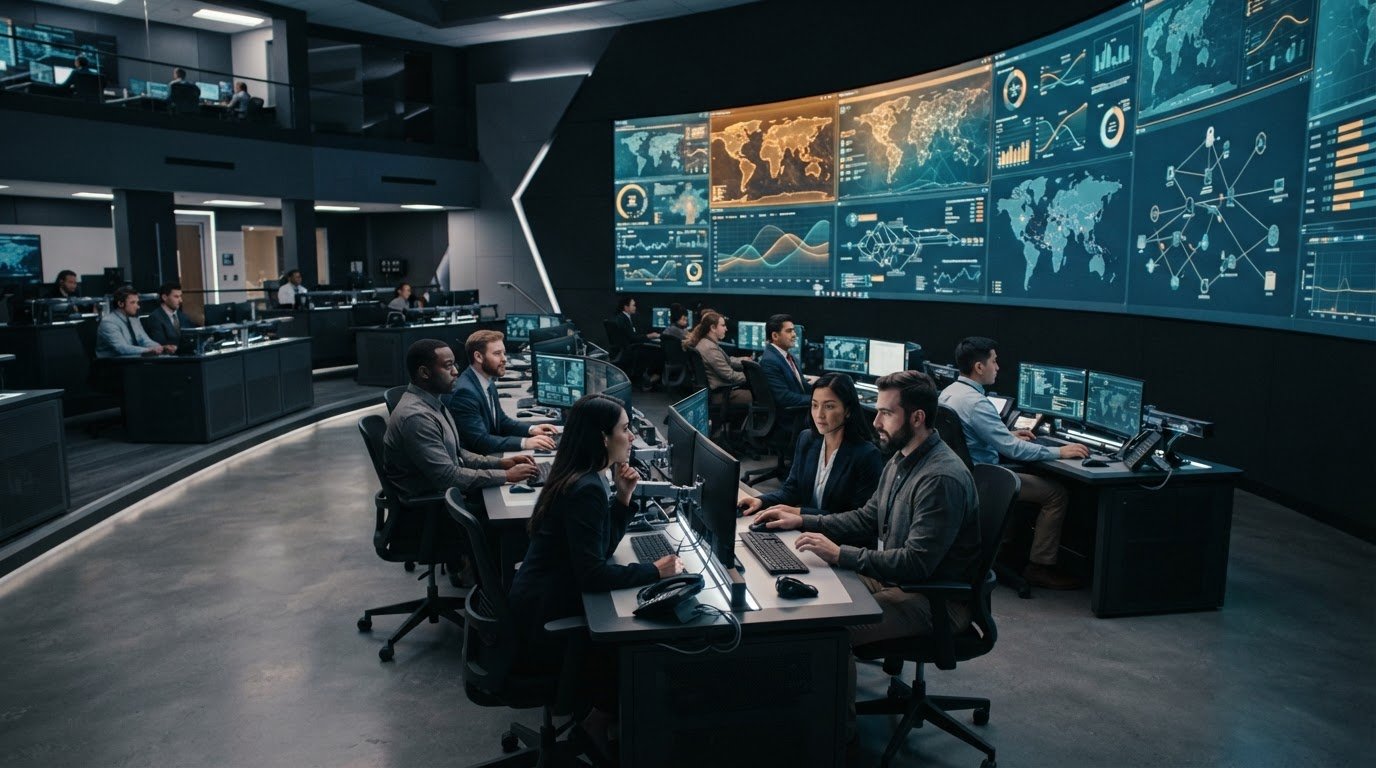
A command center can look well organized and still make it hard for operators to understand what is happening. Command center ergonomics starts with the realities of the shift: fragmented systems, information spread across multiple feeds, and no automatic escalation when an event needs attention. These gaps can slow decisions and make it harder for teams to maintain a shared operating picture.
Workspace design matters, as does the way information reaches each operator. Both affect sustained attention, task handoffs, and collaboration under pressure. Most control rooms already have the screens. What they’re missing is the layer that decides what goes on them, and escalates automatically when something needs attention.
That is where vis/ability fits: an operational intelligence layer that surfaces through the video wall, bringing applications and data streams together as a unified operating picture. This article explains how physical and cognitive ergonomics work together, how to identify operational friction before redesigning a workspace, and how a clearer flow of relevant information can help teams make timely decisions across control rooms and beyond.
Key Takeaways
- Command center ergonomics starts with understanding operator tasks and identifying friction from fragmented systems, operational silos, and missing automatic escalation.
- Attention, task switching, and shared context all shape cognitive ergonomics. Human judgment remains central to decisions.
- Look beyond furniture. Align physical conditions, information flow, and collaboration needs with the demands of each shift.
- Use a five-step assessment to identify workspace and workflow issues, then prioritize changes with input from the people who use and support the environment.
- vis/ability unifies applications and data as an operational intelligence layer that surfaces through the video wall. Most control rooms already have the screens. What they’re missing is the layer that decides what goes on them, and escalates automatically when something needs attention.
Command Center Ergonomics Starts With Operational Friction
Fragmented systems, operational silos, and missing automatic escalation shape an operator’s working conditions as directly as the physical workspace. When information sits across disconnected applications, staff may need to switch views, compare details, and assemble context before deciding what needs attention. That repeated effort can make prioritization harder, especially when several events compete for focus.
Command center ergonomics is the alignment of operator needs, operational tasks, and working conditions so people can interpret information, coordinate with colleagues, and make decisions effectively. It includes the physical environment, the cognitive demands of interpreting information, and the organizational patterns that shape handoffs and teamwork. The discipline of human factors and ergonomics examines how people interact with other elements of a system, providing a useful foundation for this broader operational view.
What does command center ergonomics include?
Physical ergonomics considers the operator’s workstation and surrounding conditions. Cognitive ergonomics focuses on attention, interpretation, and decision demands. Organizational ergonomics addresses how responsibilities, shift patterns, communication, and coordination affect work. These dimensions come together in everyday tasks: an operator needs to access relevant information, understand its context, and share it with the right colleagues.
Adjusting a chair or desk can improve physical comfort, but furniture alone cannot resolve disconnected information or unclear escalation paths. Effective design considers both where operators work and how the operational picture reaches them.
How do information silos affect operator attention?
Disconnected applications can force operators to move between sources and manually connect related details. Each switch requires them to reorient, while separate alerts or views may show changes without enough shared context to establish their relative importance. The challenge is not simply the number of feeds. It is the effort required to interpret them together.
Consider a developing service disruption. An operator may need to compare an incident report, a live data feed, and a map to understand where the issue is occurring and which teams need to coordinate. If each source remains isolated, the operator must assemble that context manually. This work competes with monitoring and communication, making it harder to keep attention on the most relevant change.
Include these points of friction in an ergonomic assessment alongside physical conditions. Identify what operators must do, what information they need at each decision point, and where the current workflow makes the work unnecessarily difficult.
How Information Flow Shapes Cognitive Ergonomics
Cognitive ergonomics concerns the mental work operators perform: sustaining attention, switching tasks, interpreting signals, and deciding what needs action. Fragmented systems, operational silos, and missing automatic escalation add to that work when staff must compare disconnected feeds and reconstruct context themselves. A clear information flow can reduce unnecessary searching and help operators focus on changes relevant to their responsibilities.
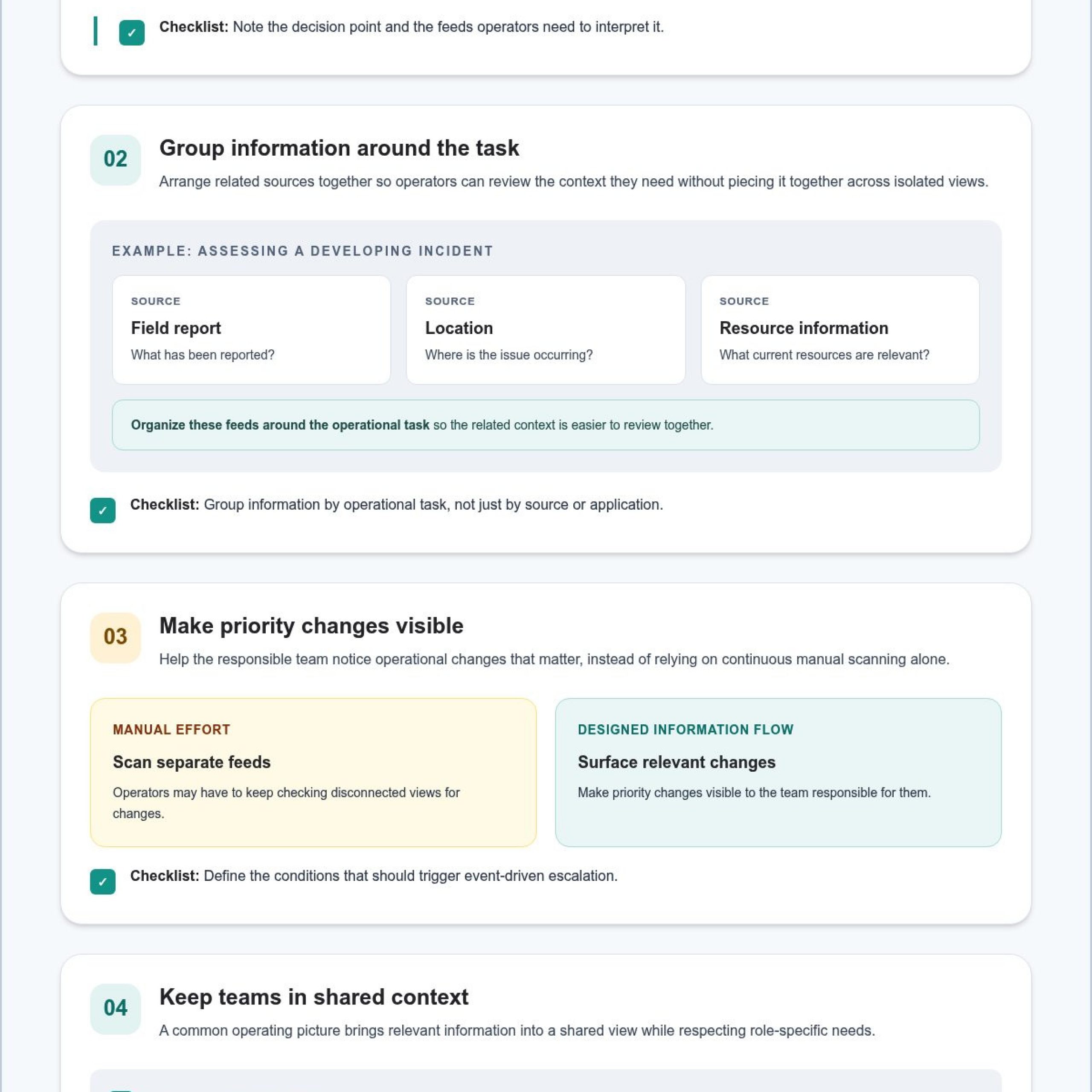
Information flow shapes cognitive workload by determining how much effort operators spend finding and connecting facts before they can judge what matters. To manage multiple data feeds in a dispatch center, identify which sources support each decision. Then group related information by operational task and make priority changes visible to the responsible team. Shared context supports coordination, while operators remain responsible for interpretation and decisions.
Why does fragmented information increase cognitive load?
When alerts, location details, and operational updates sit in separate applications, operators must switch views, compare details, and determine whether information refers to the same event. Repeated context switching can interrupt ongoing work and make it harder to rank changes by urgency. The OSHA ergonomic principles offer a broader workplace context for considering how working conditions affect people, including the cognitive demands of information-intensive roles.
For example, a dispatcher assessing a developing incident may need to relate a field report to a location and current resource information. Organizing these feeds around the decisions dispatchers make gives them a more direct way to review relevant context, rather than expecting one isolated tool to provide the full operating picture.
How can a common operating picture support operator awareness?
EOC common operating picture solutions should give authorized teams a shared view of relevant information while accounting for role-specific needs. A common operating picture can connect related updates so staff coordinate from consistent context. Visibility helps teams see what is available. Operators still interpret events, supervisors coordinate responsibilities, and decision-makers determine the response.
Event-driven escalation can direct attention when an operational change meets defined conditions, reducing reliance on continuous manual scanning. An integrated platform can act as the central hub for applications and data streams, connecting incident management software with other operational sources. Application integration connects information across systems.
Most control rooms already have the screens. What they’re missing is the layer that decides what goes on them, and escalates automatically when something needs attention. vis/ability is an operational intelligence layer that surfaces through the video wall, aggregating real-time data and video streams into a unified operating picture. Learn how the vis/ability platform supports shared visibility across control rooms, collaboration spaces, remote locations, and mobile users.
Command Center Ergonomics Goes Beyond Furniture
Replacing chairs or consoles may address physical discomfort, but it will not resolve information that is difficult to find or workflows that do not fit the operation. Command center ergonomics considers the full working system: the operator, the task, the required information, and the conditions under which teams coordinate. Furniture is one part of the assessment, not a complete answer.
Use three connected dimensions to guide the review:
Physical ergonomics: Workstation fit, reach, posture, adjustability, equipment placement, lighting, temperature, and noise.
Information ergonomics: How clearly operators can locate, interpret, and prioritize the alerts, applications, maps, and video relevant to active tasks.
Organizational and collaboration needs: How roles, shift handoffs, communication, and shared decision-making shape the work.
Which physical factors should control room planners assess?
Assess whether operators can reach frequently used controls and information without awkward or repeated movement. Review posture options and workstation adjustability, along with the placement of equipment used during routine and high-demand tasks. The right configuration depends on who uses the position and what that role requires.
Consider the environment across shifts. Lighting should support the work without creating distracting glare. Temperature and noise can affect comfort and communication. A position used for sustained monitoring may have different demands from one focused on coordination or incident management. Ask operators what changes during handoffs, peak activity, and less typical operating conditions. These observations identify practical design needs. They do not justify promises that a workspace will prevent incidents or guarantee better performance.
How should teams assess information ergonomics?
Follow the operator’s workflow and check whether essential information is easy to locate without unnecessary navigation. Examine how alerts, video, maps, and applications relate to the task at hand. If staff must repeatedly move between tools to connect details, information design may be adding avoidable effort, even when each individual tool works as intended.
Evaluate the relationship between information and decisions, not just the amount of information available. Can the operator see the details needed to assess a change? Can colleagues refer to shared context during coordination? Clear presentation can support attention and teamwork, while interpretation and action remain with the people responsible for the operation.
A disciplined ergonomic review separates observable needs from assumptions. Document reach and environmental concerns alongside navigation, prioritization, and collaboration friction. This gives the team a grounded basis for deciding whether a change should address the workspace, the flow of information, or both.
How to Assess and Improve Command Center Ergonomics
A useful assessment begins with current operations, not a proposed console layout or technology change. Document how work happens across roles and shifts before recommending adjustments. Operators can identify where tasks stall. Supervisors can clarify decision authority and escalation paths. Facilities teams can assess the environment, while technology stakeholders map how information moves between systems.
What should an operator-centered assessment examine?
Use this five-step sequence to build an initial picture of operational friction:
- Map tasks: Record routine workflows, handoffs, decision points, and escalation paths for each relevant role.
- Identify friction: Note recurring interruptions, unnecessary navigation, duplicate effort, unclear ownership, and collaboration challenges.
- Review the environment: Assess workstation fit, reach, posture options, equipment placement, lighting, temperature, and noise across shifts.
- Prioritize information: Identify the sources needed at each decision point and determine which information should be readily visible, connected, or escalated.
- Evaluate changes: Compare the revised workflow with the documented baseline using criteria agreed on before changes begin.
Make the workflow map specific. Document which applications an operator consults after an alert, what details need to be cross-checked, who receives the handoff, and what prompts escalation. Include variations between routine monitoring and periods of increased activity. This record helps distinguish an isolated inconvenience from friction that affects an essential task.
How can teams prioritize ergonomic improvements?
Rank findings by operational relevance, how often the issue occurs, and its effect on essential tasks. Separate physical adjustments, such as improving reach or workstation fit, from information-flow needs, such as connecting application data or clarifying which alerts require attention. Some issues may involve both. Keeping the categories distinct helps teams choose a response that addresses the source of the friction.
Set review criteria before evaluating a change. Teams might examine whether operators can locate key information with less navigation, complete a handoff with clearer context, or use the workspace comfortably for the tasks assigned to that position. Gather feedback from operators and supervisors, then include facilities and technology stakeholders in reviewing relevant conditions and system dependencies. A single positive impression is not proof of guaranteed productivity gains or incident prevention.
This evidence-based process keeps command center ergonomics anchored in real work. Explore how a unified platform can support connected operational information through vis/ability platform capabilities.
Build an Ergonomic Command Center Around a Shared Operational Picture
Fragmented systems, operational silos, and missing automatic escalation can leave teams assembling context from separate sources. Operators may miss an incident on a video wall when important changes compete with unrelated information or appear without enough context to recognize their relevance. A display alone cannot resolve those gaps. Relevant information and event-driven escalation need to come together through vis/ability.
vis/ability is an operational intelligence layer that surfaces through the video wall. As the central hub for applications, real-time data, and video streams, it brings relevant information into a unified operating picture and can surface operational changes through event-driven situational awareness. This gives the wall meaningful context to present, while operators remain responsible for interpreting events and deciding how to respond.
How does vis/ability connect the control room experience?
Shared operational visibility can extend beyond command centers to remote locations, conference rooms, breakout rooms, and huddle rooms. Mobile vis/ability extends that visibility to mobile users, helping distributed teams work from related information. Relevant context can reach people where coordination takes place, rather than remaining confined to one room.
Where can teams explore Activu’s approach?
Activu provides control room design services and video wall systems, alongside the vis/ability platform for connecting applications and data streams. Explore the operational intelligence platform to understand how event-driven information can surface for your team’s operational needs.
Design for Clearer Decisions Across Every Shift
Effective command center ergonomics aligns the workspace with operator tasks, information flow, and the realities of team coordination. Document operational friction before changing furniture or technology. Then assess physical conditions, information access, and handoffs together so improvements address the work operators actually perform.
A shared operating picture can help teams see relevant information in context while keeping interpretation and decisions in human hands. vis/ability aggregates real-time data and video streams into a unified operating picture. It is an operational intelligence layer that surfaces through the video wall, extending shared visibility across control rooms and other operational spaces.
Activu provides visualization and collaboration solutions for mission-critical environments. Explore Activu’s approach to control room visibility and see how an operator-centered design can support your team’s work. Start by identifying what operators need to see, share, and act on.
Frequently Asked Questions
What is command center ergonomics?
Command center ergonomics is the alignment of operator needs, operational tasks, and working conditions so people can interpret information, coordinate, and make decisions effectively. It includes physical factors such as workstation fit, cognitive demands such as attention and information interpretation, and organizational needs such as shift handoffs and team communication. This broader view helps teams assess how the workspace and information flow support the work operators actually perform.
Why is ergonomics important in a command center?
Ergonomics matters because the workspace and information flow shape how operators carry out demanding tasks. Poor workstation fit can make routine work uncomfortable, while fragmented information can add navigation and interpretation demands. Assessing these conditions helps teams identify friction that affects attention, coordination, or handoffs. Base ergonomic improvements on observed needs and review them against clear criteria, rather than treating them as a guarantee of faster decisions or fewer incidents.
How can control room design reduce operator fatigue?
Control room design can address some sources of fatigue by considering posture options, reach, workstation adjustability, lighting, temperature, and noise. Teams should also examine cognitive demands, including repeated navigation between applications and unclear information priorities. Review these factors across roles and shift patterns, since tasks and working conditions differ. Design changes can support a more workable environment, though they cannot eliminate fatigue or replace appropriate operational procedures.
What should an ergonomic command center include?
An ergonomic command center should support the physical tasks operators perform, make essential information accessible in context, and enable clear team coordination. Assessment factors include workstation fit, equipment placement, lighting, temperature, and noise, alongside the way alerts, maps, video, and applications relate to active workflows. Handoff processes and role-specific information needs also matter. The right design reflects how the team operates, rather than relying on furniture or technology alone.
How do information silos affect situational awareness?
Information silos separate details that operators may need to interpret together. Staff can be left switching between applications, comparing updates, and manually assembling context before assessing a developing situation. This effort can interrupt a task and make it harder to prioritize changes across systems. Connecting relevant information in a shared operational context can support team awareness, while operators and supervisors remain responsible for interpretation and decisions.
Can a video wall improve command center ergonomics?
Fragmented systems, operational silos, and missing automatic escalation can make it harder to bring relevant information together. vis/ability is an operational intelligence layer that surfaces through the video wall, aggregating real-time data and video streams into a unified operating picture for operators to interpret and act on.
How can a team assess command center ergonomics?
Start by documenting how operators work before proposing changes. Map routine tasks, handoffs, decision points, escalation paths, and the information sources each workflow requires. Then record recurring interruptions and review workstation fit and environmental conditions. Prioritize findings by operational relevance, frequency, and effect on essential tasks. Include operators, supervisors, facilities teams, and technology stakeholders, then evaluate changes against criteria established before implementation.