

What should a business continuity command center connect and enable when disruption occurs? When alerts, operational data, and decisions sit across fragmented systems and team silos, operators can lose a shared view of the incident. Manual monitoring and a lack of automatic escalation can leave important signals unnoticed while teams work to determine what’s happening.
Most control rooms already have the screens. What they’re missing is the layer that decides what goes on them, and escalates automatically when something needs attention.
That layer should bring disruption signals, decision-makers, and response actions into a coordinated operational view. vis/ability is an operational intelligence layer that surfaces through the video wall, unifying applications and data so teams can focus on the information that matters and act with greater clarity.
This article explains what to evaluate in a business continuity command center, from event-driven awareness and information integration to coordinated response across command centers, remote locations, meeting spaces, and mobile devices. It also compares planning and periodic reporting with the live operational view teams need as conditions change.
Key Takeaways
- Evaluate a business continuity command center by how well it connects information, decision-makers, and response actions during an active disruption.
- Compare planning and periodic reporting with the live operational view teams need to coordinate an evolving incident.
- Map the response workflow from signal detection through context, escalation, coordination, and review to clarify how teams act.
- Consider how an operational intelligence layer can help teams share relevant information across command centers, remote locations, meeting spaces, and mobile devices.
- See how vis/ability unifies operational applications and data, with relevant answers surfacing through the video wall.
Business continuity command center problems start with fragmented operations
During a disruption, operators may need to reconcile alerts, calls, radio traffic, and operational applications that sit in separate systems. Silos obscure how one change relates to another. Manual escalation adds another step: someone must notice a signal, assess its relevance, and pass it to the right decision-maker. A business continuity command center should address this operational gap, not simply provide a designated room.
Most control rooms already have the screens. What they’re missing is the layer that decides what goes on them, and escalates automatically when something needs attention.
vis/ability is an operational intelligence layer that surfaces through the video wall. As the central hub, it brings applications and data streams together so teams can see relevant context and coordinate decisions. The wall is where answers appear through vis/ability. A display alone cannot connect information or establish a response workflow.
What does a business continuity command center do?
A business continuity command center is an operational capability that helps teams maintain a shared view of conditions and coordinate decisions as an event unfolds. Continuity plans establish roles and intended responses; live operational coordination helps people understand current conditions and apply those plans. In brief: planning prepares the response; the command center aligns people and information while the response is underway.
The capability depends on people, processes, applications, and decision workflows working together. It can support teams in a dedicated facility, an Emergency Operations Center (EOC), or other operational settings. The room and its display technology may support the work, but they do not define the function.
Why do control room situational awareness problems persist?
When alerts, communications, and operational applications remain siloed, teams must switch between sources to assemble context. A change in one feed may matter more when viewed alongside another, yet disconnected systems leave operators to make that connection manually. The shared picture can become incomplete or outdated, making coordination harder even when individual systems are functioning as intended.
Manual monitoring also depends on someone noticing a change, judging its relevance, and escalating it. That workload makes it harder to keep attention on the information that matters most. For teams figuring out how to manage multiple data feeds in a dispatch center, the practical questions are which sources belong together, who needs to see a change, and how that information should reach them.
Addressing the gap means connecting operational information to human decisions. With vis/ability’s integrated operational view, teams can bring relevant context together and support shared awareness across command centers, remote locations, meeting spaces, and mobile devices.
How an operational intelligence layer supports continuity decisions
Continuity decisions depend on a clear sequence: detect a signal, connect it to relevant context, bring it to the attention of the right people, and support a coordinated decision. When each step happens across separate tools, operators spend attention assembling the picture instead of assessing what it means.
vis/ability is an operational intelligence layer that surfaces through the video wall. It serves as the central hub for operational applications and data streams, bringing selected information into a shared view. The video wall becomes the place where relevant answers appear through vis/ability, helping teams connect live conditions to the decisions and workflows that matter.
How event-driven visibility helps teams prioritize information
During an evolving event, a steady stream of updates can compete for operator attention. An event-driven operational view helps organize relevant applications and data streams, rather than requiring teams to monitor each source in isolation. Operators can consider a change alongside related context and make a more informed assessment of its significance.
An operational intelligence platform organizes information that supports the current operational picture and surfaces relevant details for attention. It does not need to replace the underlying applications. Its role is to help people see how information relates and decide what requires action.
How escalation and shared awareness connect people to action
When an event needs attention, relevant information and stakeholders should come into view according to the organization’s workflows. Automatic escalation can help direct attention, while operators interpret context, confirm priorities, and decide what happens next. Technology informs that decision; people remain accountable for making it.
A shared operational view can extend beyond the primary command center. The same relevant context can support teams in remote locations, conference rooms, breakout rooms, huddle rooms, and on mobile devices. That visibility helps distributed decision-makers work from aligned information while following their established roles and escalation paths.
For a business continuity command center, connecting signals to human judgment is central. Activu’s vis/ability platform brings operational applications and data streams into a unified view, helping teams share relevant context as they coordinate a response.
Compare continuity command center approaches by operational capability
Continuity plans and periodic reports help organizations prepare, assign responsibilities, and document conditions. During an active disruption, teams also need a current view that helps them coordinate decisions as information changes. A business continuity command center connects that live operational need to the organization’s plans.
Fragmented applications, information silos, and manual escalation can make it harder to identify what deserves attention. Separate dashboards may show useful data, yet operators still have to move between them and assemble context themselves. Displays alone do not connect those sources or determine which information should reach decision-makers.
As the central hub for operational applications and data streams, it helps bring relevant information together so teams can build shared awareness. The comparison below focuses on operational capability, not hardware or vendor claims.
| Approach | What it supports | What to assess during an active event |
|---|---|---|
| Continuity plans and periodic reporting | Preparedness, assigned responsibilities, and documented updates. | How teams turn planned roles into coordinated action as conditions change. |
| Separate monitoring systems | Visibility into individual applications or data sources. | Whether operators must switch between dashboards to connect alerts, communications, and context. |
| Unified operational view | Relevant applications and data streams brought into a shared context. | How information is prioritized, escalated, and shared with decision-makers across locations. |
A display can present information, but it cannot resolve silos or decide what merits attention. The value of a unified view depends on how well it connects source information to event context, escalation paths, and the people responsible for decisions. Live coordination complements operational continuity planning; it does not replace plans or the procedures teams follow.
Questions to use when evaluating a continuity solution
Test the operational workflow, not just the presentation. Can teams see related applications and data in one context? How do relevant events reach operators and distributed stakeholders? Does shared awareness extend to command centers, remote locations, conference rooms, breakout rooms, huddle rooms, and mobile devices? These questions help establish whether a system supports coordination beyond the primary control room.
Compare each approach against the decisions operators must make during a disruption. Look for a clear connection between information and human judgment, with teams able to act from a shared operational picture.
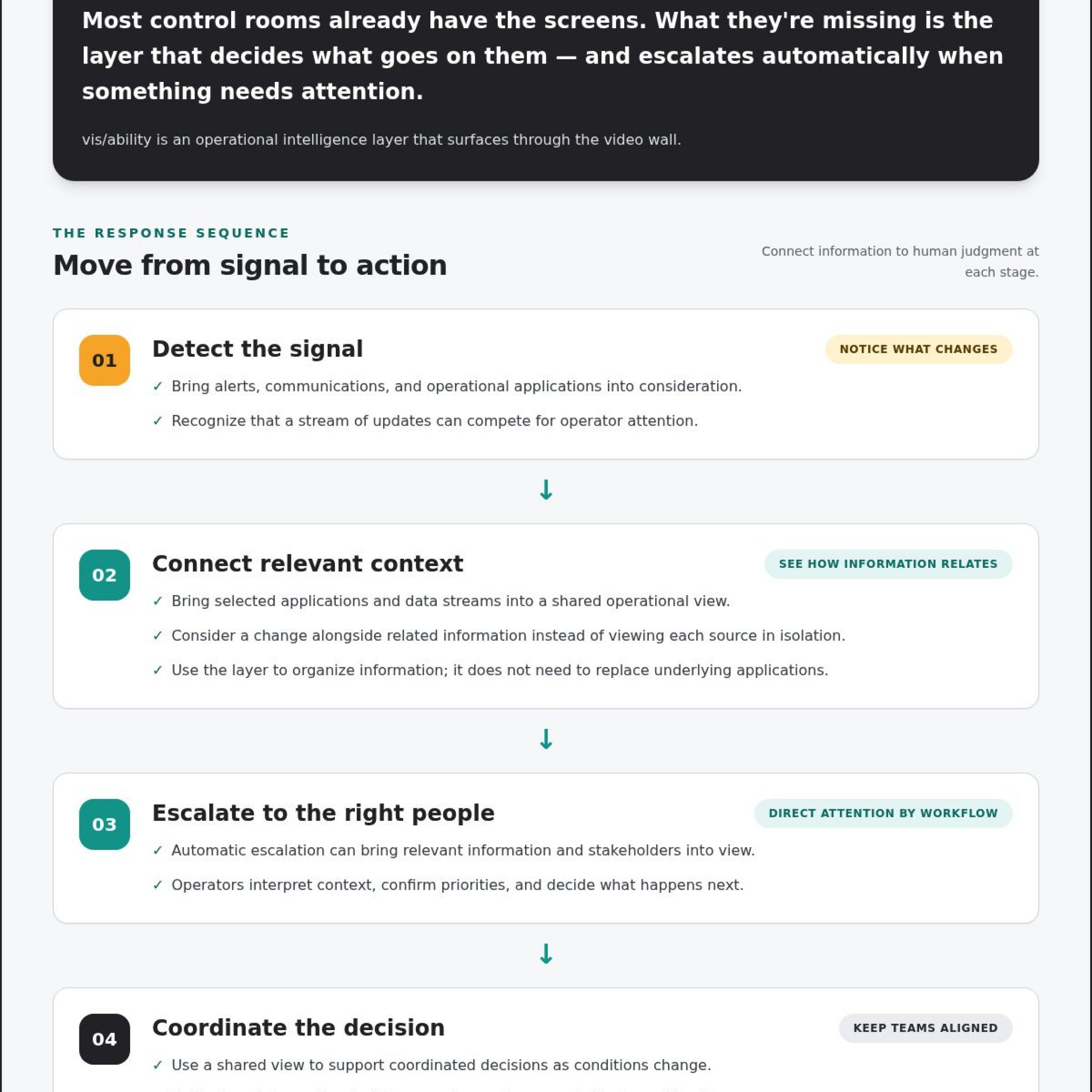
Design an incident workflow that keeps continuity teams aligned
A clear workflow gives operators a consistent path from an incoming signal to a coordinated decision. Map each stage to the roles, escalation paths, and operating procedures your organization already uses. A platform can organize information and support visibility; your procedures determine who assesses a signal and what action follows.
- Detect: Identify a signal from an operational application or communication channel.
- Establish context: Bring related information together so the team can assess what the signal may mean.
- Surface: Make relevant details visible to the people responsible for the issue.
- Escalate: Route the event according to defined roles and escalation paths.
- Coordinate: Align decision-makers around shared information and response responsibilities.
- Review: Capture what occurred and use the review to refine procedures.
Group data feeds by operational relevance and by the decisions they inform. For example, a team assessing a change in service conditions may need associated status information and communications together, rather than spread across separate applications. A unified view helps operators work with related context without repeatedly switching between isolated systems.
How to manage multiple data feeds in a dispatch center
Start by identifying which roles use each feed and what decisions it supports. Prioritize information accordingly, then map how a meaningful change reaches the relevant operators and stakeholders. This makes the workflow easier to follow and helps teams distinguish useful context from unrelated updates.
How an EOC common operating picture supports continuity
A common operating picture gives distributed decision-makers shared context for understanding current conditions. Role-based attention and escalation can help teams focus on information relevant to their responsibilities while keeping the larger situation visible to the group. vis/ability serves as the central hub into which operational applications and data streams flow, supporting a consistent view across command centers, remote locations, conference rooms, breakout rooms, huddle rooms, and mobile devices.
As an operational intelligence layer that surfaces through the video wall, vis/ability helps make relevant information available where teams coordinate. The wall is where answers appear through the platform, while operators assess context and decide what to do. Explore how control room situational awareness supports teams working across operational environments.
Use an incident management software framework to map how signals, roles, escalation, and review connect, then align each step with your procedures. Activu’s vis/ability platform brings operational applications and data streams together to support that shared view.
How Activu connects the business continuity command center
Fragmented applications, information silos, and manual escalation can leave continuity teams working from different pieces of the situation. The operational gap is clear: teams need a way to bring relevant information together and direct attention when conditions change.
It serves as the central hub into which operational applications and data streams flow. Through vis/ability, the video wall becomes the place where relevant answers appear, helping operators connect incoming information to the context needed for a decision.
Activu provides control room design services and mobile vis/ability tools to support a coordinated operating environment. The focus is how teams access information, share awareness, and follow their workflows, rather than relying on a room or display alone to create continuity.
Connect the operational picture across teams and locations
Continuity decisions often involve people beyond the primary command center. Remote stakeholders may need the same operational context as colleagues coordinating from the control room. Teams in conference rooms, breakout rooms, and huddle rooms need information relevant to their roles, while mobile vis/ability extends visibility to users outside those spaces.
A shared view helps teams discuss the same conditions and make decisions with aligned context. vis/ability brings operational information together and extends visibility across locations. Organizations define the roles, procedures, and escalation paths that guide how people respond.
Move from fragmented signals to informed human decisions
Integration connects information sources. Event-driven visibility helps surface essential details for attention, and escalation can bring relevant information to appropriate stakeholders. Together, these capabilities support operator awareness while leaving assessment and action in human hands. Technology should clarify the situation, not add another disconnected information source.
For a business continuity command center, the connection between operational data and human judgment is central. Activu’s control room collaboration solutions help teams build shared operational context across control rooms and distributed users. Explore Activu’s approach to connecting continuity operations and supporting informed decisions.
Build a clearer path from disruption signals to action
A capable business continuity command center connects live operational information to the people responsible for decisions. Teams need shared context, relevant escalation, and workflows that support coordination across locations. Planning sets direction; an integrated operational view helps teams respond as conditions evolve.
Activu brings application integration and event-driven situational awareness together through vis/ability, alongside control room design services and video wall systems. Mobile vis/ability extends operational visibility beyond the control room, helping remote teams stay connected to the shared picture.
With essential information organized to support human judgment, teams can approach disruption with greater clarity. Explore how Activu connects operational information and response teams, and take the next step toward more coordinated continuity operations.
Frequently Asked Questions
What is a business continuity command center?
A business continuity command center is an operational capability that helps teams maintain shared awareness and coordinate decisions during disruption. It brings people, processes, applications, and decision workflows together so operators can assess changing conditions and follow established procedures. A dedicated room may support this work, but the capability depends on connected information and clear coordination, not on a location alone.
How does a command center support business continuity?
A command center supports continuity by helping teams connect current operational information to the decisions and actions needed during an event. Operators can establish context, share relevant updates, escalate issues through defined paths, and coordinate across roles. The business continuity command center provides a live operational view that complements continuity plans, helping teams apply those plans as conditions evolve.
What should a business continuity command center include?
A capable setup should bring together decision-makers, operational procedures, relevant applications and data, clear escalation paths, and a shared view of changing conditions. Fragmented sources and manual monitoring can make relevant information harder to identify. vis/ability is an operational intelligence layer that surfaces through the video wall, helping teams bring operational tools into a coordinated view across control rooms and distributed locations.
How do you manage multiple data feeds in a dispatch center?
Group feeds by operational relevance and the decisions they support. For example, an operator assessing a change in service conditions may need related status information and team communications in the same operational context. Integrating applications into a unified view can reduce the need to switch between isolated screens. Define which roles need each update and how relevant changes should be escalated under established procedures.
What is the difference between a continuity plan and a command center?
A continuity plan documents preparedness, responsibilities, and intended response procedures. A command center supports live coordination by helping people understand current conditions, share relevant information, and make decisions as an event unfolds. The two work together: plans guide the response, while operational visibility helps teams apply those plans to the situation in front of them. A command center does not replace organizational procedures.
Can a common operating picture support an emergency operations center?
Yes. A common operating picture can give an emergency operations center a shared view of relevant information, helping distributed decision-makers work from aligned context. Applications and data streams can be brought together so teams can assess conditions, prioritize attention, and coordinate according to their roles. The technology informs human judgment; organizations define the procedures and escalation paths that guide decisions and response actions.