
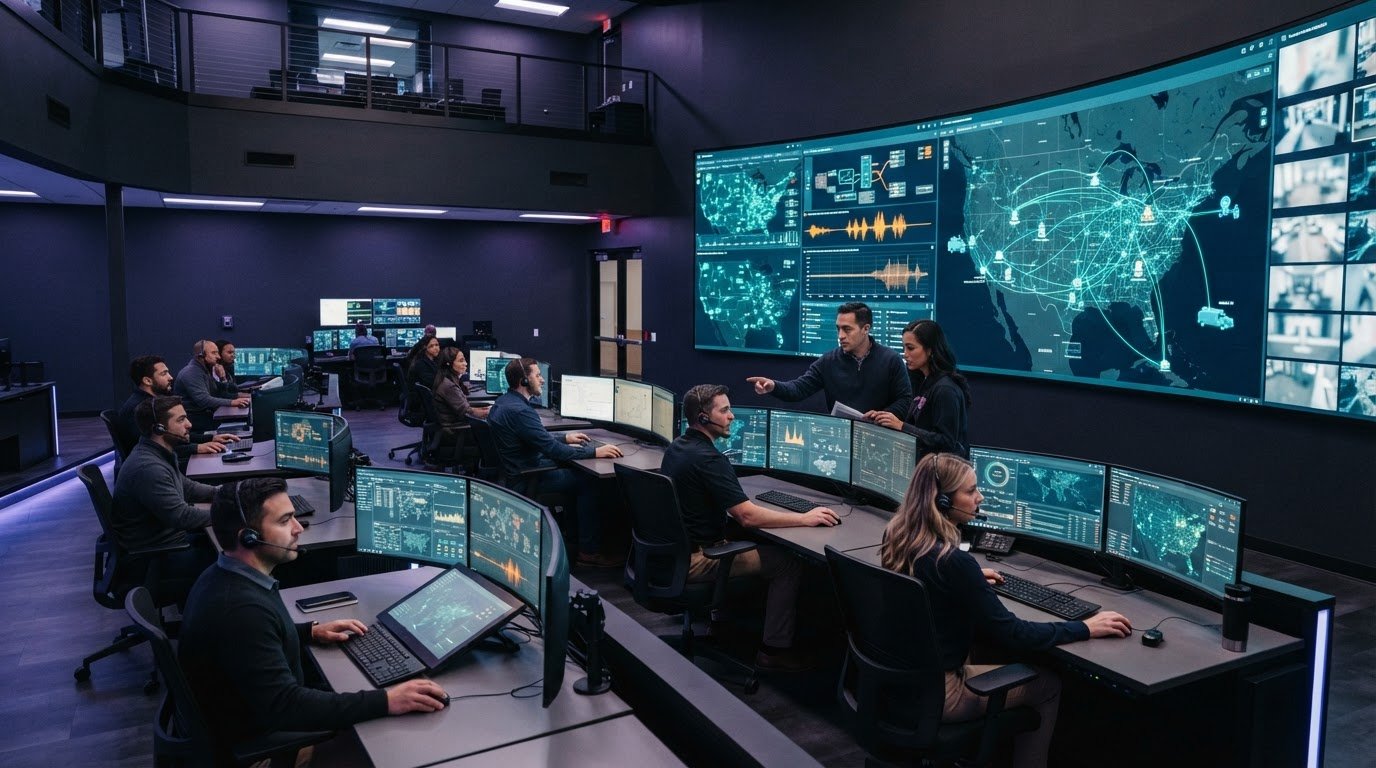
What happens when a critical update sits in one system while the people who need it are working in another? Fragmented operational data, missed escalation, and team silos can leave decision-makers without a current picture of events. Virtual command center software should connect those signals and help teams coordinate a response, rather than add another disconnected tool.
Most control rooms already have the screens. What they’re missing is the layer that decides what goes on them, and escalates automatically when something needs attention. Activu’s vis/ability is an operational intelligence layer that surfaces through the video wall, bringing real-time data and video streams into a shared operational picture.
What does virtual command center software do, and how does command center as a service fit your operational needs? This article clarifies the terminology and explains how to assess approaches against practical requirements: connecting systems, surfacing priority information, escalating events, and keeping distributed teams aligned. You’ll see how a common operating picture can support decisions across command centers, remote locations, meeting spaces, and mobile teams.
Key Takeaways
- Assess virtual command center software by how it connects operational data, events, and teams, not by its feature list alone.
- Compare service models against your requirements for integration, event handling, shared views, mobility, and security.
- Map operational scenarios, team handoffs, and escalation paths before evaluating screens or hardware.
- Look for a unified operating picture that helps teams across command centers, remote locations, meeting spaces, and mobile devices stay aligned.
- Consider how event-driven visualization can bring relevant information forward when the situation calls for attention.
Virtual Command Center Software Starts with Fragmented Operations
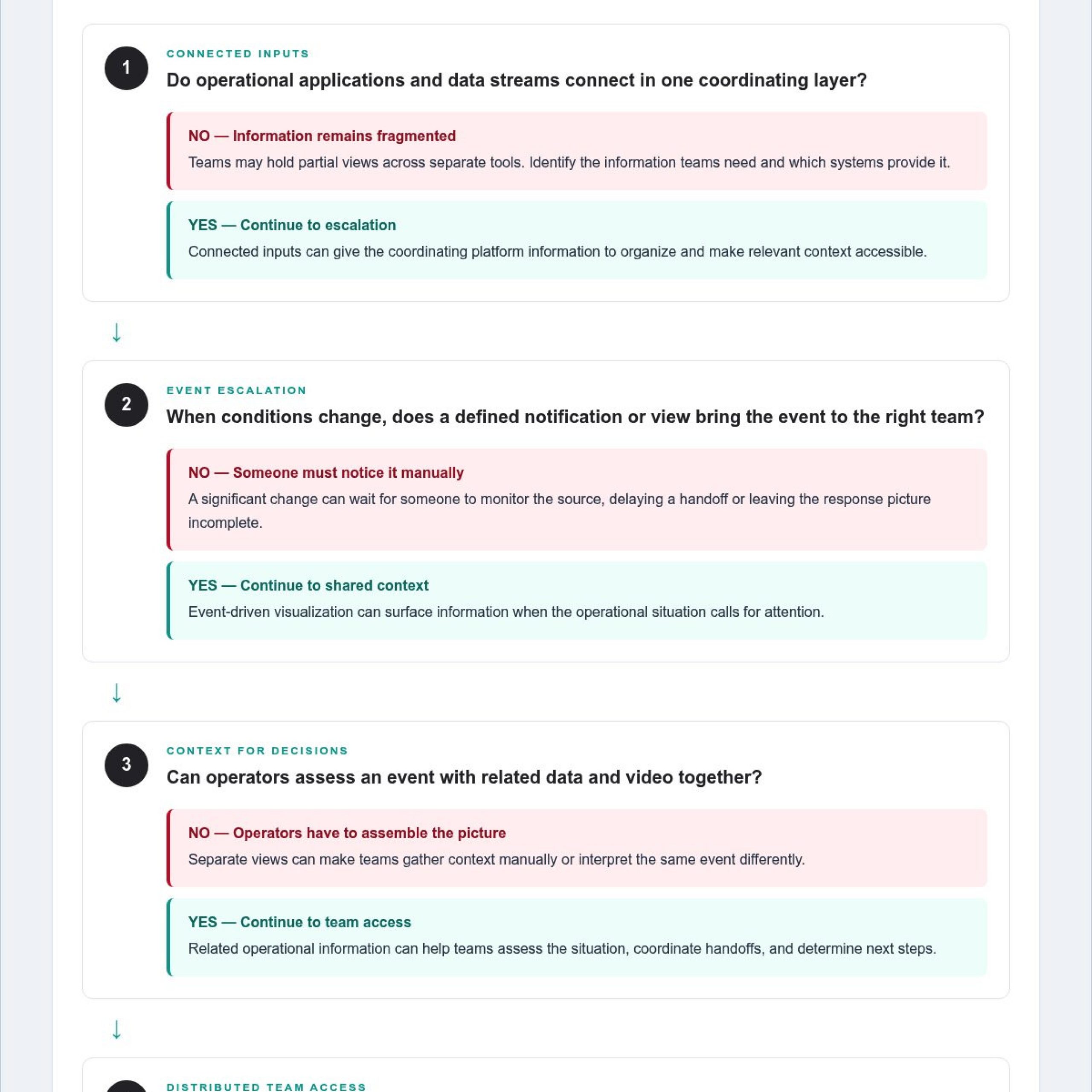
Fragmented systems separate operational data. Information silos give each team a partial view, while gaps in escalation can leave urgent signals waiting for someone to notice them. An event may appear in one application, its related video in another, and the response status in a separate workflow. Operators then spend attention gathering context instead of assessing the event and coordinating a response.
Most control rooms already have the screens. What they’re missing is the layer that decides what goes on them, and escalates automatically when something needs attention.
What does virtual command center software mean?
Virtual command center software is a software layer that organizes information from operational tools and helps people coordinate decisions across teams and locations. It can bring relevant data and video into a shared operating picture, then support how that information is presented and acted upon. Its purpose is to connect information with human judgment.
This layer is distinct from the room, displays, and other physical infrastructure used to present information. Activu’s vis/ability is an operational intelligence layer that surfaces through the video wall, with operational tools and data flowing into it as a central hub. The vis/ability platform aggregates real-time data and video streams to help teams access a coordinated view.
CCaaS in this context means command center as a service. The acronym is also used for contact center as a service, a different category focused on customer communications. Because command center as a service has no single universal scope, define what it means for your organization: which software, integrations, operating model, and ongoing services the approach includes.
Command and control principles offer useful context: information must reach the people responsible for decisions in a form they can use. A shared picture helps teams understand the situation and coordinate their actions.
Why do control room situational awareness problems persist?
Separate applications often reflect separate functions, teams, or workflows. An operator may see an alert in one system but need another tool to verify its location, assess related video, or find out whether a colleague has acted. If those views don’t connect, each person must assemble context manually, and teams may interpret the same event differently.
Escalation gaps create another risk. If a significant change doesn’t trigger a defined notification or appear in the right team’s view, someone must be monitoring the relevant source at the right moment. That can delay a handoff or leave the response picture incomplete, even when the underlying data exists.
Silos turn shared events into separate versions of the truth.
Start by identifying the information teams need, who acts on it, and what should happen when conditions change. This operational scope gives teams a sound basis for assessing command center software and service models before comparing physical infrastructure.
How Command Center as a Service Connects Data, Events, and Teams
Once teams understand where information breaks apart, they can assess how a command center as a service model could connect operational inputs with the people responsible for decisions. Applications and data streams feed into a coordinating platform, which organizes relevant information for operators and other stakeholders. The operating model should clarify how information is shared, where it appears, and how teams use it to coordinate their work.
How does event-driven situational awareness work?
Connected inputs can include operational data and video from different applications. A unifying layer brings related information into view so operators can assess an event without piecing together its context from separate tools. Event-driven visualization can surface information when the operational situation calls for attention. Operators interpret what they see, assess its significance, and decide how to respond.
Effective visualization depends on the context teams need to make decisions. A data point may be more useful alongside related video or other operational information. The definition of virtual command center describes a shared digital workspace for crisis response, including centralized communication and task tracking. That concept reinforces the value of presenting connected information in a way that supports coordinated work.
A useful way to consider the flow is:
- Inputs: Applications and data streams provide information about current operations.
- Organization: The platform relates those inputs and makes relevant context accessible.
- Decision-making: Teams use that context to assess events, coordinate handoffs, and determine next steps.
How can teams work from one operating picture?
Shared awareness needs to reach the people involved, wherever they work. Alongside a command center, teams may need access in remote locations, conference rooms, breakout rooms, and huddle rooms. Mobile access can extend collaboration to people outside the control room, keeping them connected to operational information as they coordinate with colleagues.
Activu’s vis/ability platform brings operational tools and data into a central hub. The video wall is where the shared answer appears because vis/ability determines which connected information is presented for team awareness. The platform also extends that picture to remote and mobile users, supporting collaboration beyond the primary room.
Teams assessing this approach can explore the vis/ability platform as a central hub for connecting operational information and shared awareness.
Compare Virtual Command Center Software by Operational Fit
Compare approaches by how well they support operational work. Command center as a service may combine software, integration, and an operating model, though its scope varies. Software-only approaches focus on platform capabilities, while hardware-centered approaches emphasize physical infrastructure. Before comparing options, define what each covers and whether it helps teams coordinate across existing workflows or adds another interface.
Operating model
Clarify what the service includes, which responsibilities stay with your team, and how the approach fits current operations.
Integration
Assess whether relevant applications and video streams can contribute to a useful shared view, and whether the approach fits the systems in scope.
Event handling
Consider how teams recognize relevant events, share context, and route information to the people who need to act.
Shared views
Check whether teams in control rooms and remote locations can work from information that supports coordinated decisions.
Mobility
Determine how people outside the primary command center access the information they need for their role.
Security
Define who needs access to the operating picture and how the approach aligns with your organization’s cybersecurity requirements.
Which capabilities matter for managing multiple data feeds?
For teams asking how to manage multiple data feeds in a dispatch center, start by identifying which sources operators use together to assess an event. A useful approach brings relevant application information and video into a view that preserves context. It should also help teams prioritize what matters instead of exposing every user to every feed. Assess whether operators can find related details without losing sight of the event they’re evaluating.
Integration quality depends on operational context and workflow fit. Test the approach against a real task, such as confirming an event or preparing a handoff. Teams evaluating EOC common operating picture solutions can use the same test: does the view help stakeholders understand the situation and coordinate their roles?
How should teams assess escalation and collaboration?
Trace how an event reaches the people who need to assess it. Identify the context they need, how the next team receives a handoff, and whether remote or mobile users can follow the same operational picture. To understand why operators miss incidents on a video wall, examine whether information is hard to distinguish, disconnected from related context, or outside the workflow operators monitor. Evaluate how the approach addresses those conditions.
Include cybersecurity common operating picture requirements in the assessment. Define which information teams need to see, who uses it, and how the approach fits existing security practices. A solution should support collaboration across roles without creating another disconnected information layer.
Evaluate CCaaS Against Your Command Center Workflows
Evaluate command center as a service against the decisions your teams make, the information they need, and how they coordinate across locations. A workflow-first assessment shows whether virtual command center software fits operational needs before screens or hardware shape the discussion. It also gives teams a practical way to compare integration, escalation, security, and continuity requirements without assuming every CCaaS offering has the same scope.
How can teams map requirements before evaluating software?
Begin with recurring operational scenarios. For each one, identify the decision, the roles involved, the information required, and where that information currently lives. Map command center staff alongside remote teams, including the handoffs between them. This exposes disconnected applications, manual steps, and unclear escalation paths before a platform demonstration begins.
- Define scenarios. Select representative situations, such as monitoring a developing event or coordinating a response across teams. Keep the focus on decisions and actions.
- Identify information. List the applications, data, and video streams people use to assess each scenario. Note where operators must switch tools or reconcile different views.
- Map roles and locations. Specify who needs visibility in the command center, at remote sites, and on mobile devices. Record who owns each decision and handoff.
- Trace escalation. Document how critical events reach the responsible people, what happens next, and where ownership or notification is missing or unclear.
- Set project criteria. Define integration needs, security considerations, and continuity requirements according to your organization’s workflows and environment.
Teams working across security operations centers, network operations centers, or fusion centers should map how information moves between those functions, too. Activu’s operations center environments reflect settings where teams need coordinated visibility across operational roles.
What should a CCaaS evaluation prove?
Use your mapped scenarios to structure demonstrations and assessments. Ask each approach to show how it brings relevant operational information together, makes event context available to the right roles, and supports a handoff across locations. Evaluate the actual workflow, including what operators see and what action they can take, rather than relying on a feature list.
Test integration against the applications and streams in scope for the project. Identify dependencies and assess how the proposed approach fits the organization’s security and continuity requirements. Don’t assume a platform connects every tool or that a service model includes the same operational responsibilities. Define those expectations clearly before comparing solutions.
This process helps teams judge whether an approach can connect existing tools and people around operational decisions. Activu’s vis/ability platform integrates applications and data streams to support a shared operating picture across teams.
How Activu Connects the Command Center Operating Picture
Separate workflows can leave operators, supervisors, and remote colleagues working from different views of an unfolding operation. Unclear escalation and disconnected handoffs make it harder to coordinate decisions across locations. Activu’s vis/ability platform gives teams a central point for organizing operational information around the work they need to do.
What role does vis/ability play in a virtual command center?
vis/ability connects operational tools through application integration and supports event-driven situational awareness. This helps teams bring relevant context into their workflow and focus attention where it’s needed, while people remain responsible for assessing events and deciding how to respond.
The video wall is where the shared answer appears because vis/ability determines what information is presented for team awareness. The platform also supports collaboration in remote locations, conference rooms, breakout rooms, and huddle rooms. Mobile vis/ability extends collaboration beyond the control room, helping distributed users stay aligned as operational work continues.
Teams should shape how shared information is presented around their operational needs. Activu’s vis/ability platform connects the operating picture with the environment where teams use it, so the display supports attention and coordination rather than dictating the workflow.
For organizations considering virtual command center software, the aim is to help people interpret information together and coordinate action. The platform supports that process by making operational context available to teams; it doesn’t replace their expertise or judgment.
How can organizations take the next step?
Bring a specific operational scenario to the discussion. Which teams need to coordinate? What information would help them understand the situation? Where do handoffs occur, and how should people working outside the primary room stay involved? Clear answers help connect platform capabilities to the way your organization operates.
Activu’s control room design services and platform capabilities can be considered together, aligning the operational environment with the tools teams use to coordinate. Discuss your command center requirements with Activu.
Make Your Next Operational Decision from a Shared Picture
Turn operational needs into a clear discussion about how teams receive information, recognize events, and coordinate decisions. Use a real workflow to show where connected information could support human judgment and where teams need a more consistent view. This gives your organization a practical basis for shaping virtual command center software around its operational reality.
Activu’s vis/ability platform aggregates real-time data and video streams. Application integration and control room design bring information and the operational environment into the same conversation, while Mobile vis/ability extends collaboration beyond the control room. Together, these capabilities support a shared operating picture across the people and locations involved.
Move forward with a focused conversation about your workflows, information sources, and coordination needs. Discuss your command center requirements with Activu, and take the next step toward clearer, more coordinated operations.
Frequently Asked Questions
What is command center as a service?
Command center as a service (CCaaS) describes an approach to providing capabilities for coordinating operational information and teams. Its scope can vary: it may include software, application integration, or other services tied to an organization’s operating model. Define what the service must support, such as monitoring a developing situation or sharing updates between teams, before comparing offerings. That makes the term meaningful for your requirements rather than a label with assumed features.
How is command center as a service different from contact center as a service?
Command center as a service supports operational awareness and coordination, while contact center as a service generally refers to technology for managing customer communications—represented by modern call center solutions like DialGame.AI. The shared acronym can cause confusion in procurement discussions and online research. Spell out “command center as a service” in requirements documents and describe the operational workflows involved. For example, specify whether the system must help staff monitor operational data, coordinate a response, or maintain a common view across teams.
Can virtual command center software connect applications a team already uses?
Virtual command center software can bring existing applications into a coordinated operating picture when the required integration fits the project. Identify which systems and data streams matter, what information teams need from them, and how that information should appear in operational workflows. For example, a team may need to view a relevant data feed alongside video while assessing an event. Evaluate integration against those specific sources and decisions rather than assuming every application connects in the same way.
Does virtual command center software replace a physical control room?
No. Virtual command center software can extend operational awareness beyond a physical control room, but it doesn’t inherently remove the need for a dedicated operations space. Teams may still rely on a central room for shared monitoring and coordination, while distributed staff use remote or mobile access. The right arrangement depends on who needs to collaborate, where they work, and what information they must access to support operational decisions.
How does event-driven visualization help operators notice incidents?
Event-driven visualization can bring relevant information forward when operational context calls for attention, helping operators connect an event with related data or video. When a developing situation requires review, presenting associated information together can help staff assess what they’re seeing without searching across disconnected views. Operators still interpret the context and decide how to respond. The value lies in making essential information easier to recognize and act on.
What should an organization assess before adopting CCaaS?
Start with the operational scenarios the system must support, then identify the teams, locations, applications, and handoffs involved. Assess how events reach decision-makers, what information should be shared, and how security and continuity requirements apply to the project. Ask for the proposed approach to be demonstrated using representative workflows. This lets teams judge practical fit and clarify the scope of command center as a service before selecting a solution.