

Secure control room content sharing gives authorized people the operational information they need without exposing critical systems or granting unnecessary permissions. The challenge is coordinating fragmented feeds, user access, and escalation so operators and decision-makers see relevant information at the right time.
Most control rooms already have the screens. What they’re missing is the layer that decides what goes on them – and escalates automatically when something needs attention. vis/ability is an operational intelligence layer that surfaces through the video wall, determining what appears and escalating information when it needs attention. Permissions and activity records help control who can view or act on shared content. This guide explains how secure sharing involves network design, role-based access, layouts, remote collaboration, and logging. It also covers how to share a common operating picture without opening every feed or system to everyone.
Key Takeaways
- Separate viewing access from operating privileges so each person can see and control only what their role requires.
- Use network segmentation, encrypted transport, and redundancy to protect shared content and preserve access when a connection fails.
- Plan layouts and remote access around resolution, bandwidth, compatibility, and the information each workspace needs.
- Maintain clear audit records of who accessed systems, what they viewed, and what actions they took.
- Unify applications and data feeds through an operational intelligence layer that surfaces the relevant picture through the video wall.
Why Control Rooms Struggle to Maintain Situational Awareness
Control room situational awareness often suffers when systems are fragmented. Dispatchers may track calls in one application, camera feeds in another, and field updates through separate channels. Managing multiple data feeds in a dispatch center becomes harder when operators must switch tools to connect details. Team silos add delay: each group may hold part of the operational picture without a shared view.
Emergency operations centers face a similar challenge. EOC common operating picture solutions bring relevant agency updates, maps, and incident information together so teams can interpret them. When sources remain isolated, staff must relay updates manually and reconcile differences under pressure. Without escalation that directs attention to developing events, an alert may remain in one system while responders focus elsewhere.
Most control rooms already have the screens. What they’re missing is the layer that decides what goes on them – and escalates automatically when something needs attention. vis/ability is an operational intelligence layer that surfaces through the video wall, prioritizing relevant information and bringing the answer into view. More display space alone cannot resolve disconnected workflows or determine what deserves attention.
Operators may miss incidents on video walls when a critical feed is present but lost among unrelated content, or when its significance depends on context in another application. Without prioritization and escalation, operators must identify connections themselves while monitoring multiple sources. Clear layouts matter, but so does the operational logic behind what appears.
For example, a facility alert may require attention only when viewed alongside a camera image and an incident update. Linking these sources helps teams assess the event without manually searching across applications. Teams responsible for manufacturing process control can face similar fragmentation when operational information sits in separate systems. A coherent operating picture gives people shared context for coordination and decisions.
Resolution, layouts, remote management, and compatibility
Fragmented systems and incompatible connections can make it difficult for operators to see related information together. Content-sharing tools can bring CCTV, video management systems (VMS), and incident management systems into a coordinated view through available integrations, but they provide only part of the solution. Compatibility depends on supported connections and how each source provides its data. Resolution, layout, and access design also affect whether operators can use the information effectively.
Centralized Layout and Source Management
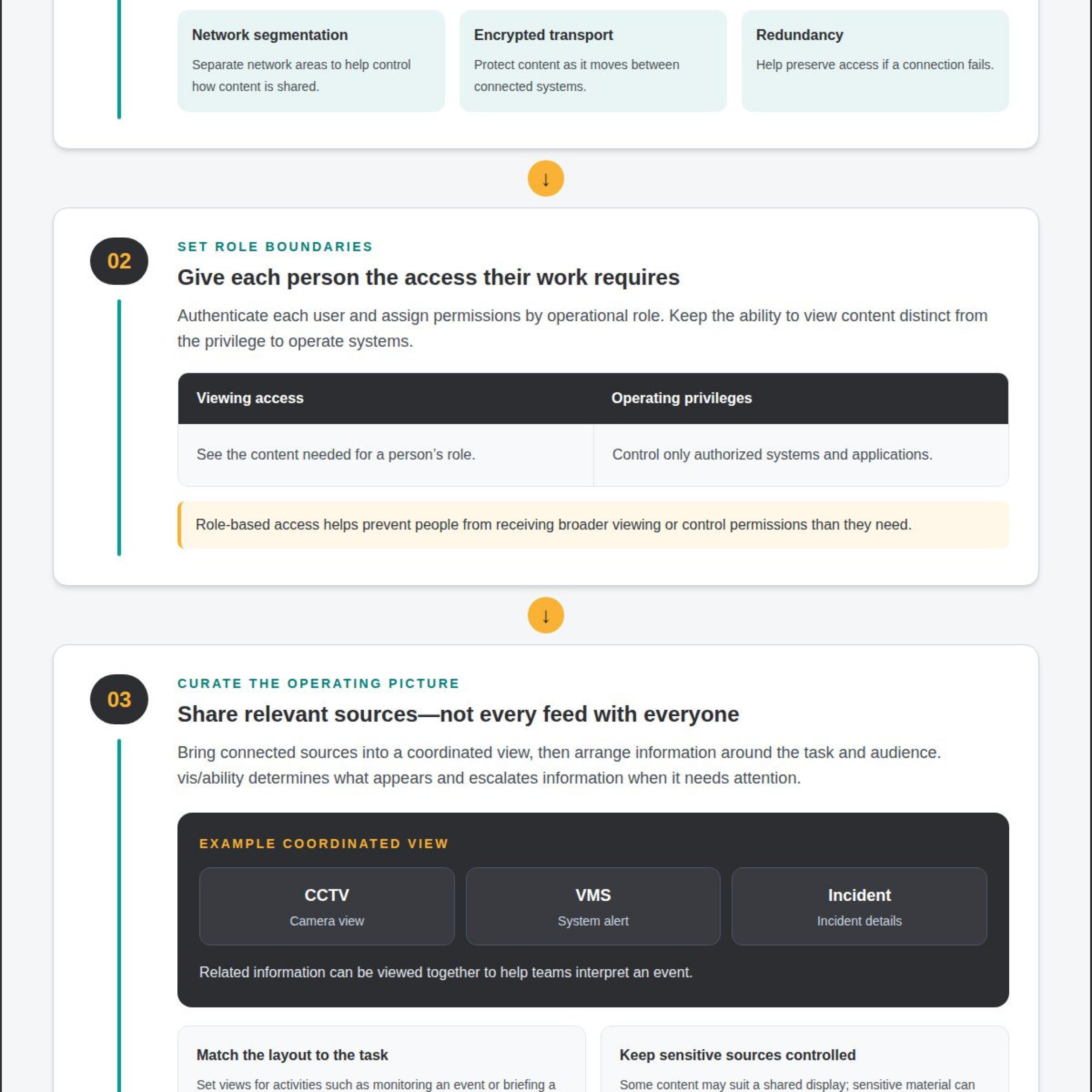
Centralized layout and source management lets authorized users select, arrange, and distribute connected feeds from one interface. vis/ability acts as the operational intelligence layer that decides which information appears on the video wall, bringing a CCTV view, a VMS alert, and incident details together so teams can interpret related information. Set layouts around tasks, such as monitoring an active event or briefing a remote team. Separate sources by audience: some may suit a shared display, while sensitive material stays in an authorized workspace. Compatibility still matters; ONVIF compliance alone may not prevent connection limits between manufacturers. Customized APIs can help aggregate information from cameras and recorders.
Managing Real-Time Sources and Displays
vis/ability determines which real-time sources appear on the video wall and workstation, giving each feed a useful place. The wall can show a camera view, a map, and an incident dashboard in separate zones based on what operators need to see. Match source resolution to display capabilities so text and visual detail remain usable. Remote bandwidth needs depend on resolution, frame rate, and the number of simultaneous feeds. Centralized source and display management can keep layouts consistent across workspaces.
Remote management can extend access while display processing remains in the physical control room. Network quality and configuration affect responsiveness, so bandwidth planning should account for every source sent to remote users. Share relevant feeds for collaboration rather than extending every screen by default.
Secure desktop management can centralize computers in a locked server room and give operators access through KVM. This keeps computers away from public areas while allowing operators to switch between systems at a workstation. Supervisors and operators can view or control the same system when their roles allow it.
Architecture also has regulatory implications. According to the European Union, under the NIS2 Directive, administrative fines for essential entities can reach 2% of global annual turnover. Documenting source access, display permissions, and system responsibilities helps connect technical design with security governance.
What does secure sharing of control room content mean?
Secure sharing gives selected people relevant operational information without granting broader system control. The right platform depends on whether a team needs controlled viewing, remote computer operation, or both. Compare authentication, role-level permissions, network architecture, integrations, and activity records, not just display features.
Remote access should authenticate each user and limit permissions to their operational role. For example, a supervisor may view a live camera feed and incident dashboard, while an operator can also control authorized applications. This separation helps ensure a briefing participant does not receive the same privileges as someone managing a system. Logs should record who accessed content, when they accessed it, and what actions they took.
Remote access can use an authenticated workstation on the organization’s network or a secure WAN connection, rather than exposing control room computers to the public internet. Centralized KVM access places computers in a protected server room and lets authorized operators reach them from workstations. Operators can switch between surveillance feeds and control applications without moving between physical machines.
During a crisis briefing, a coordinator can share a situational view on a video wall while remote leaders review the same layout from authorized workspaces. A remote expert can assess a camera feed or dashboard and advise the control room without taking over unrelated systems. This supports collaboration while keeping access appropriate to each task and recipient.
In the United States, applicable compliance requirements depend on the organization, sector, information, and contracts involved. A control room handling public safety information may face different obligations from one supporting energy operations. Map access, logging, retention, and security responsibilities to the requirements governing the operation.
To deploy secure control room content sharing, first identify the sources and workspaces. Define who can view, share, or operate each source, then connect systems through approved integrations and segmented network paths. Test a crisis briefing and remote expert session, confirm logs capture access and actions, and review the design as sources and roles change.
Network segmentation and encrypted transport
Segment control room infrastructure so video, control, KVM, and corporate IT traffic follow defined paths. For example, place operational systems on a dedicated or segmented network rather than giving them unrestricted access to general office devices. This limits unnecessary routes between systems and gives network teams a clearer boundary to monitor during an investigation.
Encrypt video, control, and KVM traffic in transit, especially when it crosses a wide area network or public network. TLS 1.3 is a transport encryption option; systems may use TLS 1.2 as a fallback when TLS 1.3 is unsupported. Encryption protects data moving between endpoints, while network separation restricts which endpoints can communicate. Neither measure replaces the other.
Keep information technology (IT) and operational technology (OT) traffic separate according to operational needs. A business workstation, for instance, should not gain a direct route to a control system just because both connect to the same facility network. Define permitted connections between segments, document the service responsible for each path, and review access when sources or workflows change.
Build redundancy into network paths and power for remote access. A secondary network route can preserve connectivity if the primary path fails, while backup power helps keep network equipment available during an interruption. KVM systems can also use network redundancy to reduce the impact of a switch failure. Test failover so operators know what remains accessible during a disruption.
Resilience depends on the full connection path, not simply on having a backup cable. Map each source through network equipment to the remote workstation or display. Test switching between primary and redundant paths, including whether the connection recovers and the correct content remains available. For remote feeds, bandwidth needs depend on resolution, frame rate, and simultaneous sources.
These controls support secure control room content sharing by making access paths deliberate and observable. Document which segments carry viewing traffic, which carry operating commands, and who maintains each connection. During a security review, teams can trace an incident from source to destination, identify the permitted route, and assess whether network separation and encryption worked as designed.
Role-based permissions and authentication
Role-based permissions link each user’s identity to the information and actions their duties require. In a control room, a dispatcher may view camera feeds and incident updates, while a supervisor can also manage shared layouts. A maintenance specialist may need equipment status without access to unrelated operational content. Authentication verifies each person before access begins.
Build permissions around tasks, not broad job titles alone. For example, distinguish viewing a CCTV feed from controlling its associated system. An incident coordinator may access relevant reports and shared displays, while authorized operators retain system controls. This supports secure information exchange without turning every workspace into an unrestricted access point.
Remote sessions should use individual authentication rather than shared accounts. Individual credentials link activity to a specific person. Limit remote access to the roles that need it, and scope each session to the required sources and actions. A remote expert invited to advise on an incident may need to view a selected feed, not operate control systems.
Access governance must reflect operational changes. During shift handover, end a departing operator’s access when their duties conclude, then assign the incoming operator the permissions needed for monitoring. When responsibilities change, update the user’s access instead of carrying forward old privileges. This keeps access aligned with current operational roles.
Maintain logs showing who accessed a system, what content they viewed, when they connected, and which actions they took. During an incident review, records can clarify whether a user viewed a relevant source or changed an operating state. Logging supports accountability, especially when roles and permissions make each recorded action clear.
Design permissions to scale across command centers, remote locations, and shared workspaces. A centralized policy can keep role definitions consistent while adjusting access by location or task. Review the model as teams, sources, and workflows change. This keeps shared operational information tied to current needs and gives staff access to what their mission requires.
What security features should control room content-sharing software include?
Control room software should combine identity checks, scoped permissions, network separation, encryption, and auditable activity. Each control addresses a distinct risk: encryption protects a feed in transit, while permissions determine whether a user can view it or operate its source. A defined architecture connects those safeguards to specific users, systems, and workspaces.
Require individual authentication for every operator and remote session. Shared accounts make activity harder to trace. Set access by role and source: a briefing participant may view a selected camera feed, while an authorized operator can control its system. Limiting remote permissions to operational duties helps keep secure control room content sharing within approved boundaries.
Separate control room traffic from general corporate IT and avoid uncontrolled consumer streaming paths. Define approved routes for video, control, and KVM traffic, then assign responsibility for each connection. Encrypt data in transit, especially across a WAN. Together, these measures make secure control room content sharing more deliberate and traceable.
Logging should capture which sources users viewed, what content they shared, when access occurred, and whether a connection allowed viewing or operation. During an incident review, records can show whether a user opened a camera feed or issued a control command. Link each action to a named user and defined role so the record provides a clear account of events.
Review the architecture as sources, sites, and workspaces change. A remote location may introduce new network paths, while a dashboard may need distinct viewing permissions. Document approved connections, decoders, access roles, and service owners. Regular technical reviews help identify outdated routes or permissions that could undermine secure control room content sharing.
For a security architecture aligned with control-room workflows, contact Activu Corporation to discuss control room design services.
Activu Corporation: Control Room Design Services
Activu Corporation can help when disconnected systems and operational workflows make a shared picture difficult to maintain. Its Control Room Design Services align room requirements with the information teams need to assess conditions and coordinate decisions. The design considers how people work, where information must appear, and how teams collaborate across operational settings, providing a practical foundation for secure control room content sharing.
Most control rooms already have the screens. vis/ability is an operational intelligence layer that surfaces through the video wall, bringing applications and data streams into a unified operating picture. It helps teams decide what information appears where and supports human judgment with relevant information when decisions are needed.
The vis/ability Platform supports a coordinated view across command centers, remote locations, conference rooms, breakout rooms, and huddle rooms. Mobile vis/ability extends that shared picture to mobile devices, supporting distributed teams that need common operational context. Together, these capabilities help teams organize secure control room content sharing around who needs information, which workspaces require it, and how collaboration takes place.
Event-Driven Situational Awareness helps surface information according to operational events, giving teams a way to focus on developing conditions. Activu’s Video Wall Systems provide a shared display for relevant information through vis/ability. Integrated information helps teams interpret conditions together instead of assembling a picture from separate sources and relaying updates manually between workspaces.
Control Room Design Services address the operational environment, including information flows, team coordination, and layouts. This is useful when a control room needs to align existing systems with remote collaboration or changing operational needs. The objective is a clear common picture that helps people interpret incoming information, maintain context across workspaces, and make decisions with greater certainty.
Contact Activu Corporation to discuss your control room design needs and the operational picture your teams need to share.
Build a Sharing Model That Can Evolve
Secure control room content sharing works best as an operational capability that adapts as teams, sources, and workspaces change. The next step is to connect the architecture to real decisions: identify which information supports each role, how teams coordinate across locations, and how access should change when responsibilities shift.
This approach keeps security connected to the mission. A new feed, remote workspace, or operational workflow can affect what teams need to see and how they collaborate. Including those changes in ongoing control room planning helps preserve a clear operating picture while maintaining access boundaries and human judgment.
Activu Corporation can help align control room design with your operational requirements and future collaboration needs. Bring the people, information flows, and decisions that shape your environment into the conversation, then define a practical path forward.
Discuss your control room needs with Activu Corporation, and take the next step toward a more connected operational picture.
Frequently Asked Questions
Can multiple users share access to the same systems in real time?
Yes, multiple authorized users can view or control the same system simultaneously when the platform supports concurrent access. For example, a supervisor can monitor a system while an operator manages it from a workstation. Assign viewing and control privileges separately so collaboration does not grant every participant operating authority. This helps teams coordinate around a shared feed while limiting system actions to users with the required role.
How do control room video walls improve monitoring and collaboration?
Fragmented systems and information silos can leave teams without a shared, up-to-date picture of an incident. vis/ability is an operational intelligence layer that surfaces through the video wall. It selects and surfaces the relevant information there, such as a map, live camera feed, and operational dashboard, so participants can connect information and coordinate decisions without relying on separate verbal descriptions. Remote collaborators can review relevant content from their workspaces.
Is streaming from control rooms risky?
Streaming can introduce risk when a feed travels over an uncontrolled route, reaches an unintended audience, or grants more access than viewers need. For example, sharing a sensitive camera feed through an unapproved consumer service can bypass access controls and monitoring. Use defined network paths, authenticated access, and clear ownership for each stream. Distinguish viewing permission from permission to operate the source.
What is secure control room content sharing?
Secure control room content sharing distributes selected operational information to authorized users while controlling access to underlying systems. A crisis team might share a live map with briefing participants while restricting camera controls to designated operators. Security depends on the full path, including the source, recipient, network connection, and actions each user can take. The goal is relevant context without unnecessary system access.
How do secure control room platforms manage access, permissions, and user authentication?
Platforms authenticate individual users and apply permissions that define which information and actions each person can access. For example, an analyst may view an incident dashboard while an operator can also control an approved application. User-specific accounts help link activity to a person during review. A well-managed setup also updates permissions when responsibilities change and records access events for operational or security review.
How can control room teams share live video, documents, and screens securely?
Teams can share approved sources through an authenticated platform that applies the organization’s access rules to each recipient. For example, an incident lead can present a live feed alongside an approved document during a briefing, while limiting distribution to the intended workspace. Use authorized connections for screen sharing and avoid forwarding sensitive content through personal accounts or unmanaged services. Keep shared material relevant to the task and audience.
What encryption and data protection standards should secure control room software meet?
Choose software that encrypts data in transit and supports a current transport security protocol. TLS 1.3 is one option; TLS 1.2 may serve as a fallback when TLS 1.3 isn’t supported. Encryption protects information as it moves between endpoints, but doesn’t define who may access it. Pair it with authentication, role-based permissions, network separation, and activity records for broader protection.
What risks and vulnerabilities arise when sharing content in a control room?
Common risks include shared credentials, overly broad permissions, unintended disclosure, insecure network paths, and service interruption. For example, a briefing layout might expose a sensitive feed to a workspace whose participants need only a general status update. Misconfigured connections can also make access difficult to trace. Limit each share to its intended audience, separate viewing from control privileges, and retain records to help investigate access and actions.