
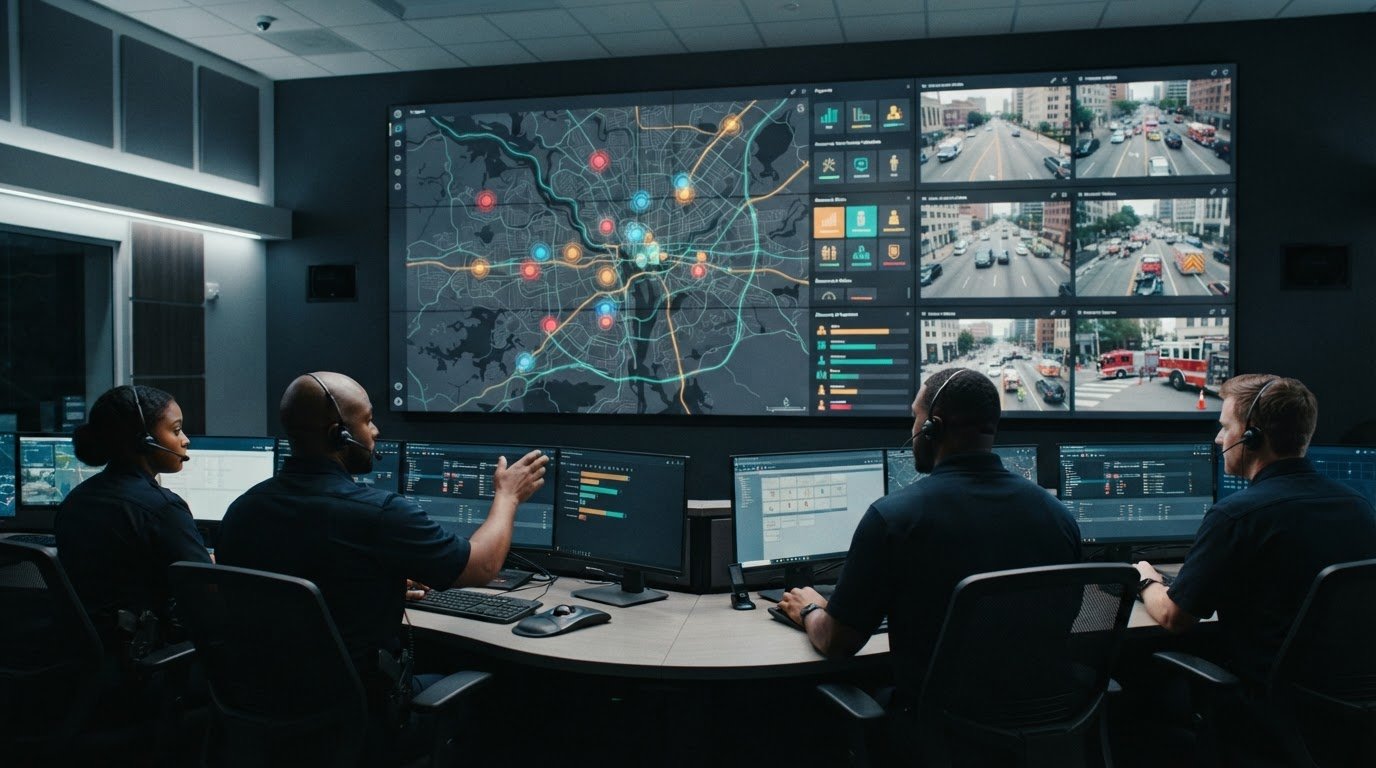
A status board earns its place when it turns fragmented source data into a shared, prioritized operating picture. Effective incident command center visualization brings maps, alerts, resource status, and live information together so decision-makers can see what matters and act with greater clarity. The display is only useful when the information is current, connected, and organized around operational needs.
In command centers, teams often contend with siloed applications, inconsistent data feeds, and events that do not automatically draw attention. Most control rooms already have screens. What they need is a layer that organizes what appears on them and surfaces important changes.
This article explains how source data becomes a useful status board, why interoperability and viewer needs shape the common operating picture, and how maps, alerts, and live feeds can support decisions. It also examines the role of configurable dashboards, the difference between displaying information and surfacing what needs action, and how operational priorities should guide what each audience sees across command environments.
Key Takeaways
- Shape status boards around the decisions operators need to make, with essential information easy to scan.
- Connect maps, alerts, resource updates, and other feeds into a shared operational picture rather than isolated views.
- Choose map detail and display layouts to match the incident, the task, and the people who need the information.
- Assess whether dashboards surface changing conditions and direct attention to priority events, not just display incoming data.
- Explore how an operational intelligence layer can bring integrated information to teams across command spaces and mobile settings.
Data visualization in mission-critical operations centers
Incident command center visualization turns operational data into displays people can interpret and use. A map, incident list, and resource status view can help an emergency team distinguish active priorities from background information. The value comes from connecting those views to responders’ decisions, not simply putting more information on screen.
Different operations need different configurations. An emergency operations center coordinating public safety may prioritize incident locations, resource assignments, and changing hazards. An airline hub overseeing air traffic control has different data, workflows, and distribution needs. A useful display reflects its operating environment, its users, and the decisions they are responsible for making.
Fragmented applications, isolated feeds, and missing escalation rules can leave operators switching between screens to assemble a picture. Most control rooms already have screens. What they need is a layer that organizes what appears on them and surfaces important changes. Before designing a layout, identify where information lives and which events should draw attention.
Organizations can set up a visualization by defining users and decisions first, then mapping relevant data sources, arranging displays around operational priorities, and testing layouts with representative information. They can validate dashboard structure with de-identified data, spreadsheets, administrator entry, or static APIs before connecting live business systems in stages.
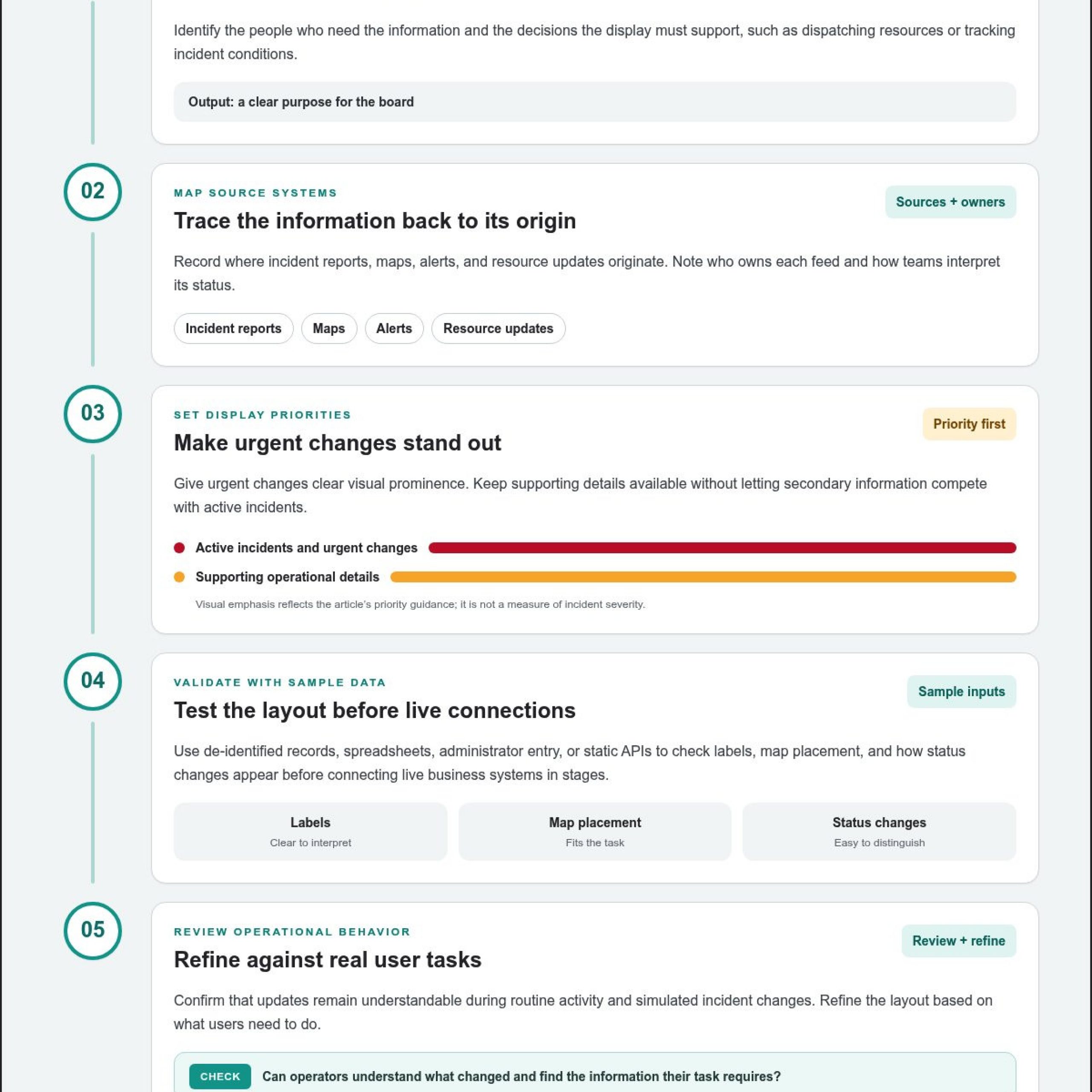
- Define the operating picture. Identify who needs the information and which decisions the display must support, such as dispatching resources or tracking incident conditions.
- Map source systems. Record where incident reports, maps, alerts, and resource updates originate. Note who owns each feed and how teams interpret its status.
- Set display priorities. Give urgent changes clear visual prominence. Keep supporting details available without letting secondary information compete with active incidents.
- Validate with sample data. Use de-identified records or static inputs to test labels, map placement, and how status changes appear before staged live connections.
- Review operational behavior. Confirm that updates remain understandable during routine activity and simulated incident changes, then refine the layout based on user tasks.
Reliability risks include stale, delayed, or unavailable feeds that make a display seem current even when its data has changed. Privacy and security risks include exposing names, accounts, real coordinates, sensitive measures, or confidential business details. Remove those details from emergency command center images before publication, and limit displayed information to what each audience needs.
Clear ownership helps teams know which source to trust when information conflicts. A dashboard should make the origin and status of important data understandable, while its layout should help operators spot missing updates. In an emergency, that clarity supports human judgment: the display organizes evidence, and personnel assess what action the situation requires.
Incident status boards and situational awareness
A status board supports situational awareness when it connects incident conditions, assigned resources, and operational priorities. Its structure should help teams understand the situation and coordinate their next decisions.
Maps, Alerts, and Live Data
A dashboard combines mapped incidents, alerts, and current operational data in a shared view. Connecting them helps personnel relate a warning to its location, affected assets, and available resources. For example, an alert beside a mapped incident and resource status gives coordinators more context than an alert viewed alone. Clear labels and update indicators help users distinguish active information from older entries.
NIMS and ICS Dashboard Support
A dashboard can organize incident information around the coordination and resource-tracking practices teams use with NIMS and ICS. The U.S. Department of Homeland Security developed NIMS, which integrates ICS, on 1 March 2004. A dashboard can make relevant records easier to review, while supporting, rather than replacing, established incident documentation and command processes.
ICS forms provide useful reference points for status-board design. The ICS 201 form captures the initial situation and resources, giving teams a starting picture of incident conditions. The ICS 204 form serves as the primary accountability document for each Division or Group. ICS resource status cards, designated ICS 219 forms, are commonly used to track resources.
These records represent different operational questions. The ICS 201 helps orient the team to the incident and available resources. The ICS 204 focuses on assignments and accountability within a Division or Group. The ICS 219 tracks resource status. A board can make these distinctions visible so users don’t confuse an incident overview with an assignment or resource update.
Useful status boards also preserve context as conditions change. A resource marked available may later receive an assignment, while an alert may need review as incident information develops. Showing status, location, and source together helps operators interpret updates. Teams can also group information by incident or operational responsibility, making it easier to see who owns the next action.
Build the board around shared operational questions: What is happening? Where are resources assigned? Which information has changed? A common layout lets command staff compare updates without relying on separate interpretations of the situation. Event-driven situational awareness can surface changes that warrant attention, and an operational intelligence platform can bring those changes into a unified view.
Keep the board aligned with how personnel coordinate. A map clarifies location, an assignment view explains responsibility, and a resource view shows status. Together, these elements give command staff a structured picture to discuss, update, and use in coordination. The display supports judgment; incident leaders remain responsible for interpreting conditions and directing response.
Software and interoperable products for turning source data into visual representations
Software turns incoming information into maps, layouts, and dashboards that operators can interpret. Interoperable products connect applications and display technologies, including touch panels, video walls, and collaborative displays. Integration matters because emergency teams need connected context, not isolated application windows. A dispatch feed, incident map, and resource application can each hold part of the picture; the software layer must make those sources useful together.
Start by identifying what each source contributes. An incident management application may provide incident identifiers and status, while a map supplies location context. A resource system can show assignments or availability. Shared identifiers, consistent naming, and clear status definitions help operators recognize when separate feeds refer to the same event. Without that alignment, one incident can appear as disconnected records across multiple views.
Integration also depends on how systems exchange information. Some sources provide structured data; others present an application interface or visual output. The display platform needs to accommodate those differences and arrange the information around operational tasks. A coordinator might need an incident list beside a map, while a supervisor may need a broader summary. One fixed layout rarely serves every role equally well.
- Inventory source systems. Identify the application owner, data type, update behavior, and operational purpose for each feed.
- Define shared context. Align incident names, locations, and status terms so separate systems describe events consistently.
- Map information to tasks. Pair each source with the view that helps an operator interpret or act on it.
- Review the integrated display. Check whether users can distinguish related data and identify the source behind an update.
Interoperability also includes how people interact with information. A touch panel can support selection or control, while a collaborative display helps a group review a shared operating picture. These interfaces should reinforce the same underlying view, so one operator’s selection doesn’t leave colleagues working from unrelated context. The screen is one access point; the integrated information model gives every display a consistent foundation.
Plan for source changes and interruptions. If an application becomes unavailable, users need a clear indication that its information may no longer reflect current conditions. If a feed changes its field names or status labels, the integration must preserve meaning rather than silently misclassifying updates. Assigning ownership for source definitions and display behavior gives teams a way to resolve these changes.
Well-integrated software prioritizes operational meaning over the number of connected feeds. A control room handling an evacuation, for example, may need incident locations, affected areas, and response resources in a coherent view. The design succeeds when operators can interpret those elements together and identify which system supplied each detail. That shared context turns multiple applications into a usable visual representation.
Command scenarios and viewer needs
Design the display around the incident, the decisions required, and the personnel who need shared context. Effective visualization prioritizes essential information and presents it in a format suited to the operational task.
Command Scenarios
A command scenario combines incident conditions, operational objectives, and viewer responsibilities to determine what a display should show. An emergency operations center coordinating response across an area has different needs from an airline hub overseeing air traffic control. Matching the visual layout to the scenario helps personnel focus on relevant information instead of unrelated feeds.
For an emergency command center managing incident lists, resource dispatch, and response, a 2D map can provide the spatial context teams need. A 3D view is useful when it improves spatial understanding or supports a presentation scenario. The choice should follow the task: dispatchers may need clear incident locations, while personnel planning movement through complex terrain may benefit from added spatial detail.
Viewer roles shape how the same scenario should be displayed. Command staff may need a concise operational overview, while dispatch personnel focus on incident details and resource assignments. Analysts may need source context to interpret changing information. Field personnel joining remotely need a view that remains legible on their device. One layout can support these audiences only when its hierarchy makes priorities clear.
Visualization Design Practices
Visualization design practices arrange information so each audience can interpret a display and respond to the scenario. Start with the decision each viewer must make, then select the map scale, labels, and supporting information that clarify it. This keeps decorative detail from competing with the operational picture.
- Prioritize the task. Place the information needed for dispatch, coordination, or incident review where its intended audience can find it quickly.
- Match spatial detail. Use a 2D map for incident locations and response activity; choose 3D only when terrain or presentation needs justify it.
- Separate audience views. Give command staff a broad summary and dispatchers the incident and resource details they act on.
- Test the scenario. Review the display using representative conditions, such as multiple mapped incidents or changing assignments.
Test layouts with the personnel who will use them. Ask a dispatcher to locate an incident and identify its assigned resources, then ask command staff to summarize operational priorities from the same picture. These tasks reveal whether labels, map scale, and status hierarchy support real decisions.
Review the display when operational objectives change. A response phase focused on dispatch may emphasize incident locations; a later coordination discussion may require a broader overview. Flexible design helps teams maintain a shared picture while adjusting what receives attention. The best layout gives each viewer enough context to act without obscuring information others need.
How do incident command dashboards integrate maps, alerts, and live data?
An incident command dashboard connects mapped locations, alert conditions, and operational feeds in one view. The integration should help users understand where an event is occurring, what has changed, and which assets may be affected. For example, operators can better interpret a weather alert when they can relate it to mapped facilities and current incident information. Correlation gives each feed operational context.
Start by connecting each source to a clear purpose. A map provides location context; an alert identifies a condition needing attention; a live feed adds current status. Shared identifiers and consistent names help the dashboard associate records from separate systems with the same incident or organizational asset. Without that relationship, a warning and a relevant location may appear unrelated.
Alert logic should distinguish events that need attention from routine updates. A useful design connects risk events to organizational assets and surfaces critical conditions for review. For example, a newly reported hazard near a facility could appear alongside its location and related operational status. Personnel can then assess it with relevant information in view, rather than searching several applications independently.
- Identify the operational event. Define which source reports an incident, alert, or changing condition.
- Associate the location. Connect the event to a mapped place or relevant organizational asset.
- Bring in related live information. Add status or resource data that helps explain the event’s operational significance.
- Set attention rules. Determine which changes should become prominent and which remain available as supporting context.
- Review the combined view. Confirm that users can distinguish the event, its location, and its associated information.
Data quality affects every step. If a location differs across source systems, a map may place an event incorrectly or fail to associate it with the right asset. If status labels differ, users may interpret equivalent conditions as separate categories. Establishing shared terms and reviewing representative records helps preserve meaning as information moves between applications.
Design the dashboard to show whether information is current and where it came from. A visible source label helps operators interpret conflicting reports. A clear update state helps them recognize when a feed has stopped changing. These cues support sound judgment; they don’t determine response decisions. Event-driven situational awareness works best when alerts direct attention while personnel assess context and choose an action.
Keep the display focused on the relationship between event, location, and operational effect. A map without relevant alerts can obscure urgency; an alert without location can lack context. A shared view helps command personnel interpret these connections. Activu’s operational intelligence platform brings information together across connected displays.
Activu Corporation: Video Wall Systems
Activu Corporation’s vis/ability Platform unifies operational tools and information as an operational intelligence layer that surfaces through the video wall. It brings the prioritized picture to teams in command centers, remote locations, conference rooms, breakout rooms, and huddle rooms, as well as on mobile devices.
When fragmented systems and disconnected feeds make shared awareness difficult, vis/ability brings those tools together in a central hub. Activu’s Video Wall Systems provide the display environment, while Event-Driven Situational Awareness helps surface information that needs attention.
Contact Activu Corporation to discuss your command center visualization needs.
Make the next operational decision clearer
Use your next planning discussion to identify where your current operating picture breaks down. Which decision takes too long because information sits in separate systems? Which personnel need the same view, and what should draw immediate attention? Clear answers help shape incident command center visualization around real workflows rather than assumptions about what belongs on a display.
Then assess how your team will keep that picture useful as incidents change. Consider who owns each source, how staff recognize updates, and how remote personnel stay aligned with command. These questions make system design an operational conversation grounded in how people coordinate and act.
Activu Corporation can help teams consider how their command environment should present and connect operational information. Contact Activu Corporation to discuss your requirements and determine a practical next step. A focused design process can give personnel a clearer foundation for the decisions ahead.
Frequently Asked Questions
What does incident command center visualization mean?
Incident command center visualization presents operational information in a visual format that helps teams interpret events and coordinate decisions. It can connect records, locations, and changing conditions in a shared view. For example, personnel reviewing an incident can compare its reported status with related information before discussing a response. The display supports situational understanding; command staff remain responsible for evaluating information and deciding what action to take.
What information should a command center dashboard display?
Show information that supports the dashboard’s audience and operational purpose. A response team may need incident identifiers, locations, status, and relevant alerts, while a coordination group may need agency assignments or affected facilities. Include source and update context where it helps users interpret information. Avoid crowding a shared display with details that don’t support a decision or unnecessarily expose sensitive personal or business information.
What are examples of command center layouts and dashboards?
A useful example is a workflow board organized by decision stage: incoming report, review, assigned action, and resolved item. Each entry can identify an owner, the latest update, and the next decision, helping supervisors find work that needs attention. A separate briefing view could group open decisions, unresolved dependencies, and completed actions. This layout makes progress and outstanding responsibilities clear without relying on a map.
What software supports command center visualization?
Organizations combine mapping, dashboard, alert-management, and application-integration software to create operational views from their systems. For incident command center visualization, relevant capabilities depend on source applications, user roles, and where teams need to access information. Activu’s vis/ability platform supports real-time maps, video feeds, dashboards, event management, and remote collaboration. Consider how the software relates information across existing operational tools.
How do visual displays differ across emergency response, cybersecurity, and IT operations?
Emergency response views often emphasize incident geography, conditions, and coordination. Cybersecurity views focus on security posture, network health, and threat response; IT operations views typically center on service status and system dependencies. Each team interprets information through different workflows and escalation paths. Effective incident command center visualization reflects those differences, giving each audience relevant context without assuming one layout or set of priorities fits every operation.