
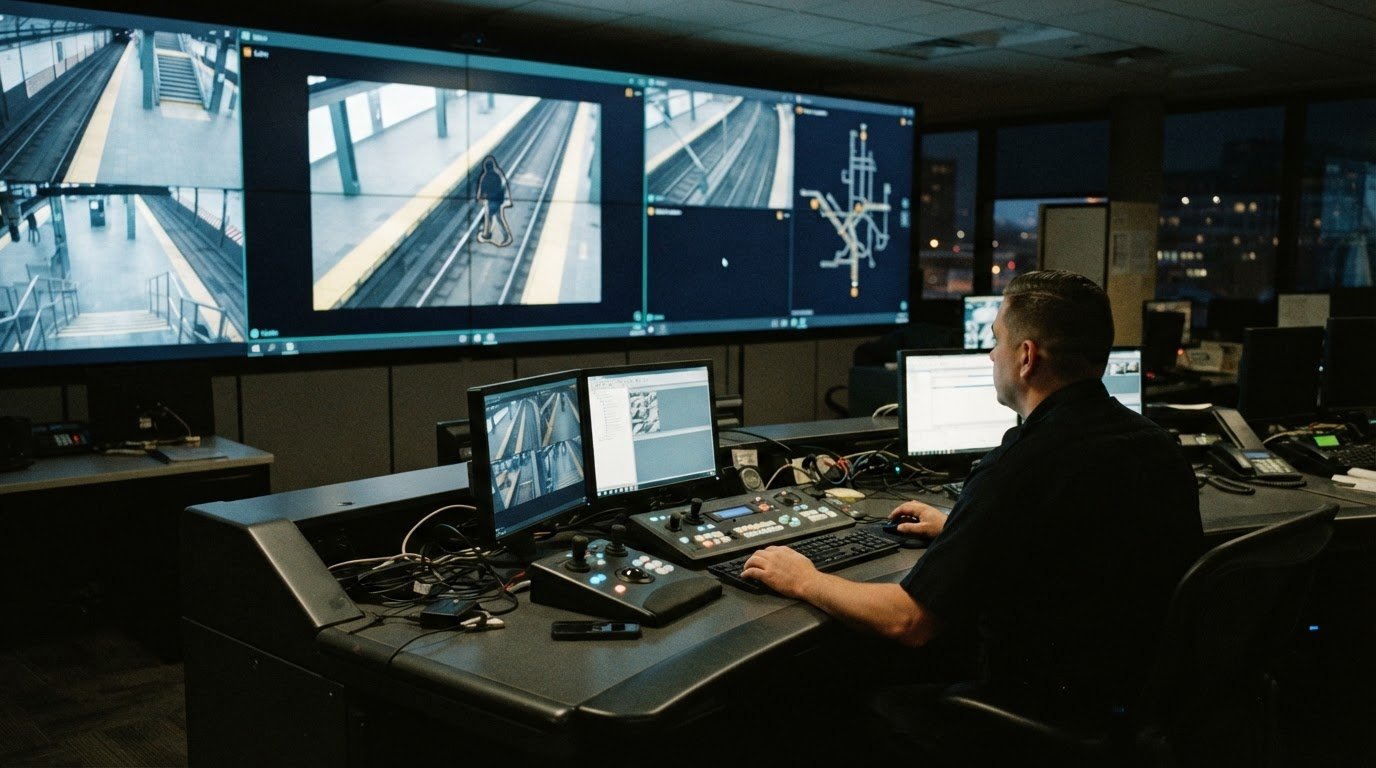
Legacy CCTV can provide useful coverage, yet operators may still have to piece together fragmented feeds and escalate incidents manually. Most control rooms already have the screens. What they’re missing is the layer that decides what goes on them – and escalates automatically when something needs attention. Video analytics integration with command center software connects detection events to operator alerts and dashboards, helping teams focus on information that supports decisions.
Existing cameras may remain in service when their feeds and analytics platform can work with command center software. The integration approach depends on the systems already in place and how they exchange video and event data. A well-planned design can bring legacy CCTV into a more unified operating picture without assuming every component must be replaced.
In this approach, vis/ability serves as the operational layer that brings relevant information to the video wall and other displays. The sections ahead explain how analytics events reach command-center operators, what integration involves for legacy infrastructure, and how connected alerts can support security monitoring and public safety operations.
Key Takeaways
- Trace how fragmented systems and siloed information can delay incident recognition, then identify where automatic escalation belongs in the response workflow.
- Legacy CCTV integration depends on compatibility and how cameras, networks, servers, and storage handle video and event data.
- Edge analytics can route detected events into operator alerts and dispatch workflows, helping teams prioritize incidents for review.
- Threat and crowd analytics can add context to security monitoring, while operators retain responsibility for assessing the situation and deciding how to act.
- vis/ability serves as the operational intelligence layer that surfaces through the video wall, bringing information together for teams across control rooms and distributed workspaces.
Why Control Room Systems Miss Incidents
Control-room situational awareness often suffers when systems are fragmented. CCTV, access control, computer-aided dispatch (CAD), facility alarms, and geographic information systems (GIS) may each provide useful information, but operators have to move between interfaces to assemble an incident picture. A camera view may show activity without its related alarm or dispatch record. A map may locate an event while relevant video remains buried in another system.
These silos slow recognition because information arrives in different formats and with different context. An operator may need to match a camera location to an address, determine whether an alarm refers to the same area, and relay findings to a colleague. If systems use different naming conventions or lack a shared event reference, teams may struggle to confirm whether separate alerts describe one developing situation or unrelated activity.
Manual escalation adds another dependency. A system may display an event, but unless it routes the alert to the right operator and communicates the next action, someone must notice it, interpret it, and notify the appropriate team. Competing priorities and changing conditions make this process harder to sustain. An alert can remain isolated from the response workflow, even when another feed contains information that would help establish its urgency.
Most control rooms already have the screens. What they’re missing is the layer that decides what goes on them – and escalates automatically when something needs attention.
That gap is operational, not simply visual. Adding feeds without connecting their events can increase the information burden without changing the response process. Teams need shared context: the location, what triggered attention, what related systems show, and who should act next. Without those connections, operators carry the integration burden themselves, switching tools and passing details between people. Incident visibility depends on how systems relate and escalate information, not just on whether each feed is available.
How Can a Professional Integrate Legacy CCTV Infrastructure Without Rip-and-Replace Costs?
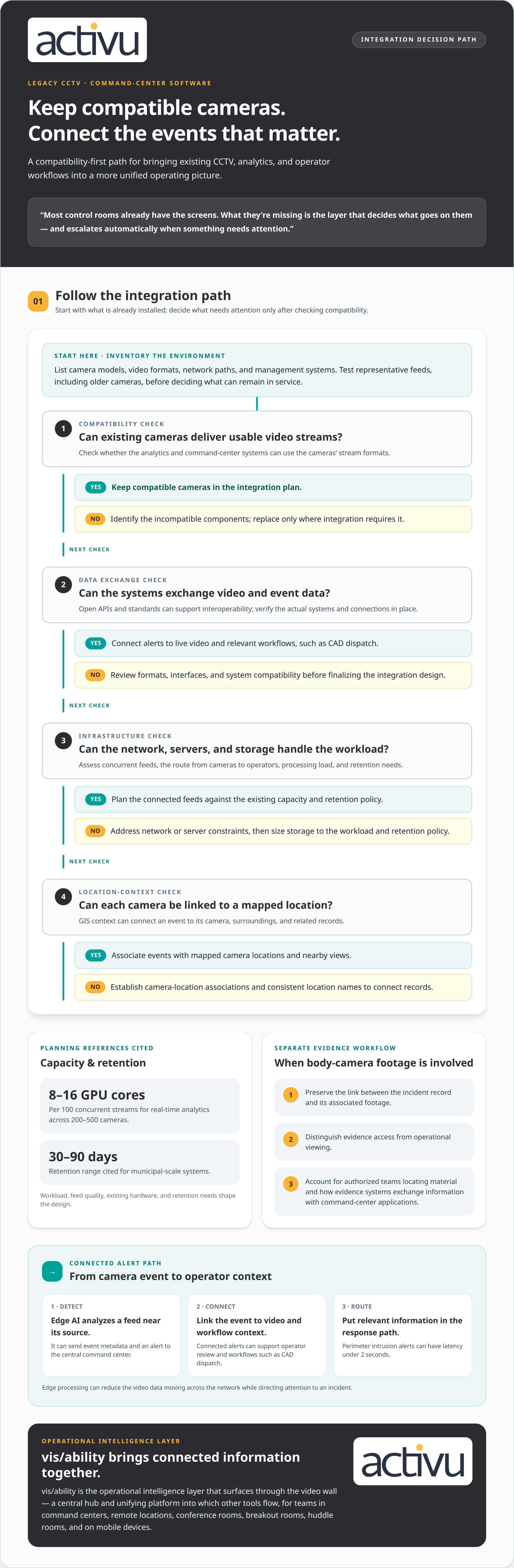
Individual technologies solve only part of the problem. A video analytics engine may identify activity and a camera system may supply footage, but operators still need compatible connections between them. A professional integration starts with an inventory of camera models, video formats, network paths, and management systems. The next step is testing representative feeds, including those from older cameras, before deciding which infrastructure can remain in service.
Compatibility depends on whether existing cameras can deliver streams in a format the analytics and command-center systems can use. Open APIs and standards support interoperability with legacy systems. Network capacity must account for concurrent feeds and the route between cameras, analytics processing, and operators. Professionals also assess server capacity and storage needs against the workload and retention policy. The brief gives 8-16 GPU cores per 100 concurrent streams for real-time analytics across 200-500 cameras, and a 30-90-day retention range for municipal-scale systems.
GIS mapping adds location context. During integration, teams associate each camera with a mapped location, then connect an analytics event to that camera and its surroundings. For example, an alert linked to a facility entrance can direct operators to the relevant view and nearby cameras. Consistent location names help connect a camera event with other records without relying on manual searches.
Body-camera evidence needs a distinct workflow from fixed-camera monitoring. Integration should preserve the link between an incident record and its associated footage, while distinguishing evidence access from operational viewing. A professional design accounts for how recordings enter the environment, how authorized teams locate relevant material, and how the evidence-management system exchanges information with command-center applications.
These checks help define a phased approach: retain compatible cameras, address network or server constraints, and replace components only where integration requires it. The result depends on existing hardware, feed quality, processing load, and retention needs, not on a blanket assumption that every camera must be replaced.
Edge AI Processing and Command-Center Alerts
Edge AI analyzes camera feeds near their source, rather than sending every stream elsewhere for processing. For example, an edge device can analyze an RTSP stream, then send event metadata and an alert to the central command center. This approach can reduce the video data moving across the network while directing attention to an incident. Perimeter intrusion alerts can have latency under 2 seconds.
Platforms that support open APIs and standards can connect video analytics with command-center software. Integration depends on whether systems can exchange event data, link alerts to live video, and pass relevant information into workflows such as CAD dispatch. No single platform pairing suits every environment: camera systems, analytics tools, and dispatch software all affect compatibility.
A useful integrated system connects each alert to context and a next step. For example, a perimeter event can identify its camera, show associated live video, notify a designated operator, and trigger escalation when the workflow calls for it. Operators need event details, alert status, and access to the relevant feed in one operational view. Clear routing helps keep alerts from becoming isolated notifications.
Real-time analytics can flag activity as it unfolds, giving operators an opportunity to assess the scene sooner than manual review alone. For example, an intrusion detection event can surface the camera feed and location for assessment, then pass incident details to CAD dispatch. Correlating video with dispatch information can help responders act with more context, while operators assess the alert and determine an appropriate response.
Integration also creates privacy, cybersecurity, and retention risks. Unrestricted viewing can expose sensitive footage, weak access controls can permit inappropriate access, and excessive retention can preserve video longer than operations require. Strong access controls, encryption, and audit logs help protect systems. Municipal-scale analytics deployments may use a 30-90-day storage-retention range, so retention policies should define which footage is kept and for how long.
Security Monitoring and Threat Analytics
Security monitoring gains context when analytics flag specific activity for operator review. A perimeter alert, for example, can identify a camera and event location, helping staff assess the live scene. Video analytics systems have reported perimeter intrusion detection accuracy of 92-98% under controlled conditions. Actual performance depends on camera placement, lighting, scene conditions, and the detection task.
Behavioral anomaly detection can surface activity that differs from an established pattern, such as movement into a restricted area. The listed false-positive rate is 1-5%, so operators need an assessment workflow rather than treating each alert as a confirmed threat. A useful workflow presents the event, associated camera, time, and location, then lets staff assign follow-up to the appropriate response role.
Crowd-density monitoring supports situational awareness at transit hubs, stadium entrances, and public gatherings. People-counting accuracy is reported at 85-93% at moderate densities. At a venue entrance, that estimate can help operators notice a developing queue and review nearby cameras. Density readings provide operational context; staff still interpret conditions and decide whether to adjust access or request support.
For large-event monitoring, teams can organize cameras by zones such as gates, concourses, and transport approaches. A crowd-counting event near an entrance can prompt an operator to compare nearby views and relay relevant information to event staff. Event thresholds and escalation paths should reflect the site’s operating plan, so changes in crowd conditions reach the team responsible for that location.
Analytics can also help operators prioritize critical events across multiple feeds. For example, a control room can route a restricted-area alert to a designated operator while keeping related camera views available for assessment. Clear alert ownership, event context, and escalation rules reduce ambiguity during busy periods. The goal is to surface actionable information, not to let a model’s classification replace human judgment.
A CCTV command center can use video analytics for motion detection, perimeter-breach detection, and crowd counting. These functions provide distinct signals for review: movement, activity at a boundary, and the number of people in view. Operators can consider each signal alongside the relevant footage, using the event context to assess what is happening before deciding on a response.
Real-time crowd-counting accuracy is listed within ±5%. That measure can inform how operators interpret a count, while the surrounding camera view and conditions remain part of their assessment. Combining crowd counts with motion and perimeter-breach detection gives the command center several kinds of activity to monitor, with staff responsible for judging the significance of each signal.
AI Video Analytics in Public Safety Command Centers
Public safety organizations can combine CCTV, traffic sensors, dispatch records, and emergency communications for shared awareness. During a road incident, for example, analytics can flag a traffic camera event while CAD provides call details. Central operators can then assess the relevant video and relay a consistent incident picture to responding teams. This approach supports public safety operations by connecting information from multiple sources.
AI can surface events that deserve prompt review. Traffic incidents may be detected in less than 30 seconds, while smoke and fire detection can provide early detection 2-5 minutes ahead. These capabilities help operators prioritize developing situations, then compare alerts with live footage and dispatch information before assigning a response. Detection time describes system performance, not the time required for a complete response.
For investigations, forensic video search can be 10-100 times faster than manual review. License plate recognition is listed at 95%+, while night performance with infrared illumination is 85-90%. Public safety teams should treat these outputs as leads for assessment, matching relevant footage with incident details rather than relying on an automated result alone.
When evaluating an integration provider, examine legacy-camera compatibility, data exchange with CAD and other systems, alert routing, cybersecurity design, and operator workflows. Look for an approach that connects an analytics event to its camera, location, and response process. The system should also support central operations and field teams during scenarios such as a roadway closure.
In the United States, applicable requirements depend on the agency, jurisdiction, and deployment. Before operation, organizations should identify relevant federal, state, and local requirements for privacy, records retention, access, and cybersecurity. They should define who can view or export footage, how long records remain available, and how access is audited. These controls help teams manage sensitive video across agencies while keeping operational alerts distinct from evidence handling.
How vis/ability Brings Operational Intelligence to Operators
As a hub for incoming tools and information, vis/ability brings operational applications into a shared operating picture. A traffic alert, for example, can appear alongside relevant maps and system updates, helping teams assess the situation without piecing together context across separate tools.
With vis/ability organizing relevant information, the video wall becomes a place where teams can see the operational picture. An operator dashboard can prioritize an active detection and its supporting information while keeping other feeds accessible. Teams can organize the view around current priorities, rather than treating every source as equally urgent.
Teams can work from that shared picture in command centers, remote locations, conference rooms, breakout rooms, and huddle rooms. During a facility disruption, command staff can review an operational update while colleagues in a conference room coordinate their assessment. Mobile vis/ability extends access to mobile devices for authorized personnel working away from the main control room.
In real-time intelligence operations, connecting an event with useful context helps teams coordinate decisions. A traffic incident, for example, can bring together a detection, a relevant camera view, and information from other applications. Operators can use that common picture to discuss changing conditions and share updates with the teams involved.
Defense and military teams can also use a shared operating picture across central and distributed locations. Personnel in a command center and a remote operations room can review relevant application information during an evolving event. A consistent view supports coordination across locations, while access controls and cybersecurity practices help protect sensitive operational information.
Activu Corporation: Video Wall Systems
Activu Corporation supports organizations connecting legacy CCTV, video analytics, and command-center workflows. Its Video Wall Systems, Application Integration, vis/ability Platform, and Event-Driven Situational Awareness address different parts of that operational need. Start with the team’s use case: which information matters during an incident, which applications provide it, and how operators need to coordinate around it.
Application Integration connects operational applications and data sources within the working environment. For a public safety team, that could mean bringing relevant camera information into an operating picture alongside the tools staff use to manage incidents. The aim is to help operators work with connected information rather than treating each application as a separate destination. Integration can be shaped around the organization’s existing environment and workflows.
The vis/ability Platform helps teams organize information and determine what appears for operators. Video Wall Systems provide a shared viewing surface, while vis/ability helps make the information shown there relevant to the current operation. The wall is where information is displayed; vis/ability helps organize it. This distinction matters when teams need a coordinated view of events, applications, and supporting context, rather than disconnected sources without operational prioritization.
Event-Driven Situational Awareness brings attention to operational events that warrant review. In a legacy CCTV environment, teams can use this approach to connect analytics activity with the information operators need to assess it. Activu’s Control Room Design Services can also address how the operational environment supports collaboration and decision-making. These offerings suit organizations planning an integration around operator needs, application connections, and a shared operating picture.
To discuss your command-center requirements, contact Activu Corporation.
Frequently Asked Questions
How Can a Provider Transform Video Surveillance into a Strategic Advantage?
Connecting surveillance to operational applications lets footage support decisions beyond incident review. vis/ability brings real-time maps, video feeds, dashboards, and event management into a shared operating picture. A team managing a facility disruption can use that context to coordinate its assessment and share relevant information with colleagues. Mobile video streaming and remote collaboration can extend operational visibility beyond the main control room.
What is video analytics integration with command center software?
Video analytics integration with command center software connects analytical events and camera footage with the applications operators use to understand and manage incidents. It can make an alert’s associated video and operational context easier to access in a shared working environment. For example, a team can review a flagged event alongside a map or dashboard. Analytics identifies activity for attention; operators interpret the information and decide on an appropriate response.
What cameras, VMS platforms, APIs, and infrastructure are required?
Requirements depend on the cameras, video management system (VMS), network, and applications already in use. A professional assesses available video feeds and data connections, then designs integration around compatible sources and workflows. Activu’s vis/ability connects to virtually any data source without hard-wiring. The infrastructure must still support the organization’s chosen video, analytics, and operational applications, including the network paths that carry information to users.
How do integrated platforms handle alerts, video feeds, and incident workflows?
Integrated platforms can connect an event to its video feed and operational applications, helping staff review relevant information in context. In vis/ability, event management, dashboards, maps, and video feeds support a shared operational view. Teams can organize how information appears and who needs access, including remote users. The platform brings context to operators; staff assess events, coordinate with colleagues, and follow their organization’s procedures for handling incidents.
How do leading video analytics and command center solutions compare?
Compare solutions by their support for open APIs and standards, ability to link alerts with live video and CAD workflows, and capacity to handle required streams, processing, and retention. The right pairing depends on the camera systems, analytics tools, dispatch software, and infrastructure already in place.